

 Tiếng Việt
A Fiji eSIM gives you mobile data in Fiji without hunting for a local SIM or paying home-carrier roaming charges. With Twise, you choose a plan online, receive a QR code by email, install it on an eSIM-compatible, carrier-unlocked phone, and connect when you arrive. All Twise Fiji eSIM plans are World eSIMs, so the same eSIM can continue across other supported countries. You can choose from World 68, 80, 98, 125 or 195+ Countries, with daily plans from 1–30 days, fixed-data plans from 3–30 days, and one plan, Orange Holiday World 195+, that includes limited calls and SMS.
Most travelers use their Fiji eSIM for maps, hotel and transfer messages, booking apps, translation, and keeping in touch over WhatsApp. This guide shows how to pick the right plan, how a Fiji eSIM compares with a local SIM and roaming, and how to install it without surprises.
Fiji eSIM Plans at a Glance
Twise does not sell a Fiji-only plan. Every option for Fiji is a World eSIM, and the main difference between them is how many countries they cover, plus how the data is delivered (daily or fixed). The table summarizes what is listed on the Twise Fiji page. Confirm exact allowances on the plan you select before checkout.
| Plan | Coverage | Data | Validity | Calls/SMS | Best for |
| World 68, 80 and 125 Countries (Daily) | Fiji + supported countries (68, 80 or 125) | 500MB, 1GB, 2GB or 3GB per day | 1, 3, 5, 7, 10, 15, 20 or 30 days | Data-only | Predictable daily use |
| World 68, 80 and 125 Countries (Fixed) | Same as above | 3, 5, 10, 20, 30 or 50GB | 3, 5, 7, 10, 15 or 30 days | Data-only | Flexible use across the trip |
| World 98 Countries | Fiji + supported countries | 6GB | 15 days | Data-only | A two-week trip with one set allowance |
| World 195+ Countries (Orange Holiday World) | Fiji + 195+ countries and regions | 5GB in Fiji | 30 days | 15 call minutes and 50 SMS | Long trips that need some voice/SMS |
The 15 call minutes on the Orange plan apply to calls within the countries the plan covers. Before buying, check the country list, allowance, validity, hotspot terms, and call/SMS conditions on the selected product page.
Which Fiji eSIM Plan Should You Choose?
Two decisions matter: which coverage footprint you need and how you want your data delivered.
Step one: choose by itinerary. If Fiji is your only stop, the smallest footprint that includes Fiji is enough, and you can pick on data and validity. If Fiji is one stop in a longer trip, for example a flight that connects through another country before or after your island stay, check the country list of each plan against every destination. A larger footprint such as World 125 or World 195+ is the safer choice when your route is not fixed.
Step two: choose daily or fixed data.
- Short trips of 1–5 days. A daily plan is usually the simplest. A 500MB–1GB daily allowance generally covers maps, WhatsApp, email, and hotel apps, while a heavier user can move up to 2–3GB per day.
- Holidays of 7–14 days. A daily plan gives a fresh allowance every day, which suits travelers who want predictable usage and do not want to manage a single data pool. A fixed-data plan suits uneven days: little use on a quiet resort day, much more on a sightseeing or transfer day. If you tend to use data in bursts, fixed data tends to fit better.
- Longer stays of 15–30 days. A larger fixed-data plan (20–50GB) or the 30-day Orange plan suits remote work, frequent streaming, or heavier use. If you plan to use your phone as a hotspot, check the hotspot terms on the product page.
- Need limited calls or SMS. Orange Holiday World 195+ is the only plan that includes them, and it is a 30-day plan, so it fits longer trips better than a short holiday.
Fiji eSIM vs Local SIM vs International Roaming
Each option solves a different problem.
| Feature | Twise Fiji eSIM | Local Fiji SIM | Home carrier roaming |
| When you buy | Before arrival, online | Usually after arrival | Usually already on your plan |
| Physical SIM swap | No | Yes | No |
| Setup | QR code installation | Insert SIM, follow local activation steps | None |
| Keep your home SIM active | Yes, on compatible dual-SIM phones | Depends on your phone | Yes |
| Local phone number | No (Orange plan has limited calls/SMS) | Yes | No, uses your home number |
| Works in other countries | Yes, within each plan’s country list | Usually limited to one country | Depends on your carrier |
| Cost transparency | Fixed price per plan | Local prepaid pricing | Varies widely by carrier; check before you go |
| Best for | Travel data and multi-country trips | Needing a Fijian number | Maximum simplicity |
When a local SIM may be better. If you will stay in Fiji for months, or you need a Fijian number for local calls, deliveries, or registrations, a local SIM and a domestic plan are the better fit. A Twise eSIM is built for travel data, so it does not replace a long-term local line.
When a Twise Fiji eSIM makes more sense. If you want mobile data ready before you land, you travel for a short period, you carry a dual-SIM phone, or Fiji is one stop among several countries, an eSIM saves time and avoids a trip to a SIM shop.
Check If Your Phone Supports a Fiji eSIM
Compatibility decides whether the eSIM will work, so check it before you buy.
Does your phone support eSIM? Many recent iPhones, Google Pixel phones, selected Samsung Galaxy models, and other supported Android phones have eSIM. Support varies by model and market, so check Twise’s full device list.
Is your phone carrier-unlocked? An eSIM-capable phone can still reject a travel eSIM if it is locked to its original carrier. This is easy to check with your carrier before you leave, and it is one of the most common reasons an installation fails.
Quick on-device checks:
- iPhone: Settings → Cellular (or Mobile Data) → look for Add eSIM
- Samsung: Settings → Connections → SIM Manager → look for Add eSIM
- Google Pixel: Settings → Network & internet → SIMs → look for Add SIM or eSIM
If you see an Add eSIM option, your phone supports eSIM. Menu names vary slightly by manufacturer and software version.
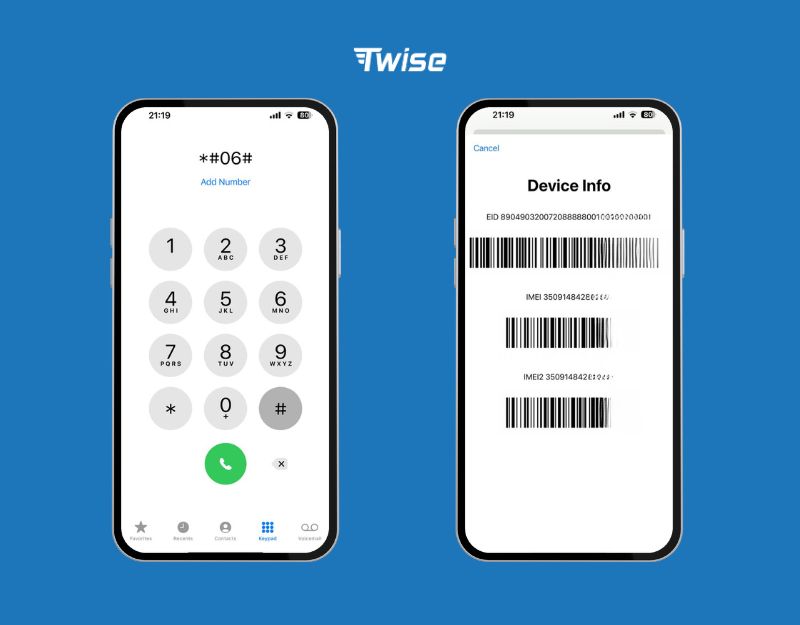
See the full Twise eSIM-compatible phones list.
How to Buy and Install Your Fiji eSIM
You can complete the whole process before you leave home.
Step 1: Choose your plan. Compare World 68, 80, 98, 125 and 195+ options by itinerary, trip length, data needs, and whether you need calls and SMS.
Step 2: Check out on the Twise website. Payment and delivery happen on twise.tech.
Step 3: Receive your QR code by email. The QR code and setup instructions arrive electronically. Keep the email safe and do not share the QR code.
Step 4: Install on Wi-Fi. Install while connected to stable Wi-Fi, ideally before departure.
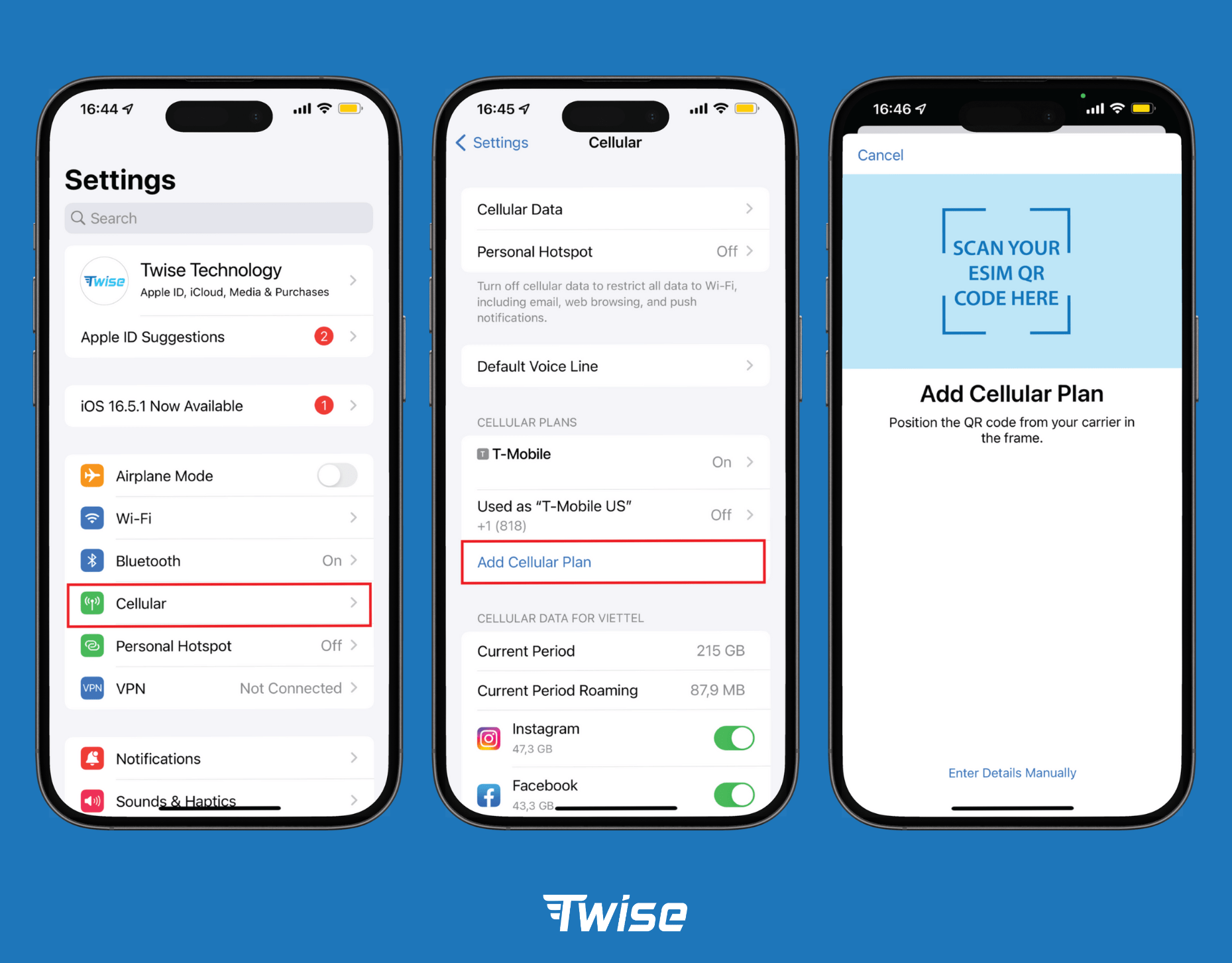
On iPhone: Settings → Cellular (or Mobile Data) → Add eSIM → Use QR Code → scan the code from your email → label the line “Twise” → select it for mobile data. Full guide: How to install an eSIM on iPhone
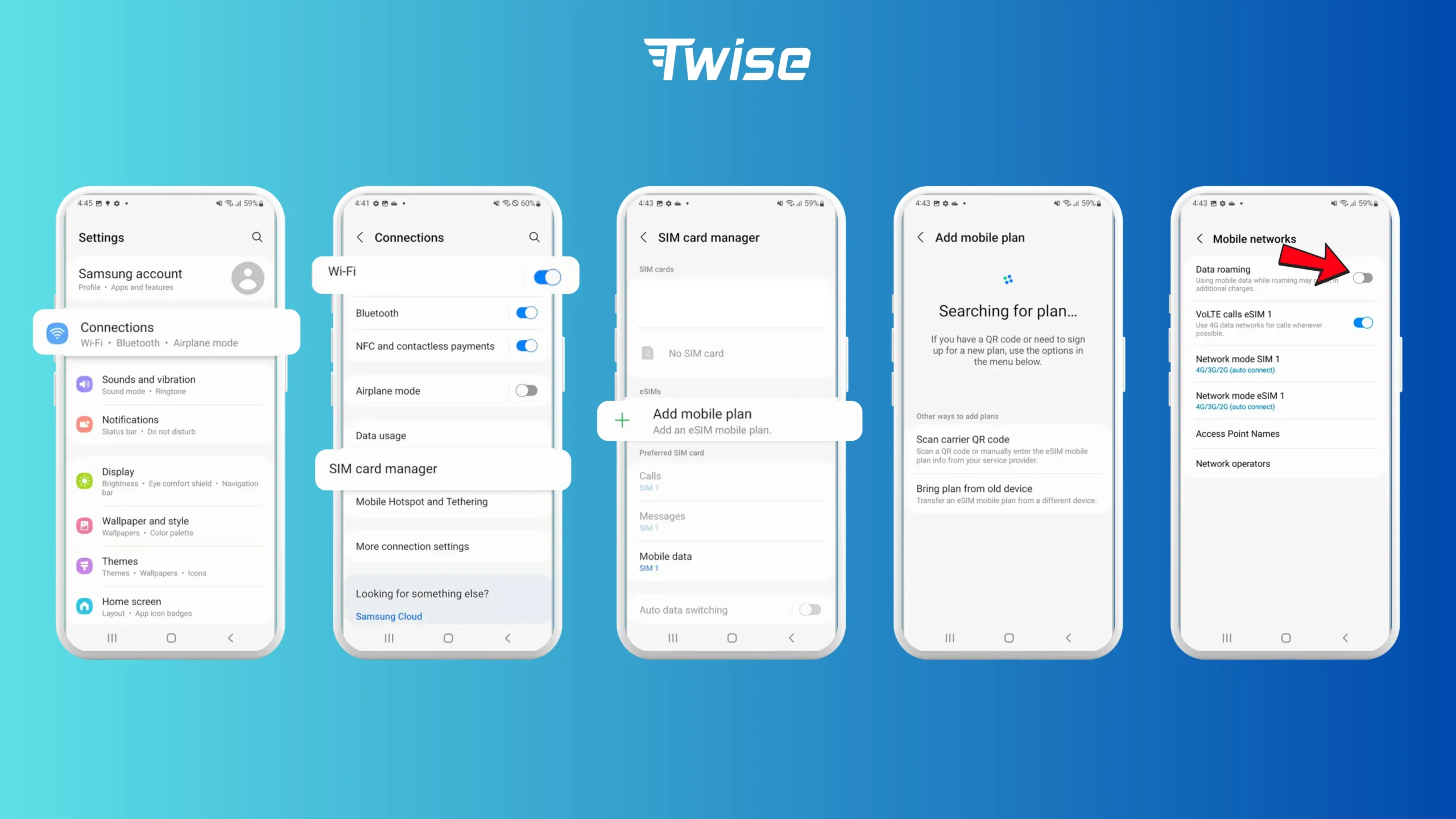
On Android: Settings → Connections (Samsung) or Network & internet (Pixel) → SIM Manager or SIMs → Add eSIM → Scan QR code → confirm. Menu wording varies by manufacturer. Full guide: How to install an eSIM on Android.
Step 5: Select Twise for mobile data. On dual-SIM phones, set the Twise line as the cellular-data line and turn off automatic data switching so the phone does not fall back to your home SIM.
Step 6: Turn on Data Roaming for the Twise line. The Twise line needs Data Roaming switched on. This is normal for travel eSIMs, and it only affects the Twise line as long as it is the line selected for data.
Do not delete the eSIM after installing it. The QR code installs once, so a deleted eSIM cannot be reinstalled from the same code. If you need to stop using it, switch the line off instead.
Data-Only vs Calls and SMS: Which Fiji eSIM Do You Need?

Data-only eSIMs. The World 68, 80, 98, and 125 plans are data plans. You can still call and message through WhatsApp, FaceTime, Telegram, Messenger, and similar apps over mobile data. For most holidaymakers, this covers hotel and tour communication.
When Orange Holiday World may be better. Orange Holiday World 195+ adds 15 call minutes and 50 SMS to 20GB of data over 30 days. The minutes apply to calls within the covered countries. It suits longer trips, or travelers who want a small voice and SMS allowance as a backup. If you only need to receive verification codes, a dual-SIM setup is usually simpler.
Keeping your home number with dual SIM. Compatible phones can keep your home SIM on for incoming SMS and OTPs while the Twise eSIM handles data. Check your home carrier’s roaming terms first, as receiving SMS abroad can carry fees. You can keep the home SIM’s data roaming off.
Practical Tips for Using Your Fiji eSIM
Install before you fly. Install the profile on reliable Wi-Fi, with the QR email easy to reach. Follow the activation rules on your product page so validity starts when you expect.
Check which line is using data. A common source of surprise charges is the phone quietly using the home SIM for data. Confirm the Twise line is selected for cellular data, and turn off cellular data switching if your phone offers it.
Keep your home SIM for OTPs. Banking and account apps often send codes by SMS. Keep the home SIM on for messages while Twise carries data, subject to your carrier’s terms.
Expect varied coverage on remote islands. Fiji has resorts and islands spread over a wide area, and mobile coverage can vary between main islands and remote ones. If you are staying somewhere remote, ask your accommodation about connectivity.
Watch fixed-data usage. Streaming, automatic cloud backups, video calls, and hotspot can use a fixed allowance quickly. Check remaining data in the first days.
Check country coverage before your next flight. World 68, 80, 98, 125, and 195+ plans have different country lists. Confirm every onward destination on the product page before leaving Fiji.
Get Connected in Fiji With Twise eSIM
A Fiji eSIM lets you prepare your connection before you leave: choose the coverage you need, get your QR code by email, and install it without swapping a physical SIM. Twise offers World plans for 68 to 195+ countries, daily plans from 1–30 days, fixed-data plans from 3–30 days, dual-SIM compatibility for keeping your home number, and one eSIM that continues across supported countries. Calls and SMS are available on Orange Holiday World.

Fiji eSIM FAQs
Yes, if your phone supports eSIM, is carrier-unlocked, and the plan you choose includes Fiji. All Twise plans listed for Fiji are World eSIMs.
It depends on your trip. Daily plans suit predictable daily needs. Fixed-data plans suit trips with uneven usage. A larger coverage plan such as World 125 or World 195+ suits multi-country routes, and Orange Holiday World suits travelers who want limited calls and SMS.
Light use, such as maps, messaging, and browsing, needs far less than social media, video calls, hotspot, or streaming. If you use your phone as a hotspot or stream often, choose a larger allowance.
Most Twise plans for Fiji are data-only. Orange Holiday World 195+ includes 15 call minutes and 50 SMS, with calls applying within the covered countries. It does not replace a local Fijian number.
Yes, install it over Wi-Fi before departure, and follow the activation rules on your product page so validity starts when you expect.