
 Tiếng Việt
A Ghana eSIM is a digital SIM you buy online, install with a QR code before you fly, and use for mobile data in Ghana. Twise offers Africa 6 Countries plans, World data plans (daily or fixed, 1–30 days), and an Orange Holiday World 195+ Countries plan with 20GB, 15 call minutes and 50 SMS. Most plans are data-only, so you use apps like WhatsApp and Google Maps rather than a Ghanaian phone number.
Pick a plan below and your QR code arrives by email after checkout. If your trip continues into other countries, read the Africa vs World section first, because the country list matters more than the price.
Twise Ghana eSIM Plans: Which Option Fits Your Trip?
Twise lists 11 products on its Ghana page. They fall into a few families, and the real differences are the country list, the data format, and whether calls and SMS are included.
| Plan family | Coverage | Data | Validity | Calls/SMS | Best for |
| Africa 6 Countries, Daily | Ghana + 5 other countries | 500MB, 1GB, 2GB or 3GB per day | 1–30 days | Data only | Regional trips with steady use |
| Africa 6 Countries, Fixed | Ghana + 5 other countries | 3GB–50GB | 3–30 days | Data only | Regional trips with uneven use |
| World Daily (68, 80, 125 countries) | Wider country lists | 500MB–3GB per day | 1–30 days | Data only | Multi-region travel, predictable use |
| World Fixed (68, 80, 125, 156 countries) | Wider country lists | 1GB–50GB, depending on product | 3–30 days | Data only | Flexible global use |
| World 98 Countries | 98 countries | 6GB | 15 days | Data only | Light to moderate use |
| Orange Holiday World 195+ | 195+ countries and regions | 20GB | 30 days | 15 call minutes, 50 SMS | Long trips, more data, some voice |
The Africa 6 Countries plans are the regional option. They come as daily plans (1–30 days) and fixed plans (3–30 days), and they make sense when your whole route sits inside the six-country list.
World Daily plans reset your allowance every day. World Fixed plans give you one pool for the whole validity period. World 98 Countries is a single 6GB / 15-day option.
Orange Holiday World 195+ Countries is the odd one out. It pairs 20GB over 30 days with limited traditional communication: 15 call minutes and 50 SMS.
Before checkout, open the product you chose and confirm its country list, allowance, validity, network and voice/SMS terms. Products that look similar can differ in the details.
Africa 6 Countries vs World eSIM: Which Is Better for Ghana?
This is the decision that most affects what you pay and whether your eSIM works at your next stop.
Choose Africa 6 Countries when Ghana and every other country on your route are on its six-country list. A regional plan is simple and keeps your data on one profile through the border.
Choose a World plan when your trip goes beyond that list, for example onward to Europe or elsewhere. World plans cover more countries (68 to 156 across the product lines), and Orange Holiday World reaches 195+ countries and regions.
Compare the full route before buying. A plan that includes Ghana is not automatically right for your trip. Write down every country you will enter and check each one against the product’s list. This takes two minutes and prevents the most common mistake: buying a plan that works in Ghana but not at the next border.
Then match the plan to trip length.
| Trip | Suggested plan type | Why |
| 1–5 days in Ghana | Daily plan, 500MB–1GB per day | Predictable limits for maps, messaging and ride apps |
| 7–14 days, steady use | Daily plan, 1–2GB per day | Fresh allowance each day, easy to track |
| 7–14 days, uneven use | Fixed plan | One pool absorbs heavy travel days |
| 15–30 days, remote work or heavy use | Larger fixed plan, or Orange Holiday World 20GB | More total data for a longer stay |
| Ghana + other African countries | Africa 6 Countries, if all are on the list | One regional plan |
| Ghana + other regions | World plan | Wider country list |
One caution on World 98 Countries: 6GB over 15 days is about 400MB per day on average. That is fine for maps, WhatsApp and email, but tight if you upload photos, join video calls or share a hotspot.
Daily Data vs Fixed Data: Which Ghana eSIM Is Better?
Daily data suits predictable travelers. You get a fresh allowance each day, so one heavy afternoon does not drain the whole trip. The tradeoff: unused data does not roll over, so a quiet day at the hotel wastes that day’s allowance.
Fixed data suits uneven travelers. Picture two slow days in a city, then a long day of navigation, translation and photo sharing on the road. One pool absorbs that swing better than a daily cap. The tradeoff is discipline. If you spend heavily early on, nothing remains for the end of the trip, so check your usage in your phone’s settings.
Orange Holiday World is neither of those. It gives you 20GB over 30 days, and it also supports hotspot, which helps on a longer stay if you want to share a connection with another device.
A simple rule: pick daily if you know roughly what you use, fixed if your days vary, and a larger fixed or Orange plan for remote work or stays close to a month. Hotspot terms for the other plans can differ, so check the product page before you rely on it.
Data-Only vs Calls and SMS: What Do You Need in Ghana?
Most Twise Ghana plans are data-only. You get mobile internet, but no Ghanaian phone number for ordinary calls and texts. For many visitors that is enough, because WhatsApp, Telegram, FaceTime, Messenger, Google Maps, translation and booking apps all run on data.
Data-only is usually enough when you message through apps, your trip is short or medium, and you do not need a local number for hotels, drivers or deliveries.
Calls and SMS become useful when you want some traditional communication capability. Orange Holiday World 195+ includes 15 call minutes and 50 SMS alongside its data. The call minutes are for calls within the countries the plan covers. Treat them as a backup, not a replacement for a full voice plan.
If you need a Ghanaian number for local calls during a long stay, a local SIM is the better tool (see the next section).
Keep your existing number with dual SIM. On a compatible phone, your regular SIM can stay active for calls, texts and one-time passcodes while the Twise eSIM handles data. Set Twise as the mobile-data line, and turn off data roaming on the home SIM so it cannot connect without your knowing.
Ghana eSIM vs Local SIM vs International Roaming
Each option fits a different traveler. Twise does not sell a local Ghanaian SIM, so this comparison is meant to help you choose honestly.
| Feature | Twise Ghana eSIM | Local Ghana SIM | Home carrier roaming |
| Buy before arrival | Yes | Usually bought locally | Usually already active |
| Physical SIM swap | No | Yes | No |
| Setup | QR code, installed before travel | In-person purchase and registration | None |
| Keep home SIM active | Yes, on compatible dual-SIM phones | Depends on the phone | Yes |
| Multi-country use | Yes, by plan country list | Usually limited to Ghana | Depends on carrier |
| Calls and SMS | Limited, Orange plan only | Usually available | Depends on carrier |
| Best for | Travel data, multi-country trips | Long stays, local number | Convenience on short trips |
A local Ghana SIM may be better if you stay for months, need a Ghanaian number for local services, or want a domestic voice and data package. You will need to find a shop, and you may need to register the SIM with ID.
A Twise Ghana eSIM makes more sense if you want data working before you land, travel through more than one country, or want to keep your home SIM for OTPs. You skip the airport SIM queue, and the eSIM installs from your phone.
Home roaming is the easiest option, but costs vary a lot by carrier. Check your carrier’s Ghana rates before you leave.
Check Your Phone, Then Install Your Ghana eSIM
Two things decide whether an eSIM installs. Your phone must support eSIM, and it must be carrier-unlocked. An eSIM-capable phone that is still locked to its original carrier can reject a travel eSIM profile. Check the [Twise compatible devices list](LINK: trang danh sách thiết bị tương thích).
Quick checks:
- iPhone: Settings → Cellular/Mobile Data → look for Add eSIM
- Samsung: Settings → Connections → SIM Manager → look for Add eSIM
- Google Pixel: Settings → Network & Internet → SIMs → look for Add eSIM
Menu names can vary by brand and software version.
Buying and installing, step by step
- Choose your plan on the Ghana page, based on route, trip length, data use and whether you need calls or SMS.
- Pay at checkout on the Twise website.
- Receive your QR code by email, with installation instructions.
- Install before departure, on stable Wi-Fi. The QR code installs the eSIM once, so do not delete the profile after installing.
- Select the Twise line for mobile data, and keep your main SIM set for calls and texts if you want them.
- Turn on Data Roaming for the Twise eSIM and follow the product’s activation instructions.
iPhone: Settings → Cellular/Mobile Data → Add eSIM → Use QR Code → scan the Twise QR code → label the line (for example, “Twise Ghana”) → set it as your mobile-data line when you arrive.
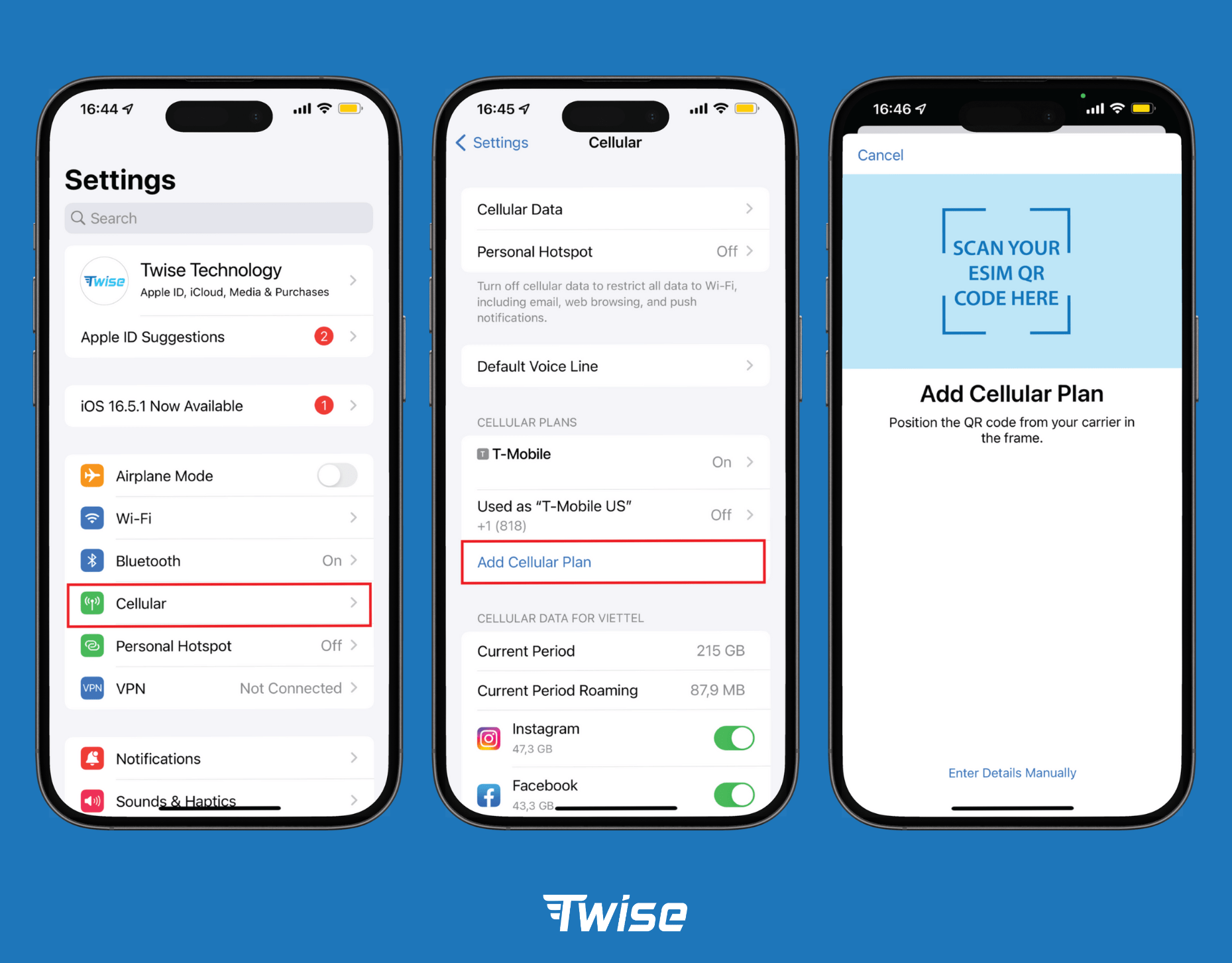
Full guide: How to install an eSIM on iPhone.
Android (Samsung-style): Settings → Connections → SIM Manager → Add eSIM → Scan QR Code → confirm. On arrival, enable the Twise line, select it for mobile data, and turn on data roaming if needed. Labels differ on other brands (for example Network & Internet → SIMs on Pixel).
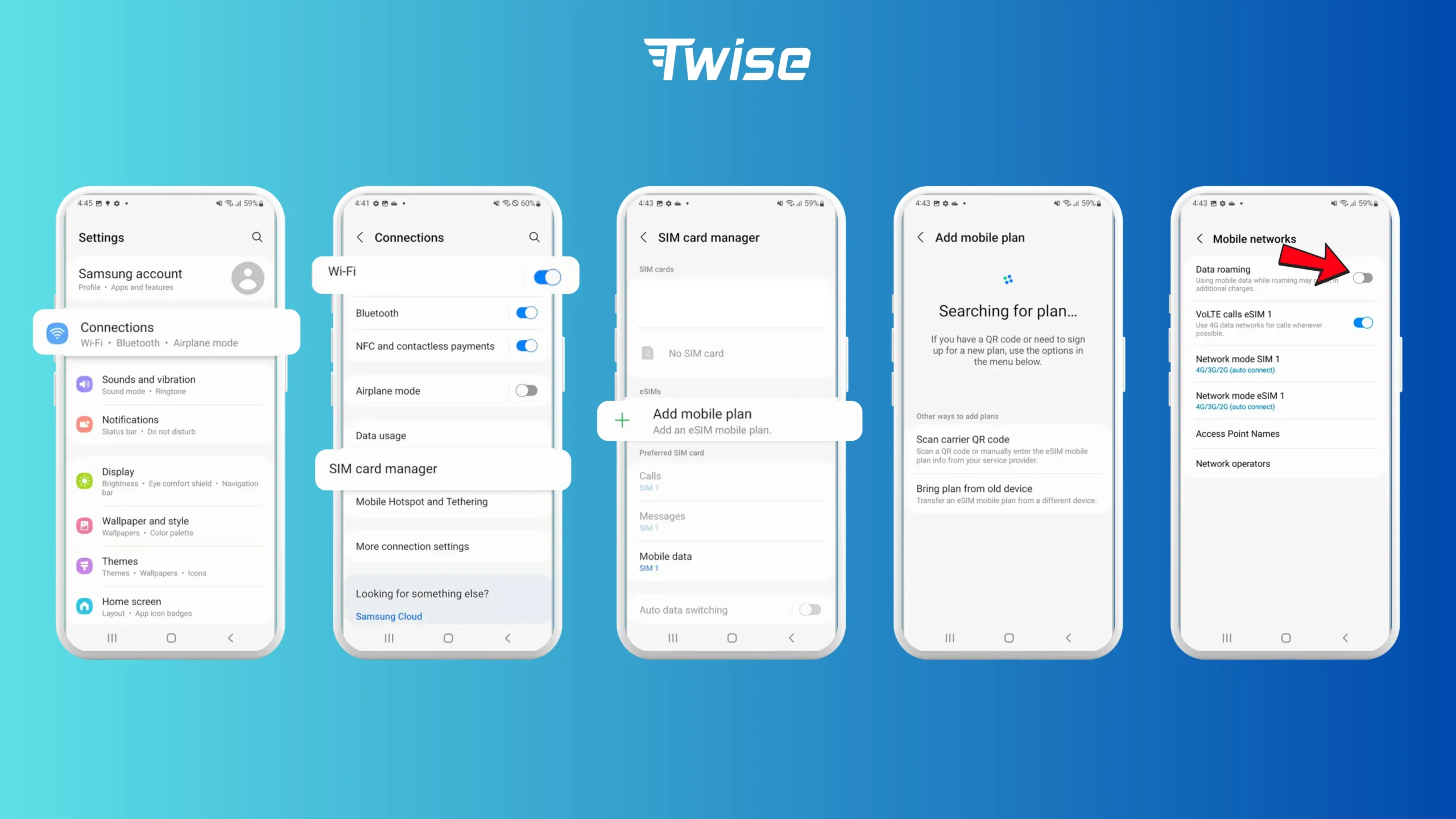
Full guide: How to install an eSIM on Android.
For visual walkthroughs and troubleshooting, see the Twise Help Center. Also check the product page for when its validity period begins.
Practical Tips for Using Your eSIM in Ghana
Install before you fly. Do it on reliable Wi-Fi with the QR email easy to reach. A QR code is awkward to scan from the same screen that shows it, so open the email on a laptop or second device.
Keep your home SIM for OTPs. Banking and account codes often arrive by SMS. Leave the home SIM on, but switch off its mobile data and data roaming.
Avoid accidental home-SIM roaming. Confirm which line is selected for mobile data, and turn off any automatic data switching that could send traffic back to the home SIM.
Watch your data on fixed plans. Cloud photo backups, large uploads, app updates and hotspot sharing use data quickly. Pause automatic backups for the trip.
Plan for rural areas and parks. Coverage can thin out away from cities and towns, as in most countries. Download offline maps for places you plan to visit before you leave.
Check coverage before crossing borders. Africa 6 and World plans have different country lists. Verify the next country before you cross, not after.
Get Connected in Ghana With a Twise eSIM
Choose by route, trip length and data use: Africa 6 Countries plans for regional trips, World daily or fixed plans from 1–30 days for broader itineraries, or the 20GB Orange Holiday World plan with limited calls and SMS. Your QR code arrives by email, your home SIM stays available on compatible phones, and one eSIM can follow you across supported countries.

Ghana eSIM FAQs
Yes. A travel eSIM works in Ghana if your phone supports eSIM, is carrier-unlocked, and the plan includes Ghana. Twise plans on the Ghana page install with a QR code before you travel.
Yes. A travel eSIM works in Ghana if your phone supports eSIM, is carrier-unlocked, and the plan includes Ghana. Twise plans on the Ghana page install with a QR code before you travel.
If every country on your route is on the Africa 6 Countries list, that regional plan is the natural choice. For broader itineraries, a World plan covers more countries, and Orange Holiday World reaches 195+.
Maps, messaging, email and light browsing use modest data. Video calls, streaming, hotspot sharing, cloud backups and frequent uploads need more. If you are unsure, a fixed plan or a larger allowance gives you a buffer.
Most Twise plans for Ghana are data-only. Orange Holiday World 195+ includes 15 call minutes and 50 SMS with 20GB of data. If you need a Ghanaian number, a local SIM is a better fit.
Yes, install it on Wi-Fi before departure. Then switch on the line and Data Roaming when you arrive. Check the product page for when its validity starts.