

 Tiếng Việt
A Greenland eSIM lets you arrange mobile data before you fly, with no physical SIM swap and no search for a shop on arrival. Twise offers two World eSIMs that include Greenland: World 98 Countries with 6GB for 15 days, and Orange Holiday World 195+ with 20GB for 30 days plus calls and SMS support. Both are multi-country eSIMs. Twise does not list a Greenland-only local eSIM on this page.
Which Greenland eSIM should you buy?
- Trip of up to 15 days with maps, messaging and moderate browsing: World 98 Countries, 6GB.
- Longer trip, heavier use, or a need for calls and SMS: Orange Holiday World 195+, 20GB.
- Before buying, confirm that your phone supports eSIM, is carrier-unlocked, and that Greenland and every onward country are on the plan’s list.
Twise Greenland eSIM Plans: 6GB or 20GB?
| World 98 Countries | Orange Holiday World 195+ | |
| Data | 6GB | 20GB |
| Validity | 15 days | 30 days |
| Calls / SMS | Data only | Supported but limited |
| Coverage | Greenland + supported 98-country list | Greenland + 195+ supported countries and regions |
| Best for | Shorter trips, moderate use | Longer trips, heavier use, calls |
Check the product page for the exact country list, local network availability, validity, calling and SMS terms, and hotspot conditions before checkout.
World 98 Countries is the lighter option. It gives you 6GB to use over 15 days, which works out to about 400MB per day if you spread it evenly. That is enough for navigation, messaging, email, booking apps and moderate browsing, and it is a sensible fit if you also continue to other countries on the 98-country list.
Orange Holiday World 195+ is the higher-data, wider-coverage option. 20GB over 30 days works out to roughly 670MB per day, and it adds limited calls and SMS alongside data. It fits longer stays, business travel and travelers who expect to use video calls, uploads or occasional streaming.
Is 6GB or 20GB better? The right amount depends on how you use your phone, not on Greenland itself. Maps, WhatsApp, email and web searches use relatively little. Video calls, photo and video uploads, streaming and hotspot use much more. If you plan to share lots of photos from a trip like this, or you rely on your phone for work, 20GB leaves more room.
Save big downloads for Wi-Fi. Use your accommodation’s Wi-Fi for system updates, cloud backups, offline-map downloads and large media transfers, and keep mobile data for when you are out.
A rule from supporting travelers: buy for your heaviest day, not your average day. Arrival day is usually the most data-hungry, because maps, bookings, ride or transfer apps and messaging all run at once.
Which Greenland eSIM Should You Choose?
| Trip | Suggested plan |
| Up to 15 days, maps and messaging | World 98 Countries, 6GB |
| Up to 15 days, frequent uploads or video calls | Orange Holiday World 195+, 20GB |
| 15–30 days | Orange Holiday World 195+, 20GB |
| You need calls and SMS | Orange Holiday World 195+ |
| Greenland plus other countries | Whichever plan’s country list covers every stop |
| Light user relying on Wi-Fi | World 98 Countries, 6GB |
Short trips (up to 15 days). The 6GB plan fits travelers who use their phone for navigation, messaging, email and travel apps. Its 15-day validity matches a typical trip.
Longer trips (up to 30 days). The 30-day, 20GB option is the only one whose validity covers a month, and it is the better choice for extended stays or business travel.
Do you need calls and SMS? Travelers who communicate through WhatsApp, FaceTime, Telegram, Messenger and email may not need traditional calls and SMS. Choose Orange Holiday World if you want a small allowance of calls and SMS alongside your data, for example to reach a hotel, a guide or a transfer provider. Keep your home SIM active for bank verification codes either way.
Greenland plus other countries. Both plans are multi-country, but their country lists differ: 98 versus 195+. Confirm that every stop on your route is listed before you buy.
What to Expect From Mobile Data in Greenland
Greenland is not a destination where you can assume the same connectivity as a dense European city. A few points shape how you should plan.
Towns are far apart. There are no roads connecting Greenland’s towns, so travelers move between them by air or by boat. Your connectivity will change as you move, and you may spend long stretches in places with weaker signal.
Coverage is concentrated around towns. Expect your best signal in and around towns and settlements. If you plan to hike, take a boat trip into a fjord or visit remote areas, assume there will be gaps and plan accordingly.
Download offline maps before you go. Save maps, your accommodation details, transport confirmations and key documents before you leave a town, so navigation and essentials work even if the signal drops.
Cruises and expedition ships. Phones on a ship usually connect to the ship’s own maritime network rather than to land networks, and travel eSIMs generally do not cover that. If part of your trip is on a ship, check your plan’s terms and your ship’s connectivity policy, and treat your eSIM as the land-based option.
Do not rely on one connection. Have a plan for the moments when you lose signal: offline maps, saved confirmations and a screenshot of your ticket or booking.
Local-versus-travel. Twise’s Greenland page offers World eSIMs, not a Greenland local eSIM. If you need a Greenlandic phone number or plan to stay for months, a local provider’s SIM may fit better.
Greenland eSIM vs Physical SIM vs International Roaming
| Feature | Twise Greenland eSIM | Physical SIM | Home carrier roaming |
| Buy before travel | Yes, online | Usually bought locally | Usually already enabled |
| Physical SIM swap | No | Usually yes | No |
| Keep home SIM | Yes, on compatible dual-SIM phones | Device-dependent | Yes |
| Multi-country use | Yes, within the plan’s list | Usually more limited | Carrier-dependent |
| Calls and SMS | Orange Holiday World only | Plan-dependent | Carrier-dependent |
| Best for | Short and medium trips, multi-country itineraries | Longer stays, local number needs | Maximum simplicity |
When a physical SIM may be better. If you need domestic telecom services, a local number or a long-term connectivity arrangement, a local SIM is the better fit.
When a Twise eSIM makes more sense. It suits short-to-medium stays, travelers who want connectivity ready before they land, dual-SIM users, and trips that cross several countries.
Roaming is the simplest option, but international rates and daily passes are set by your carrier. Check your carrier’s charges for Greenland before you rely on it.
Check Whether Your Phone Supports Greenland eSIM
You need an eSIM-capable, carrier-unlocked phone.
eSIM support. Recent iPhones, supported Samsung Galaxy and Google Pixel models, and selected other Android devices support eSIM. Check the full Twise list before you buy: [LINK: Twise eSIM compatible devices page]. Some regional models have eSIM disabled, so the exact model matters.
Carrier-unlocked. A compatible phone can still reject a travel eSIM if it is locked to another carrier, which commonly affects phones bought on installment plans. Ask your carrier if you are unsure.
Quick checks:
- iPhone: Settings → Cellular (or Mobile Data) → Add eSIM.
- Samsung: Settings → Connections → SIM Manager → Add eSIM.
- Google Pixel: Settings → Network & Internet → SIMs → Add eSIM.
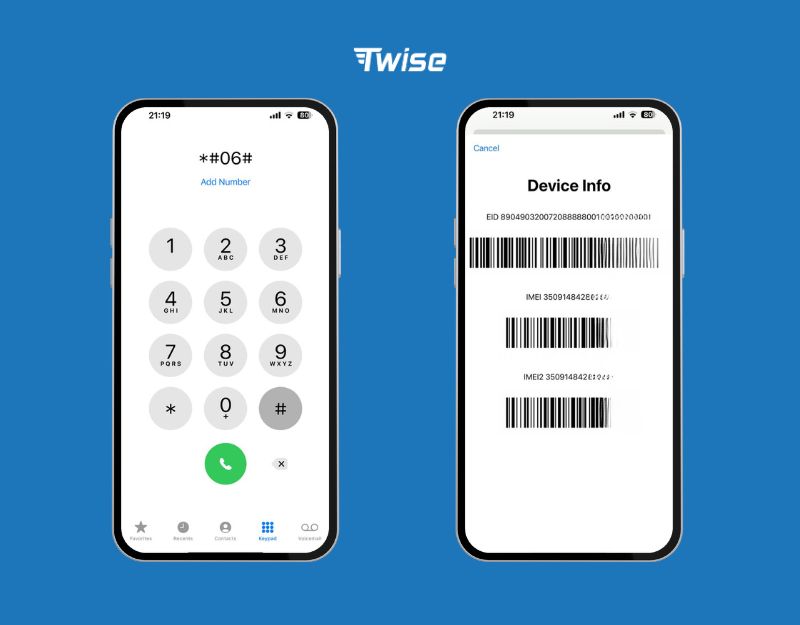
How to Buy and Install Your Greenland eSIM
- Choose your plan. Compare 6GB for 15 days and 20GB for 30 days by trip length, data needs, route and whether you need calls and SMS.
- Check out on Twise. Payment takes place on the Twise website.
- Check your email. Twise sends the QR code or setup details after purchase.
- Install over Wi-Fi before you fly.
- Select the Twise line for mobile data.
- Turn on data roaming for the Twise line if required and follow the product’s activation instructions.
iPhone: Settings → Cellular (or Mobile Data) → Add eSIM → Use QR Code → scan the code → label the line (for example “Twise Greenland”) → select it for mobile data when you are ready.
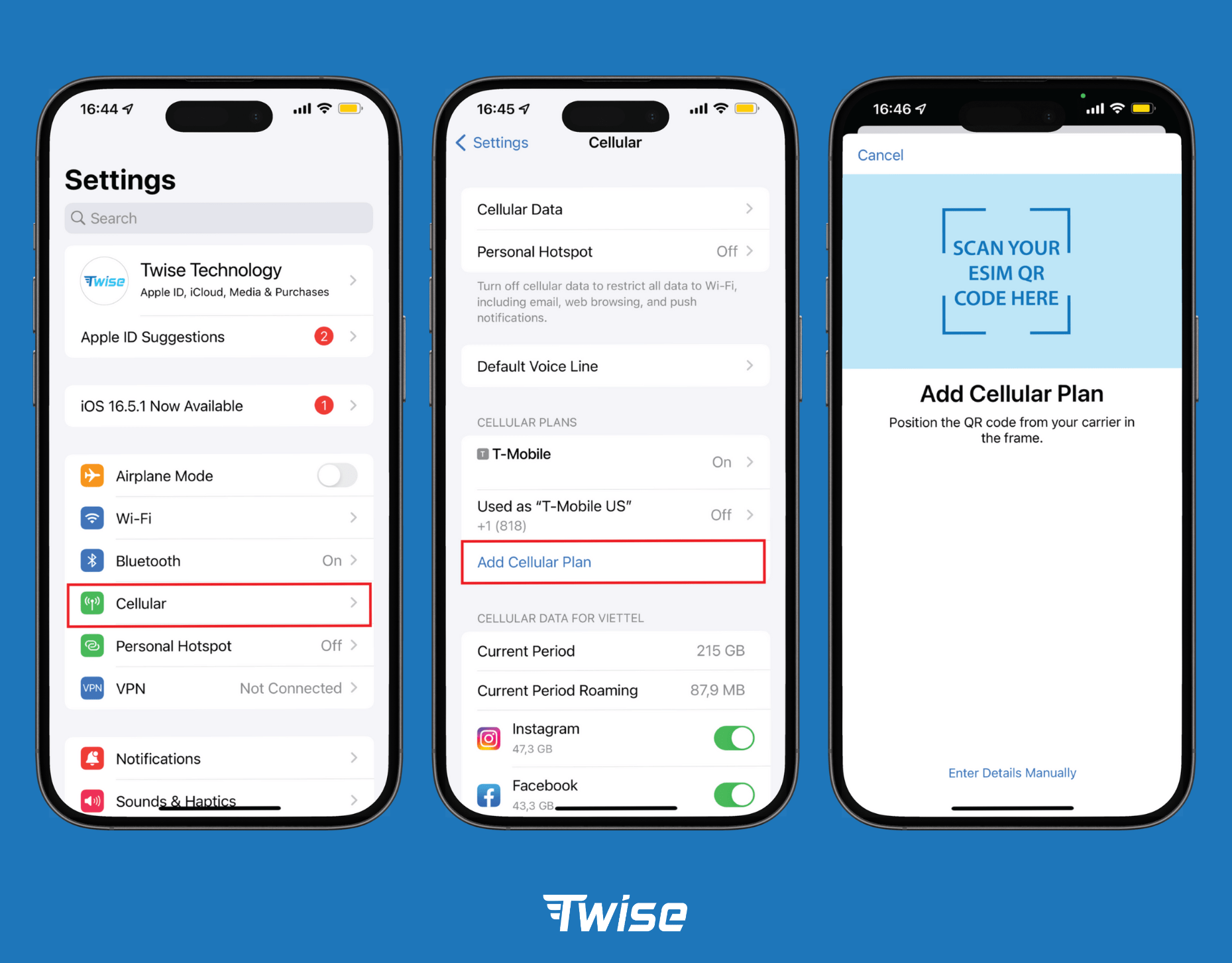
Full guide: How to install an eSIM on iPhone
Android (Samsung-style): Settings → Connections (or Network & Internet) → SIM Manager (or SIMs) → Add eSIM → Scan QR Code → confirm. Menu names vary by manufacturer.
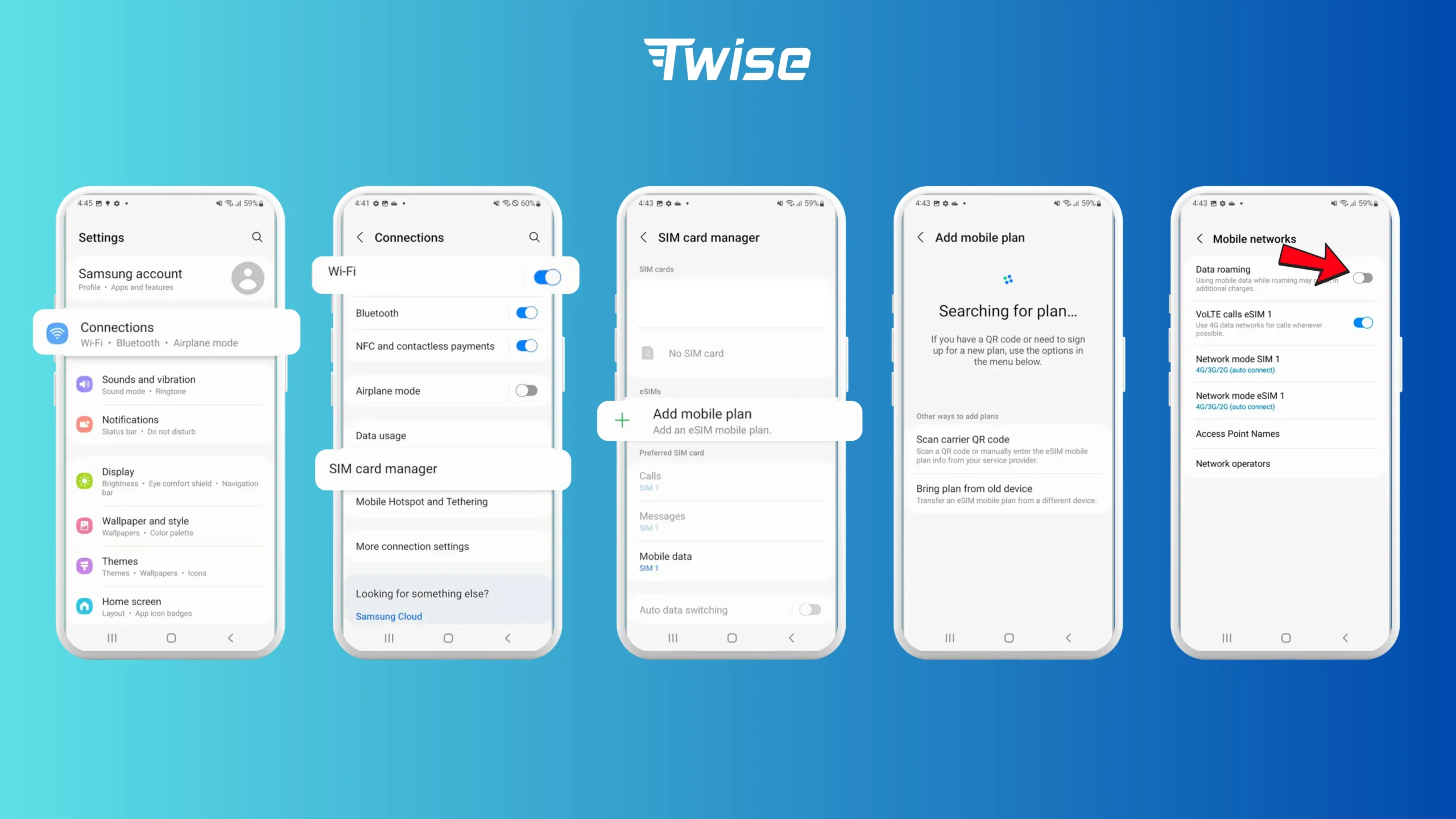
Full guide: How to install an eSIM on Android.
Dual SIM for travel. Keep your home SIM active for calls, SMS and bank verification codes, and assign mobile data to the Twise line. Turn off data roaming on the home SIM and disable automatic data switching so your phone does not quietly use home roaming.
Check the product’s activation rules before installing, because some plans start counting validity at installation and others when they first connect to a network.
Troubleshooting and Practical Tips
Wrong line selected for data. The eSIM can be installed correctly while data still runs on your home SIM. Check the mobile data setting.
Data roaming is off on the Twise line. Travel eSIMs usually connect through partner networks abroad, so the Twise line often needs data roaming enabled.
Line is off or the phone is locked. Confirm that the Twise line is switched on in SIM settings and that your phone is carrier-unlocked.
No signal on arrival. After a long flight, restart the phone or switch airplane mode on for ten seconds. If you are in a remote area, move to open ground or closer to town before concluding something is wrong.
Practical tips:
- Install before you fly, while Wi-Fi and the setup email are easy to reach.
- Download offline maps before leaving a town.
- Keep your home SIM for OTPs and banking messages.
- Verify which line handles mobile data each time you land.
- Limit cloud backups, app updates, streaming and high-resolution uploads to conserve data.
- If part of your trip is on a ship, plan on separate connectivity there.
If nothing works, contact Twise through the Help Center with your phone model, the message you see and a screenshot of your line settings.
Get Connected in Greenland With Twise
Choose World 98 Countries for up to 15 days with 6GB, or Orange Holiday World 195+ for 30 days with 20GB and calls and SMS support. You can keep your home SIM active on a compatible dual-SIM phone and carry the same eSIM to other countries on the plan’s list. Install it at home, download your offline maps, and arrive ready.

Greenland eSIM FAQs
Yes, if your phone supports eSIM, is carrier-unlocked, and your plan includes Greenland. Twise lists two World eSIMs that cover it.
World 98 Countries, with 6GB for 15 days, suits shorter and moderate-use trips. Orange Holiday World 195+, with 20GB for 30 days, suits longer stays and heavier use.
Maps, messaging, email and browsing need relatively little. Video calls, social uploads, streaming and hotspot use much more. Plan for your heaviest day, and use Wi-Fi for large downloads and backups.
World 98 Countries is data only. Orange Holiday World 195+ supports calls and SMS alongside 20GB of data.
Mobile coverage in any country varies by location, and remote areas may have gaps, so download offline maps and plan for moments without signal.
Ship networks are separate from land networks, and travel eSIMs generally do not cover them. Check your plan’s terms and your ship’s connectivity policy.