Tiếng Việt
Malaysia is one of the easier countries in Southeast Asia to stay connected in — but “easy” doesn’t mean “no research needed.” Getting the right eSIM before you land can save you a queue at KLIA, a wrong-turn Grab pickup, or a surprise roaming bill. This guide covers what a Malaysia eSIM actually does, where coverage is strong or patchy, and exactly what Twise’s Malaysia eSIM includes — limits and all.
Malaysia’s Mobile Landscape: Why People choosing CelcomDigi
Malaysia’s mobile networks are genuinely advanced — the country has multiple operators actively expanding 5G — but as a traveler, the more useful question isn’t “does this plan say 5G?” It’s “will data work where I’m actually going?”
| Network | Traveler relevance | What to know |
| CelcomDigi | Major operator; the network Twise Malaysia eSIM runs on | Formed from the 2022 Celcom-Digi merger, combining two large telcos serving a customer base of over 20 million |
| Maxis | Major mobile brand | Frequently compared by locals and long-stay residents |
| U Mobile | Newer 5G rollout partner | Reported partner with Huawei and ZTE on Malaysia’s second 5G network rollout |
| Yes 5G / YTL | Part of the national 5G rollout ecosystem | Relevant mainly for 5G market context, not tourist plans |
| TM / unifi | Fixed broadband and mobile brand | Runs on Malaysia’s original wholesale 5G network shared across mobile licensees — relevant for hotel Wi-Fi/fiber quality |
Coverage varies by region, not just by network. Kuala Lumpur, Penang, Malacca, and Johor Bahru are consistently well-covered. Langkawi and other islands are generally reliable in town centers but can dip near beaches or on boats. Sabah and Sarawak’s cities (Kota Kinabalu, Kuching) have solid urban coverage, but jungle lodges, national parks, and rural interiors — including Taman Negara and remote parts of Cameron Highlands — can have inconsistent signal.
Malaysia is far more connected than remote destinations like the Mongolian steppe or Gobi Desert, so you don’t need to plan around total blackouts. But offline maps and a hotel Wi-Fi backup are still worth having for islands, highlands, and nature stays.
What Is the Best eSIM for Malaysia?

The best Malaysia eSIM gives you reliable local mobile data, a setup you can finish before you fly, enough data for maps and everyday apps, hotspot support if you need it, and clear terms so nothing surprises you mid-trip.
What Twise Malaysia eSIM includes: access via Digi/Celcom, 50GB of high-speed 5G/4G data, hotspot support, a data-only design (no cellular calls or SMS), a 90-day QR validity window with no renewal option, smartphone-only compatibility, and no TikTok access. Speed drops to 384Kbps once the 50GB high-speed allowance is used.
What “data-only” means in practice: your regular phone number can’t make or receive calls or texts on this eSIM. But WhatsApp, Messenger, Telegram, FaceTime, and Google Meet all work normally over data — which covers how most travelers actually communicate abroad anyway.
This plan fits travelers who want setup done online, data ready at KLIA arrival, and support for Grab, maps, messaging, translation, bookings, and hotspot — without hunting for a SIM counter after a long flight.
Twise Malaysia eSIM: Which Fits Your Itinerary?
Kuala Lumpur city trip: ideal use case — KLIA arrival, Grab from the airport, Google Maps, hotel messages, restaurant search, and banking app verification all run smoothly on data alone.
KL + Penang or Malacca: works well for multi-city travelers who need maps, intercity bus or train tickets, and hotel coordination across stops.
Langkawi or island trip: useful for airport or ferry arrival, hotel transfers, and tour messages — pair with hotel Wi-Fi and offline maps for beach or boat areas where signal can thin out.
Sabah, Sarawak, or rainforest trip: reliable in cities and towns; expect variable connectivity at jungle lodges, in national parks, and on boat routes.
Business trip: hotspot support covers email and quick tasks, but heavy video calls or file transfers are better handled on hotel Wi-Fi, especially after the high-speed allowance is used.
Long stay or local-number needs: if you need a Malaysian phone number, cellular calls, SMS, or a plan you can renew indefinitely, a local prepaid or postpaid SIM is the better fit — not a travel eSIM.
Plan Comparison at a Glance
| Need | Best option | Why |
| Online setup before arrival | Twise Malaysia eSIM | Skips SIM-shop friction |
| Large data allowance | Twise 50GB plan | Covers app-heavy travel |
| Hotspot use | Twise Malaysia eSIM | Hotspot supported |
| Regular calls/SMS | Local SIM | Twise is data-only |
| TikTok use | Local SIM/Wi-Fi | Not supported on Twise |
| Long stay or renewal | Local SIM/eSIM | Twise plan can’t be renewed |
| Tablet use | Check alternative | Twise is smartphone-only |
| Heavy video after 50GB | Wi-Fi or a renewable plan | Speed drops to 384Kbps |
What 384Kbps actually feels like: basic messaging, simple web pages, and light app use still work. Video calls, streaming, large downloads, and hotspot-heavy sessions will feel noticeably slow — plan to switch to Wi-Fi for those.
Reading the fine print — data-only, no TikTok, no renewal — before buying saves more frustration than comparing prices alone.
Does eSIM Work in Malaysia?
Yes, as long as your phone is eSIM-compatible and carrier-unlocked. If you’re not sure, check Twise’s guide to devices that work with eSIM before purchasing.
With Twise Malaysia eSIM, you can use Grab, Google Maps, WhatsApp, booking apps, email, translation tools, bank app verification, and hotspot (where supported). It does not cover cellular calls, SMS, a local phone number, plan renewal, or TikTok — and it’s built for smartphones, not tablets.
When the plan starts: activation begins once you connect to a supported network in Malaysia, tracked on UTC+8 time — so a late-night arrival still counts as the same activation day locally.
Malaysia eSIM Coverage: What to Expect in Real Travel Situations
| Travel situation | eSIM usefulness | Backup |
| KLIA arrival | High | Airport Wi-Fi |
| Kuala Lumpur city | High | Hotel Wi-Fi |
| Penang / Malacca | High | Offline maps |
| Langkawi / islands | Medium-high | Hotel Wi-Fi + offline maps |
| Cameron Highlands | Variable | Offline maps |
| Sabah / Sarawak cities | High | Hotel Wi-Fi |
| Rainforest / jungle lodges | Variable | Offline docs + guide |
| Ferries / boats | Variable | Offline tickets |
If signal drops, don’t delete the eSIM profile — check that the line is still enabled, toggle airplane mode once, switch to offline maps or hotel Wi-Fi, and wait until you’re back in a covered area.
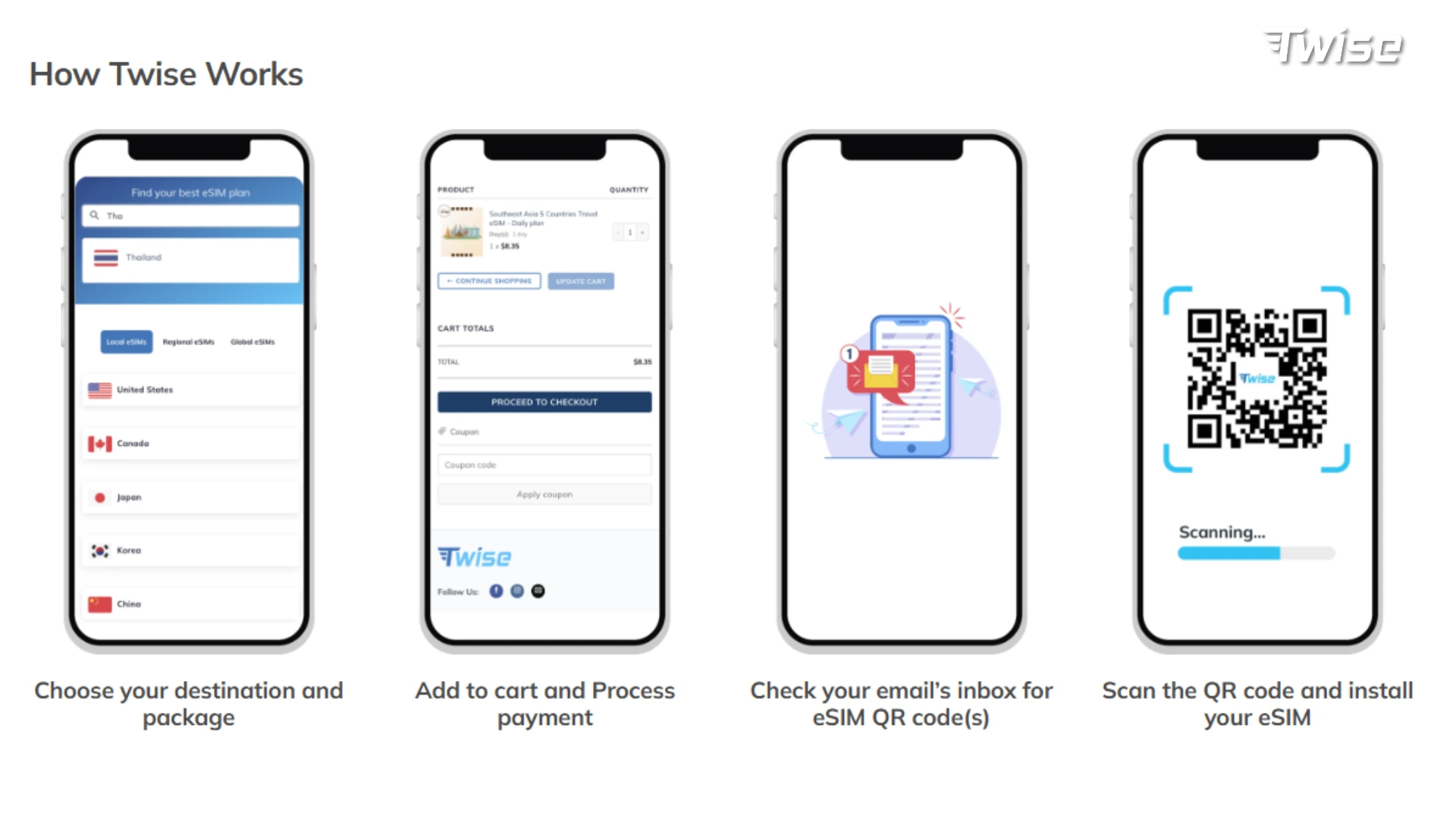
A Simple Four-Step Process
Twise Malaysia eSIM vs. Local SIM: Which Should You Choose?
| Option | Best for | Tradeoff |
| Twise Malaysia eSIM | Online setup, data-heavy app use | Data-only, no TikTok, no renewal |
| Local SIM | Calls/SMS, local number | Requires a shop or airport counter visit |
| Physical SIM | Non-eSIM phones | Needs a SIM swap |
| Home roaming | Convenience | Often expensive |
| Pocket Wi-Fi | Group or laptop-heavy sharing | Extra device to carry and charge |
Choose Twise if data covers everything you need. Choose a local SIM if calls, SMS, or a Malaysian number matter. Choose a physical SIM only if your phone genuinely can’t run eSIM.
Practical Tips for Using Your eSIM in Malaysia
- Install before departure, using stable Wi-Fi — see how to place an eSIM with Twise.
- Scan and activate within 90 days of purchase; the QR code expires after that window.
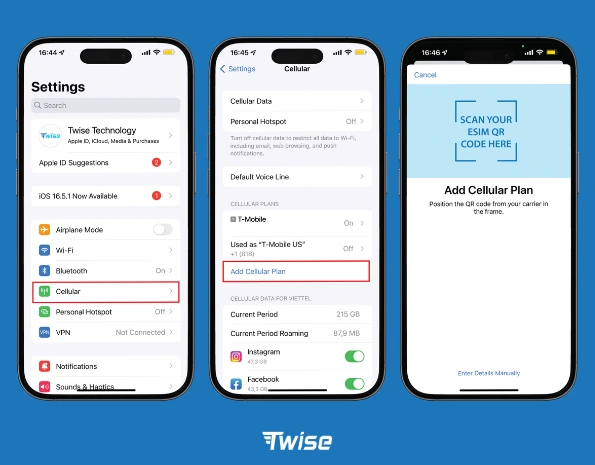
- Set the Twise eSIM as your mobile data line in your phone’s cellular settings.
- Turn on data roaming for the eSIM line if required — keep your home SIM’s roaming off to avoid charges.
- Keep your home SIM active for OTPs (banking, account verification) but not for data.
- Test Grab, Maps, and WhatsApp before leaving the airport, so you’re not troubleshooting mid-transfer.
- Use hotel Wi-Fi for TikTok, large uploads, and app updates — TikTok isn’t supported on this eSIM, and Wi-Fi protects your high-speed allowance.
- Download offline maps before islands, highlands, or rainforest routes, where signal can vary.
How Much Data Do You Need for Malaysia?
- Light use: messaging, maps, email, and hotel Wi-Fi for the rest — fits short city stays.
- Moderate use: Grab, daily maps, WhatsApp, translation, bookings, and social media (excluding TikTok on this plan) — fits most first-time travelers.
- Heavy use: hotspot, work calls, cloud backup, streaming — 50GB is generous, but heavy hotspot or video use can burn through it faster than expected.
How to Set Up a Malaysia eSIM Before Travel
- Check your phone’s eSIM compatibility and unlock status.
- Buy your Malaysia eSIM before departure.
- Install it while connected to stable Wi-Fi.
- Set it as your mobile data line.
- Turn on data roaming for the eSIM line if prompted, keeping your home SIM’s roaming off.
- After landing, test your browser, maps, Grab, WhatsApp, email, and hotspot before leaving Wi-Fi.
Best Travel Apps to Use with a Malaysia eSIM
- Maps: Google Maps or Apple Maps, with offline maps downloaded for islands and rural routes.
- Ride-hailing: Grab — close to essential for airport transfers and city travel.
- Messaging: WhatsApp and email for hotel and tour coordination.
- Translation: useful in local markets, food courts, and rural bus counters.
- Payments: Touch ‘n Go and bank apps — keep your home SIM available for OTP codes.
- Transport: airline, bus, and ferry apps for domestic bookings and confirmations.
Before Leaving Kuala Lumpur or a Major City: Connectivity Checklist
- Download offline maps for islands, highlands, or rainforest legs
- Save hotel, driver, and booking contacts
- Screenshot ferry, flight, and tour confirmations
- Check your remaining data and hotspot use before a business call or long travel day
- Switch to Wi-Fi for TikTok, large uploads, and downloads
- Let family know before boat, jungle, or highland routes with thinner signal
Common Malaysia eSIM Mistakes to Avoid
- Assuming the eSIM covers calls and SMS — it’s data-only
- Forgetting TikTok isn’t supported on this plan
- Running hotspot heavily without checking remaining data
- Waiting past 90 days to scan the QR code
- Trying to activate it on a tablet — it’s built for smartphones
- Deleting the eSIM profile unnecessarily
- Leaving home SIM data roaming switched on
Malaysia eSIM for Different Traveler Types
| Traveler type | Best setup |
| Kuala Lumpur city traveler | Twise eSIM + Grab + Maps + hotel Wi-Fi |
| Penang / Malacca traveler | eSIM + maps + hotel messages + food search |
| Langkawi / island traveler | eSIM + offline maps + hotel Wi-Fi backup |
| Sabah / Sarawak nature traveler | eSIM in cities/towns + offline docs for rural sections |
| Business traveler | eSIM + hotspot check + hotel Wi-Fi for calls/files |
| Family traveler | Shared data, monitored against the 50GB cap |
| Long-stay traveler | Twise for arrival, local SIM/eSIM for ongoing calls/SMS |
Where Twise eSIM Fits: Malaysia Local Data Without SIM-Shop Friction
Twise’s Malaysia eSIM runs on Digi/Celcom access and is built for the parts of a trip that depend on data — KLIA arrival, Grab, maps, hotel messages, WhatsApp, translation, and bookings — all set up online before you fly.
It’s transparent about its limits: data-only, no cellular calls or SMS, no TikTok, no renewal, smartphone-only, and a speed drop to 384Kbps after the 50GB allowance. Use it for the connected, app-driven parts of your trip, and keep Wi-Fi or offline backups ready for heavy media use or lower-signal routes. You can browse other destinations on the Twise eSIM page.
Malaysia eSIM Setup Checklist Before Departure
- Confirm your phone supports eSIM and is unlocked
- Buy from Twise Malaysia eSIM
- Scan and install within 90 days of purchase
- Save your setup guide and QR details
- Set the eSIM as your mobile data line
- Turn on eSIM data roaming if required, keeping home SIM roaming off
- Test Grab, Maps, WhatsApp, and email after arrival
- Use Wi-Fi for TikTok, uploads, and updates
- Download offline maps for islands, highlands, or rainforest routes

FAQs
No. It’s data-only; regular cellular calls and texts don’t work on this plan.
Yes. WhatsApp, Messenger, Telegram, FaceTime, and Google Meet all work over data.
Speed drops to 384Kbps — fine for messaging and light browsing, slow for video or large uploads.
90 days from purchase — install before that window closes.
Yes, in town and city areas. Expect more variable signal in rural interiors, jungle lodges, and on boat routes.
More useful tips for your Malaysia journey
Does FaceTime Use Data? How Much Data FaceTime Uses When Traveling