


Metro by T-Mobile eSIM Explained: Easier Ways to Connect in the U.S.
Nov
Metro by T-Mobile is one of the most popular prepaid carriers in the United States, especially for people looking for affordable mobile plans backed by reliable nationwide coverage. As a sub-brand of T-Mobile, Metro operates on the same 5G network that reaches cities, suburbs, and rural areas across the country. For budget-conscious users, short-term residents, or anyone who prefers prepaid over postpaid contracts, Metro has always been a go-to option.
In recent years, the company introduced Metro by T-Mobile eSIM, making it possible to activate service digitally without inserting a physical SIM card. For users already in the United States, this upgrade brings a noticeable improvement—faster setup, fewer store visits, no physical SIM handling, and a more flexible mobile experience overall. With eSIM, customers can switch between plans, replace lost SIM cards, or set up new service simply by scanning a QR code.
However, while Metro’s eSIM support is a welcome addition for domestic users, it does come with limitations. Most importantly, Metro eSIM activation is not designed for international travelers who haven’t arrived in the U.S. yet. The system is built for domestic prepaid activation, meaning people outside the country cannot purchase or activate Metro eSIM in advance.
This creates real challenges for tourists or business travelers who want mobile data immediately upon landing.
What is Metro by T-Mobile eSIM?
Metro by T-Mobile eSIM is the digital version of a SIM card that allows users to activate Metro service without needing a physical SIM. Instead of inserting a plastic card into your phone, you simply download the eSIM profile and connect directly to the network.
Here’s what it includes:
- Digital activation — No shipping, no waiting.
- Instant setup — Perfect for replacing lost SIM cards or switching phones.
- Backed by T-Mobile’s extensive 5G coverage — You get the same network performance as T-Mobile prepaid customers.
- Designed primarily for U.S.-based prepaid users — This is the most important detail for travelers.
Because Metro is a domestic-focused prepaid brand, the esim Metro by T-Mobile is built for customers already physically located in the U.S. It’s intended to help people activate service quickly and conveniently, but it is not designed for international presale or pre-arrival activation.
Still, if you’re a U.S. resident or long-term visitor already in the country, Metro’s eSIM can be a fast and modern way to activate service.

How to Get Metro by T-Mobile eSIM
While Metro’s eSIM support is improving, the process still requires customers to be physically inside the United States at the time of activation. This is because Metro needs to verify the device, payment method, and network availability within the U.S. before issuing an official Metro by T-Mobile eSIM QR code.
Eligibility Requirements
To get a Metro eSIM, you must have:
- A Metro account or a new activation request
- An unlocked, eSIM-compatible phone (iPhone, Pixel, Samsung, etc.)
- A valid payment method that Metro accepts
- Access to the Metro by T-Mobile app, which verifies your location inside the U.S.
Step-by-Step: How to Activate a Metro by T-Mobile eSIM
- Download the Metro by T-Mobile App
Available on iOS and Android. You must install it while you’re in the U.S., as activation may require device location confirmation. - Create a New Metro Account
Or log in if you already have an existing prepaid account. - Choose Your Plan
Metro offers unlimited plans, data packs, and budget options. Select the one you want. - Complete Payment
Metro may require a payment card that matches a U.S. billing address, especially for first-time activations. - Receive Your Metro by T-Mobile eSIM QR Code
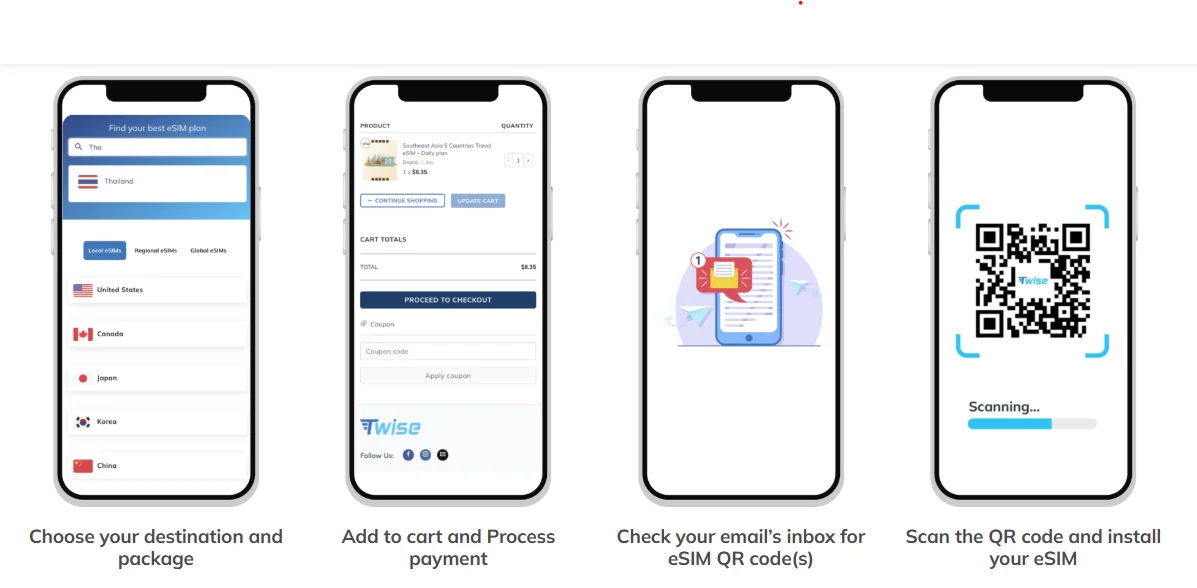
The QR code may arrive via email or SMS, depending on your account settings. This is your digital SIM. - Scan the QR Code on Your Device
Go to your phone’s eSIM settings → Add eSIM → Scan QR → Install. - Restart Your Phone and Enable Mobile Data
The network should connect within a few minutes.
Once the setup is complete, your metro t mobile esim will be ready to use on T-Mobile’s 5G network.
Limitations of Metro by T-Mobile eSIM
Although Metro eSIM is extremely convenient for U.S. customers, it has noticeable limitations for international users and travelers preparing for their trips.
1. Only Available After You’re Physically in the U.S.
The activation process checks your device’s location during setup. If you’re abroad, it usually won’t allow eSIM delivery or activation.
2. Requires U.S. Payment Methods
Metro prepaid activations often reject international cards due to billing ZIP code mismatches.
3. No International Online Purchase
Metro by T-Mobile does not offer global presale eSIM support. There’s no method to buy your eSIM before you arrive.
4. No Early Activation Options
You cannot schedule an activation for a future arrival date. Everything must be done inside the U.S. service area.
5. Designed for Domestic Users
Metro’s eSIM system expects users to be:
- Physically in the U.S.
- Using U.S.-based addresses
- Paying with domestic methods
- Connecting to the T-Mobile network locally
For tourists or first-time visitors landing at American airports, these restrictions mean you won’t have mobile service immediately upon arrival, which can be stressful when trying to book rides, navigate, or contact accommodations.
And this is exactly why many travelers look for a more flexible alternative that offers the same T-Mobile network experience—but without the geographic or payment limitations.
Best Alternative for Travelers: Twise Local T-Mobile eSIM
For people traveling to the U.S.—especially tourists, digital nomads, students, and business travelers—the Twise Local T-Mobile eSIM is a significantly easier and more practical option.
Twise is a trusted provider offering T-Mobile-network eSIMs that can be purchased worldwide, without needing to be inside the U.S. It’s designed specifically to eliminate the challenges international visitors face when trying to activate domestic eSIMs like Metro.

Why Twise Is Better for International Travelers
✔ Buy from anywhere – no U.S. location required
Whether you’re in Vietnam, Japan, Germany, India, or Australia, you can buy and install the eSIM instantly.
✔ Activate before landing
You can set your activation date based on Los Angeles time, ensuring your eSIM activates the moment your plane arrives.
✔ Get a U.S. phone number before you fly
Twise provides a temporary +1 U.S. phone number for calls, texts, and OTP verification. No U.S. residency required.
✔ Cheaper than buying T-Mobile directly
Twise offers competitive pricing because the plans are optimized for travelers.
✔ Uses the SAME T-Mobile 5G network as Metro
Coverage quality is identical—only the purchasing experience differs.
✔ No contracts, no ID, no U.S. billing
Anyone can buy a plan securely with international payment methods.
Metro by T-Mobile eSIM is excellent for locals.
Twise Local T-Mobile eSIM is excellent for international visitors.
Comparison: Metro by T-Mobile eSIM vs. Twise Local T-Mobile eSIM
|
Feature |
Metro by T-Mobile eSIM | Twise Local T-Mobile eSIM |
| Availability | U.S. only | Global purchase |
| Activation | After arrival | Before departure |
| Coverage | T-Mobile 5G network | Same T-Mobile 5G network |
| Plan Type | Domestic prepaid | Local + travel plans |
| Payment Options | Often requires U.S. card | International cards accepted |
| Ideal For | U.S. residents | Travelers, students, tourists |
| Setup Difficulty |
Medium |
Very easy |
Takeaway:
Metro eSIM is great once you are inside the United States.
Twise is the better option if you haven’t arrived yet.
How to Set Up and Activate Twise Local T-Mobile eSIM
Activating Twise is intentionally simple—built for international customers who don’t want to deal with U.S. payment or app restrictions.
Step-by-Step Guide
- Visit the Twise Local T-Mobile eSIM
- Select a U.S. Local T-Mobile Plan
Choose from unlimited data plans, data + calls plans, or short-term packages. - Enter Your Activation Details
- Select the Starting Date (based on Los Angeles timezone).
- Submit your EID and IMEI for auto-prompt setup.
This helps Twise trigger activation on the exact date you choose.
- About Security:
Your EID and IMEI are device identifiers only – they do not provide access to your data, files, or personal information. Twise uses them strictly for activation.
If you prefer not to provide these numbers, Twise also offers U.S. internet-only plans that do not require EID or IMEI. - Purchase Securely
Twise accepts global payment methods, making checkout simple for international users. - Activate Automatically on the Start Date
Your eSIM will connect to T-Mobile’s network at the exact time you selected – no extra steps required.
This process eliminates stress entirely. No U.S. address, no app restrictions, no arrival-day complications.
Metro by T-Mobile eSIM is a solid digital option for customers already within the United States. It delivers fast activation, strong coverage, affordable prepaid plans, and the convenience of using T-Mobile’s 5G network. But for international travelers—or anyone who wants mobile data the moment they land—Metro’s eSIM system is not ideal, mainly because it cannot be purchased or activated before arrival.
For tourists, business travelers, exchange students, and first-time visitors, the Twise Local T-Mobile eSIM provides:
- Faster setup
- Budget-friendly
- Global availability
- Equal T-Mobile 5G performance
- A U.S. phone number before arrival
- No need for American payment methods
FAQs
Activation depends on the type of USA eSIM you choose:
- Local eSIMs (e.g., T-Mobile or AT&T) – These support calls and SMS within the USA. During checkout, provide your EID and IMEI. After successful activation on your selected activation date, your eSIM will be delivered to your device via push notification before 9:00 AM (GMT-7).
- Roaming eSIMs (data-only) – After completing the payment, Twise will immediately send your eSIM QR code to your email. Simply scan the QR code to install your eSIM and turn on data roaming to start using it.
Twise’s customer support is available 24/7 to assist you. You can contact them through the official channels below for immediate help:
Facebook Fanpage: Twise
Email: [email protected]
WhatsApp: (+1) 818-915-0777
More helpful tips for your USA journey
Prepaid eSIMs for USA Travel: Affordable, Fast 4G/5G, Nationwide Coverage
Best Prepaid eSIMs for First-Time Travelers to the USA
How much data will I need for travel?
