Tiếng Việt
A Mongolia eSIM is a practical option for travelers who want mobile data ready at arrival — for maps, hotel and guide messages, translation, booking apps, and avoiding expensive home roaming.
But no provider should promise you’ll be connected everywhere. Outside Ulaanbaatar and major towns, travel often means long road journeys, open steppe, desert routes, and remote ger camps where signal is weak or absent. That doesn’t make an eSIM less useful — it means using it realistically: rely on it for the connected parts of your trip, and pair it with offline maps, saved contacts, and a power bank for the remote parts.
Twise offers a Mongolia local eSIM built around that idea — mobile data without SIM-shop friction, and no overpromising on “internet everywhere.”
Mongolia’s Mobile Landscape
| Provider | Traveler relevance | Watch out for |
| MobiCom | Local operator with a tourist data SIM and eSIM-by-QR option | Coverage still route-dependent; no guaranteed signal in Gobi, steppe, or ger camps |
| Unitel | Prepaid TourSIM plans with 4G data plus domestic calls/texts | Confirm international calls/SMS and eSIM availability before buying |
| Skytel / G-Mobile | Local networks, more relevant for long-stay or domestic use | Avoid assuming tourist-plan or eSIM support without checking directly |
| Twise Mongolia eSIM | Data-first, online setup before arrival | Check phone compatibility and hotspot rules; don’t expect signal everywhere remote |
Mongolia isn’t a city-first destination like Japan or Singapore. Most trips start in Ulaanbaatar, then move into national parks, desert routes, and remote camps — so coverage is best understood by route, not as a single yes/no answer.
- Ulaanbaatar & airport arrival: best signal. Useful for driver messages, hotel check-in, maps, and translation the moment you land.
- Major towns and populated routes: generally reliable; long transfers may have signal in stretches and gaps in between.
- Terelj National Park / short trips from UB: usable but variable by terrain and camp location — download offline maps before you leave the city.
- Gobi Desert, steppe, ger camps: expect signal in towns and some route sections, then nothing for long stretches. This doesn’t mean the eSIM is broken — it means there’s no coverage there.
- Khuvsgul Lake, mountains, long road routes: similar pattern — signal shifts with terrain, distance from towns, and weather.
What Is the Best eSIM for Mongolia?
The best eSIM gives you local mobile data, simple setup, a validity period that matches your trip, enough data for maps and messaging, and honest expectations about coverage outside Ulaanbaatar.
For most short-term visitors, an eSIM is best when your priority is mobile data for apps — Google Maps, WhatsApp, Telegram, translation, hotel and booking access — rather than local calls or SMS.
Your ideal setup depends on your route:
- Ulaanbaatar-only trip: convenience and quick setup matter most.
- Gobi Desert or steppe tour: data amount matters less than offline preparation.
- Business trip: hotspot support may matter more than total data.
- Long stay: a local SIM (for a Mongolian number or local calls) may be worth comparing.
A large data package isn’t automatically better — data amount and coverage are two different things. More data means more usage where a network exists; it doesn’t create signal in a remote desert valley.
Does eSIM Work in Mongolia?
Yes — if your phone supports eSIM and is carrier-unlocked. If you’re unsure, check Twise’s guide to eSIM-compatible devices before buying.
What eSIM usually covers: mobile data for maps, messaging, translation, booking apps, banking, email, and app-based calls. Some plans support hotspot — confirm before purchase.
What it usually doesn’t include: a local phone number, voice calls, SMS, guaranteed remote signal, or long-term local pricing. If you need any of these, compare a local SIM or eSIM instead.
Twise Mongolia eSIM vs. Other Options
| Option | Best for | Tradeoff |
| Twise Mongolia eSIM | Online setup, data-first short trips | Needs an eSIM-compatible phone |
| Local tourist eSIM/SIM | Local number, calls/SMS, long stays | Shop visit or local setup flow |
| Physical SIM | Non-eSIM or locked phones | Requires in-person purchase |
| Home roaming | Convenience, no new SIM | Often expensive; confirm Mongolia is covered |
| Pocket Wi-Fi | Groups or laptop-heavy use | Extra device to carry and charge |
Choose Twise if you want setup done before you fly and you mainly need data. Choose a local SIM if you need a Mongolian number or voice/SMS. Choose physical SIM only if your phone can’t do eSIM at all.
How Much Data Do You Need?
- Light use: messaging, email, basic maps — fits travelers staying mostly in Ulaanbaatar with hotel Wi-Fi available.
- Moderate use: daily maps, translation, messaging apps, bookings, occasional social media — fits most travelers.
- Heavy use: video calls, hotspot, frequent uploads — note that more data still won’t create coverage in remote areas.
To save data: use hotel Wi-Fi for app updates and large uploads, download offline maps before long journeys, and turn off automatic cloud backup on mobile data.
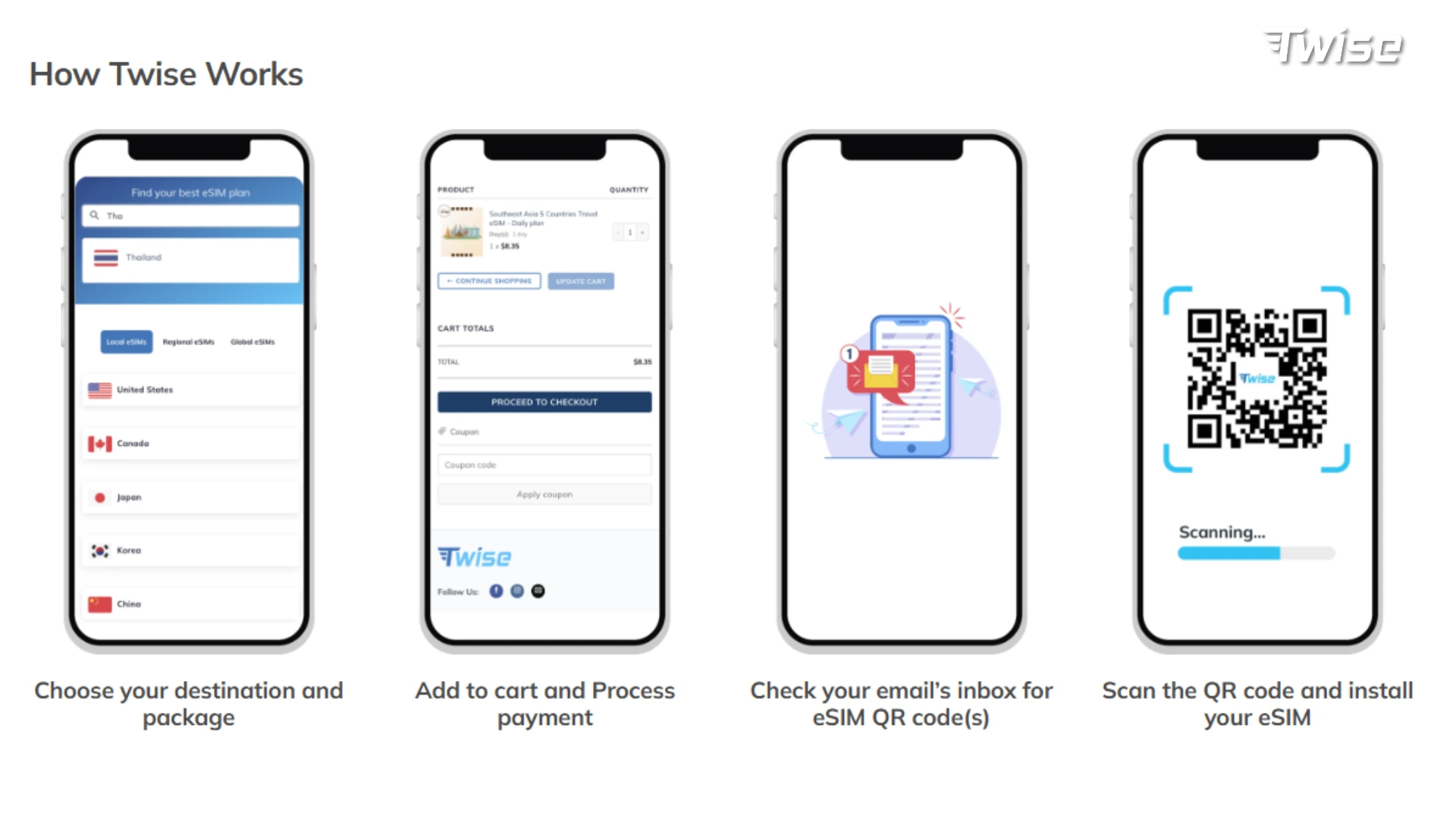
Setting Up Your Mongolia eSIM
- Check compatibility — confirm your phone supports eSIM and is unlocked.
- Buy before departure — use stable Wi-Fi and a valid email; save your QR code and activation details.
- Install on Wi-Fi — don’t wait until you’re at the airport or in transit.
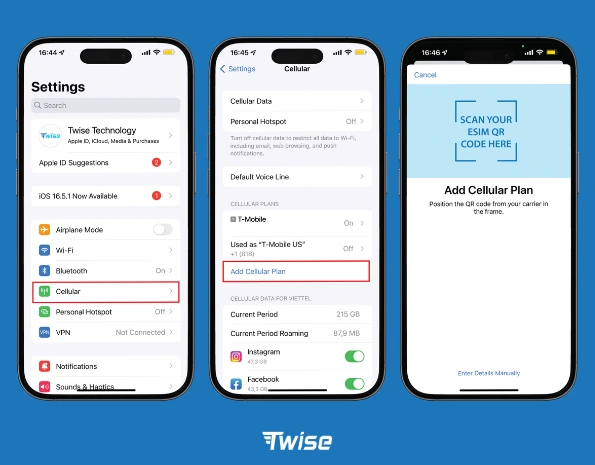
- Set the eSIM as your mobile data line in your phone’s cellular settings.
- Enable data roaming on the eSIM line if required — this is separate from your home SIM’s roaming setting, which should stay off to avoid fees.
- Test after arrival — open a browser, load maps, send a message, and try hotspot (if needed) before leaving Wi-Fi.
Best Apps to Pair With Your eSIM
- Maps: Google Maps for Ulaanbaatar; download offline maps for any route beyond the city — save the full route, not just the destination.
- Messaging: WhatsApp, Telegram, or email to coordinate with guides and hotels — send key questions before you lose coverage.
- Translation: download offline language packs where available.
- Documents: keep hotel bookings, itineraries, insurance, and passport copies accessible offline.
- Banking: keep some cash on hand outside Ulaanbaatar in case card or app access needs data you don’t have.
Before You Leave Ulaanbaatar: Remote Travel Checklist
Prepare as if data may disappear once you’re on the road:
- Download offline maps for your full route
- Save guide, driver, hotel, and emergency contacts
- Screenshot pickup times, bookings, and itineraries
- Carry a charged power bank
- Ask your guide where signal typically drops and returns
- Message family before remote legs so they’re not surprised by silence
If signal drops mid-trip, don’t delete the eSIM or change settings — check the line is still enabled, toggle airplane mode once if needed, and wait until you’re near a settlement.
Common Mistakes to Avoid
- Assuming eSIM works everywhere in Mongolia
- Installing without stable Wi-Fi
- Deleting the eSIM profile (many can’t be re-scanned)
- Leaving home SIM data roaming on
- Forgetting to enable and select the eSIM line after landing
- Skipping offline maps before Gobi, steppe, lake, or self-drive routes
- Not checking hotspot support before you need it

FAQs
Yes, if your phone is eSIM-capable and unlocked — coverage follows mobile networks, so expect strong signal in cities and gaps in remote areas.
It depends on your route, trip length, and whether you need hotspot or local calls — there’s no single best plan for every itinerary.
In towns and some route sections, yes; continuously, no. Offline maps and guide support are essential regardless of plan.
Both are legitimate local options; the better choice depends on your specific route and whether you need voice/SMS — verify current plans directly.
Yes, and it’s recommended — install on Wi-Fi and test before you leave the airport.
Most travel eSIMs are data-only. If you need SMS or calls, compare a local SIM.
More useful tips for your Mongolia journey
Does FaceTime Use Data? How Much Data FaceTime Uses When Traveling