Tiếng Việt
A Philippines eSIM gives travelers mobile data without visiting a local SIM shop. Twise’s DITO-based plan offers 1GB–5GB of high-speed data per day, hotspot support, and a daily reset at midnight Philippine time — but it is data-only, and coverage remains route-dependent.
That data does specific work on a real trip: arrival transport at NAIA, Google Maps, Grab, accommodation messages, translation, ferry and flight updates, online bookings, and internet-based calls. It’s not a phone line — it’s the connectivity layer under all of that.
Compare current Twise Philippines eSIM plans once you’ve checked the network and coverage details below.
Philippines Mobile Networks: DITO vs Smart vs Globe
| Network | Current Position | Useful Traveler Context | Main Caution |
| DITO | Strong recent network-experience results, growing 5G footprint | Twise’s daily Philippines plan runs on DITO signal | Coverage must be checked for specific islands and inland routes |
| Smart | Strong 5G coverage performance | Local prepaid eSIM includes calls, texts, and data | Local eSIM must be registered |
| Globe | Strong overall coverage performance | Broad local prepaid ecosystem plus its own local eSIM | Tourist registration requirements apply |
Recent Opensignal results are why this shouldn’t be simplified to “Smart for rural, Globe for cities.” In the October 2025 report, Globe led Overall Coverage Experience, Smart led 5G Coverage Experience, and DITO won most other award categories — the networks are genuinely competitive across different metrics, not neatly split by region.
DITO Telecommunity
The newest major national operator and Twise’s network partner for this product. Published 5G locations include parts of Metro Manila, Cebu City, and Davao City, but coverage still needs checking at the barangay or route level — treat 4G as the safer planning baseline rather than assuming 5G everywhere.
Smart Communications
Offers a direct local prepaid eSIM that includes calls, texts, and data. Available through Smart’s online store and select airport booths. Registration is required before activation.
Globe Telecom
Offers its own local prepaid eSIM service. Foreign tourists must register for local service, and the validity and documentation requirements differ from an international travel eSIM like Twise’s.
What the Network Landscape Means for Travelers
Choose by route, not by carrier reputation alone. A DITO-based travel eSIM suits a city-and-mainstream-destination itinerary well. Travelers who need a Philippine phone number, or who are prioritizing a specific network for a remote route, should compare local Smart or Globe options directly.
What Is a Philippines eSIM?
A Philippines eSIM is a digital mobile profile that provides data through a local partner network without replacing your physical SIM. Travel eSIMs are usually data-only, while locally issued Smart, Globe, or DITO eSIMs may include a Philippine number, calls, and SMS.
How a Travel eSIM Connects to DITO
Twise’s Philippines plan is installed as a digital profile and routes data through DITO’s network via a roaming-style arrangement — you’re not opening a DITO account directly.
Travel eSIM vs Local Philippine eSIM
A Twise travel profile is a different product from a locally issued DITO prepaid eSIM. The local version is tied to a registered Philippine identity and can include calls and texts; the travel version is data-only and built for short-term visitors.
Does a Travel eSIM Need Philippine SIM Registration?
Local physical SIMs and local eSIMs require registration under the Philippines’ Subscriber Identity Module Registration Act, which links the profile to a valid government ID. Third-party international travel profiles like Twise’s generally operate through roaming arrangements and don’t issue a locally registered Philippine number, so this specific registration step doesn’t apply to them.
Twise Philippines DITO eSIM at a Glance
| Feature | Detail |
| Daily data | 1GB, 2GB, 3GB, 4GB, or 5GB per day |
| Speed after allowance | Reduced to 128Kbps until next reset |
| Reset time | Midnight, Philippine time (UTC+8) |
| Calls/SMS | Not included — data-only |
| Phone number | None issued |
| Hotspot | Supported |
| Renewal | Not available — one-time validity period |
| Device support | Smartphones only |
| Installation window | QR must be installed within 90 days of purchase |
What Happens After the Daily Allowance?
Speed drops to 128Kbps until the next midnight reset — enough for text-based messaging, not for maps-heavy navigation or video.
How the UTC+8 Reset Works
Philippine time is UTC+8. Since the daily allowance resets at midnight local time, activating late in the day effectively gives you a shorter first day of full-speed data — worth accounting for if you land in the evening.
Calls, SMS and Phone Number
No regular cellular calls, no SMS, no Philippine number. Internet-based calls (WhatsApp, FaceTime, etc.) work over the available data.
Hotspot, Renewal and Device Limits
Hotspot tethering is supported. The plan doesn’t renew or top up — buy a new plan if you need more days. It’s smartphone-only, and the QR code must be installed within 90 days of purchase.
Which Daily Data Plan Do You Need?
| Daily Allowance | Best For | Watch Out For |
| 1GB/day | Maps, messaging, tickets, light browsing | Video and social uploads use it up quickly |
| 2GB/day | Regular maps, social media, occasional video | Keep cloud backups off |
| 3GB/day | Frequent navigation, uploads, moderate streaming | Hotspot use can still consume it fast |
| 4GB/day | Heavy phone use, occasional laptop sharing | Not a substitute for full-time remote-work broadband |
| 5GB/day | Frequent video, uploads, hotspot sessions | Speed still drops after the daily cap |
Light city traveler (Manila–Cebu itinerary): 1–2GB/day usually covers maps, Grab, and messaging comfortably. Island-hopping traveler: saving data matters at ports and during transfers, where accommodation messages and ferry updates matter more than browsing. Remote worker: factor in hotspot use and video meetings, with hotel Wi-Fi as backup rather than the primary connection. Content creator: uploads add up fast — compress video before uploading and keep automatic cloud backup off.
DITO Coverage Across Popular Philippine Routes
The Philippines is an archipelago, and coverage varies by route far more than by island name alone.
Metro Manila and NAIA: solid for arrival transport, accommodation messages, and city navigation. 5G is available in selected DITO areas — not throughout every terminal or building.
Cebu City and Mactan: DITO publishes 5G in selected Cebu City locations. Check your accommodation and any onward-island route separately, since city coverage doesn’t guarantee the same on connecting islands.
Davao City: reliable for city use and airport transfers; coverage thins noticeably once you move into less populated Mindanao routes.
Boracay: coverage in the populated resort strip differs from boat transfers and offshore activities — don’t assume the same signal on the water.
Palawan (Puerto Princesa, El Nido, Coron): one province, widely separated destinations. Puerto Princesa coverage says nothing reliable about remote El Nido roads, Coron boat trips, or offshore lagoons.
Bohol and Panglao: resort and town areas perform differently from interior roads and boat excursions.
Siargao: accommodation Wi-Fi, saved maps, and driver contacts still matter outside the main tourism zones.
Banaue, Sagada, and mountain routes: terrain creates real gaps. Download offline information before heading into these areas.
Ferries and island-hopping boats: terrestrial coverage generally fades once you leave the coast.
How Travelers Actually Use Mobile Data in the Philippines
- After landing: opening pickup instructions, contacting accommodation, arranging transport from NAIA or a regional airport.
- During city travel: maps, Grab, translation, restaurant messages, and online bookings.
- At ferry ports: checking schedule changes, showing electronic tickets, confirming accommodation and onward transport.
- During island stays: balancing mobile data with hotel or café Wi-Fi rather than relying on one exclusively.
- For payments and verification: keeping your home SIM available for OTP messages while data roaming stays off on that line, so you’re not billed for home-network data use.
How to Install and Activate the Twise Philippines eSIM
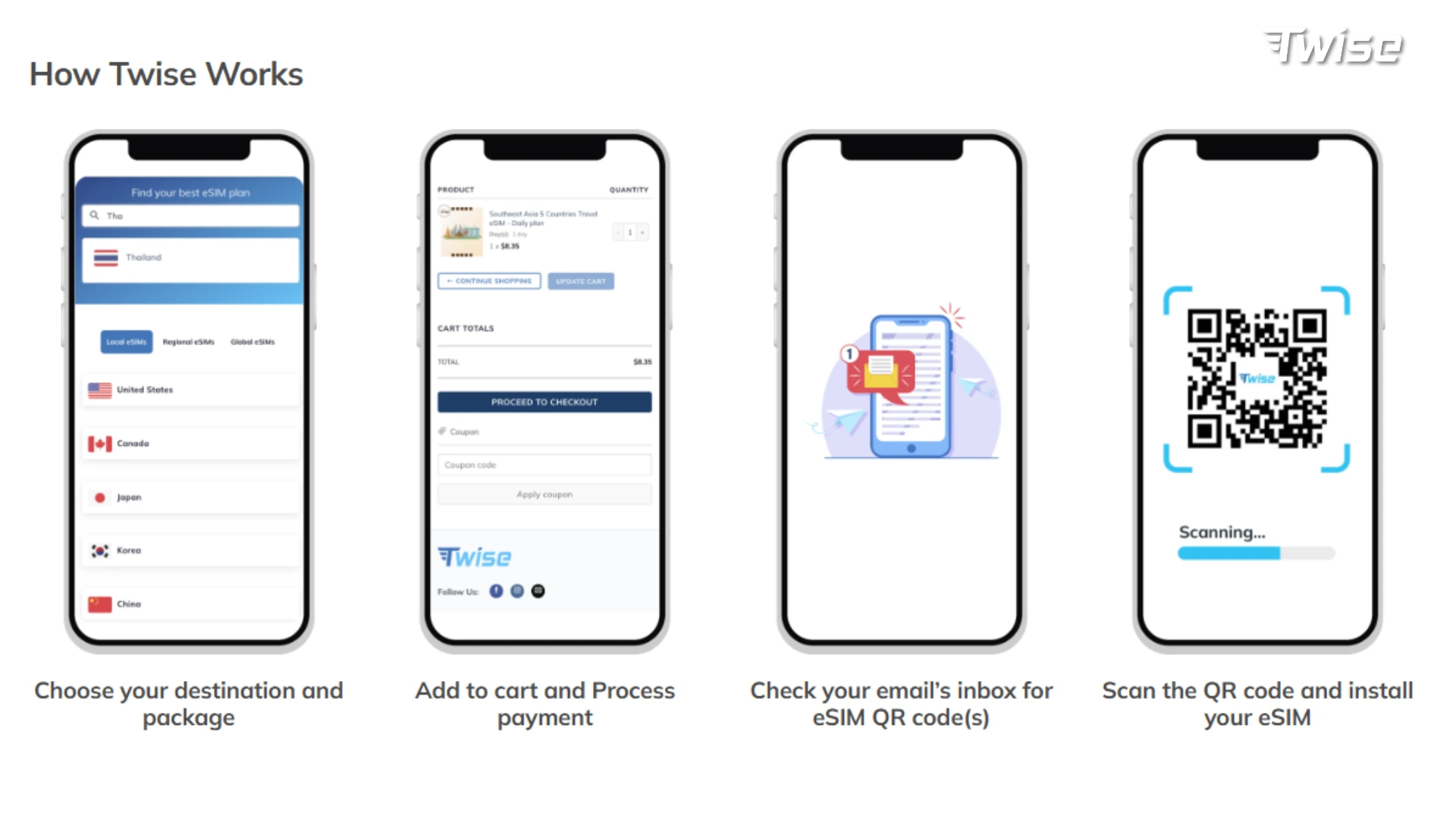
- Check phone compatibility — confirm it supports eSIM and is unlocked from your home carrier.
- Install within the 90-day window, using reliable Wi-Fi, and keep the QR email saved.
- Keep the eSIM off until arrival — no need to activate early.
- Configure after landing: turn on the Philippines eSIM, select it for cellular data, enable data roaming on the travel line if required, disable data roaming on your home SIM, turn off automatic cellular-data switching, and keep the home SIM active only for calls or verification texts.
- Don’t delete it while troubleshooting — removing the profile can complicate reinstallation.
What to Do When the Philippines eSIM Does Not Connect
- Check which line is active for data
- Enable data roaming on the travel eSIM
- Toggle Airplane Mode on and off
- Restart the phone
- Check the APN settings
- Try an approved manual network selection
- Confirm your destination actually has DITO coverage
- Contact support before deleting the profile

FAQs
Only through internet-based calling apps like WhatsApp or FaceTime, using the eSIM’s data.
Yes, install it in advance over Wi-Fi, but keep it turned off until arrival; the QR code must be installed within 90 days of purchase.
No — SIM Registration Act requirements apply to locally issued SIMs and eSIMs, not to third-party international travel profiles like Twise’s.
Not universally. Recent network testing shows Globe leading overall coverage experience and Smart leading 5G experience, with DITO strong across most other categories — the right choice depends on your specific route.
More useful tips for your Philippines journey:
Does FaceTime Use Data? How Much Data FaceTime Uses When Traveling
How Much Does a Travel Hotspot Cost? Pocket Wi-Fi vs Phone Hotspot vs eSIM