Tiếng Việt
A Sri Lanka eSIM lets an unlocked, compatible smartphone use mobile data without replacing its physical SIM. Twise offers data-only daily and unlimited 4G options for maps, ride apps, hotel messages, and internet calls. It does not include a Sri Lankan number, regular calls, or SMS. Coverage depends on the local partner network and route, so travelers should also download offline maps and save essential booking details.
Sri Lanka’s Mobile Networks at a Glance: Why Dialog Axiata is the leader
Sri Lanka now has three licensed mobile network operators, not four. Dialog completed its amalgamation with Airtel Lanka on August 30, 2024 — Airtel Sri Lanka no longer exists as an independent operator, though the brand name may still appear on some legacy materials. Any current comparison listing Dialog, Mobitel, Hutch, and Airtel as four separate networks is out of date.
| Operator | Traveler relevance | Independent testing (Opensignal, Feb 2026 report) |
| Dialog | Broadest coverage footprint; airport tourist eSIM available; local-number option | Won Best Network overall, plus Coverage Experience, Reliability, Consistent Quality, and Time on Network |
| SLT-Mobitel | Strong speed performance; tourist eSIM available at arrival | Won all four speed awards (download/upload, overall and 5G) and Video Experience |
| Hutch | Data-focused plans and eSIM; confirm exact tourist onboarding before relying on it | Not part of the 5G spectrum auction; focused on rural 4G/fiber expansion instead |
Dialog’s strength is breadth of coverage — useful if your route includes highland or rural stretches. SLT-Mobitel’s strength is raw speed, which matters more for city-based streaming or video calls than for basic maps and messaging. Hutch is generally the budget option, and worth confirming directly if you’re relying on it outside urban areas. No single operator is “fastest everywhere” — performance varies by category and by where you actually are.
Twise Sri Lanka eSIM Plans: What Do You Get?
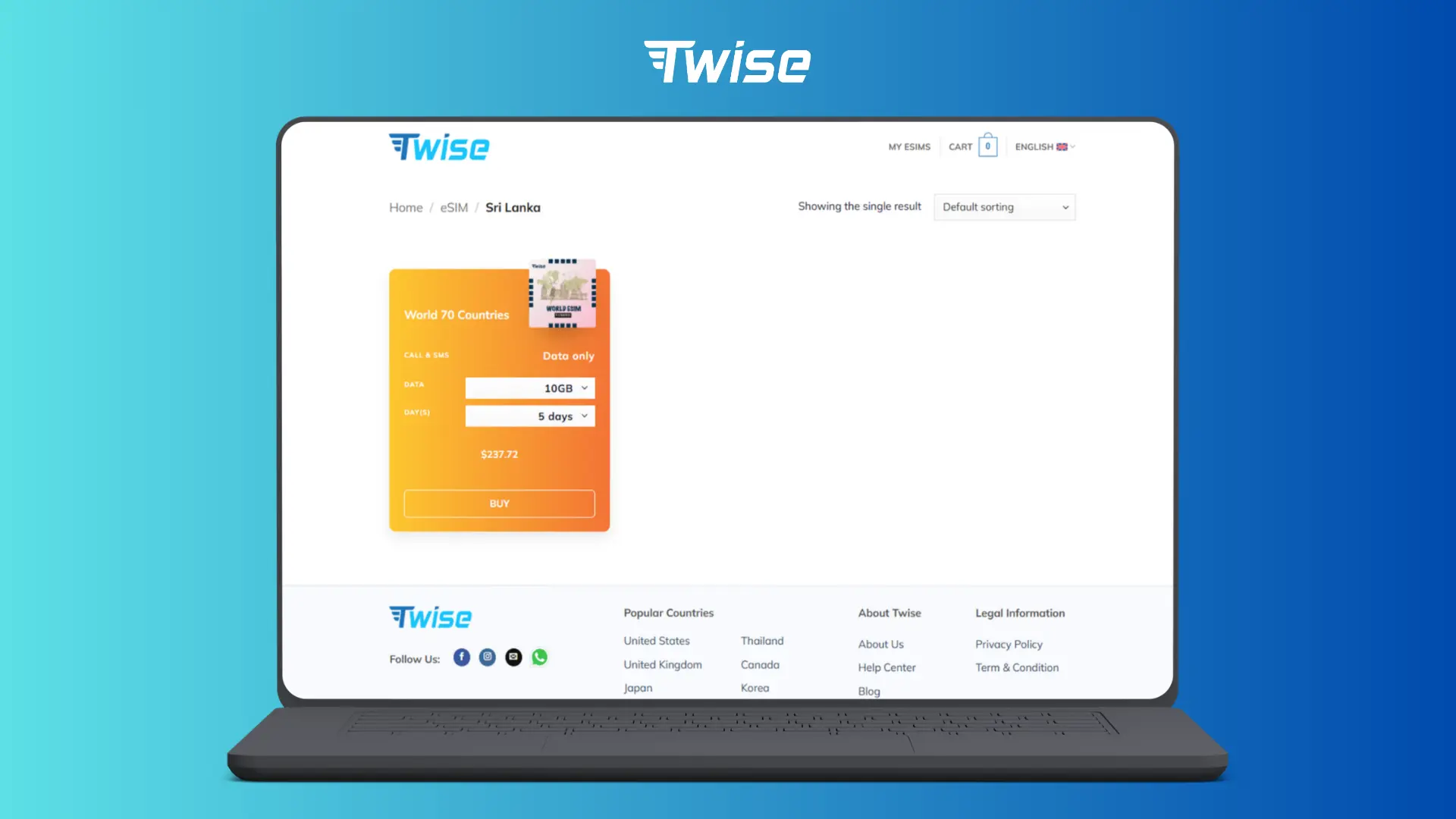
Twise’s Sri Lanka eSIM page currently lists daily-data, standard-data, and unlimited 4G options, alongside regional and global plans. All the visible Sri Lanka product cards are data-only.
Daily data plans run from 500MB to 3GB. You get a fresh high-speed allowance each day; once it’s used, speed drops to 128Kbps until the next reset. At that reduced speed, basic text messaging may still work, but image-heavy maps, video, large files, and ride-app loading can become slow or unreliable.
The daily reset happens at 5:30 a.m. Sri Lanka time — the plan resets at 00:00 UTC, which is 5:30 a.m. local time, not midnight. If you use your allowance heavily at night, don’t expect a fresh reset until the following morning.
Unlimited 4G plans carry a high-speed threshold and fair-use policy shown on the live plan card — check this rather than assuming “unlimited” means no traffic management at all.
Data-only means no local number. Ordinary phone calls and SMS aren’t available. WhatsApp, FaceTime, Messenger, and other internet-based calling services work normally over the data connection.
Hotspot is supported, but the product is built for smartphones — it’s not recommended for tablets or other eSIM devices.
Activation and validity: install the QR code within 180 days of purchase; the plan starts once activated in a supported country, with timing on UTC+0; the eSIM cannot be renewed.
| Traveler behaviour | Suggested plan type | Reason |
| Maps, messages, occasional browsing | 500MB–1GB per day | Lower daily use |
| Social media and internet calls | 1–2GB per day | More room for media |
| Frequent uploads or hotspot use | 3GB or unlimited-style option | Higher daily demand |
| Sri Lanka plus other Asian countries | Regional plan | Reduces profile switching |
| Extended global itinerary | Global plan | One plan across wider travel |
Compare Sri Lanka eSIM plans by trip length, daily data use, and route rather than by the largest number on the page.
Travel eSIM vs. Local SIM, Roaming, and Pocket Wi-Fi
| Option | Best for | Local number | Setup | Main limitation |
| Twise eSIM | Short trips and app data | No | Low | Cannot renew; no cellular calls |
| Local eSIM/SIM | Local number and longer stays | Yes | Medium | Registration required |
| Airport tourist SIM | Help after arrival | Usually yes | Medium | Queue and in-person process |
| Home roaming | Minimal setup | Keeps home number | Very low | May be expensive |
| Pocket Wi-Fi | Groups and several devices | No | Medium | Battery and device management |
A Twise travel eSIM is best for online setup, keeping your physical home SIM, and getting app-based mobile data soon after arrival. A Dialog, Mobitel, or Hutch local eSIM is better when a local number, calls, SMS, top-ups, or direct carrier support matter. Dialog and Mobitel both advertise tourist SIM or eSIM access at Sri Lankan airport arrival points, which suits travelers comfortable completing registration after landing. Home-carrier roaming works for very short trips or as an emergency fallback. Pocket Wi-Fi is useful for several devices but needs charging, collection, return, and staying near the router.
Calls, SMS, WhatsApp, and OTP Codes
Twise’s Sri Lanka plan is data-only and doesn’t connect to ordinary cellular voice services — no regular phone calls. WhatsApp, Messenger, FaceTime, Telegram, Zoom, and similar apps make internet calls normally when the data connection is usable.
Selecting the Twise eSIM for data doesn’t normally require changing the number registered to WhatsApp — you keep your existing account and number. For bank OTPs, keep your home SIM active if you need incoming SMS, but disable data roaming on that line; home-carrier SMS or roaming charges may still apply. A local SIM becomes worthwhile specifically when regular local calling, cellular SMS, or a domestic number is essential to your trip.
How Much Data Do You Need in Sri Lanka?
| Travel style | Planning range | Typical activity |
| Light | 500MB–1GB per day | Maps, messages, and booking access |
| Standard | 1–2GB per day | Social posting, music, and app calls |
| Heavy | 3GB+ per day | Video uploads, hotspot, and remote work |
| Hotel-Wi-Fi-supported trip | Smaller daily plan | Data mainly during transport |
| Work trip | Larger or unlimited-style plan | Calls, files, and laptop tethering |
A traveler who uses the daily allowance at night won’t get a fresh reset at Sri Lankan midnight — high-speed data returns around 5:30 a.m. local time. More data can’t fix a lack of signal in a tunnel, national park, or remote valley; that’s a coverage question, not a volume one. Hotspot use changes the math fastest — laptop updates, cloud sync, and video meetings can burn through a daily allowance quickly.
How to Install and Activate a Sri Lanka eSIM
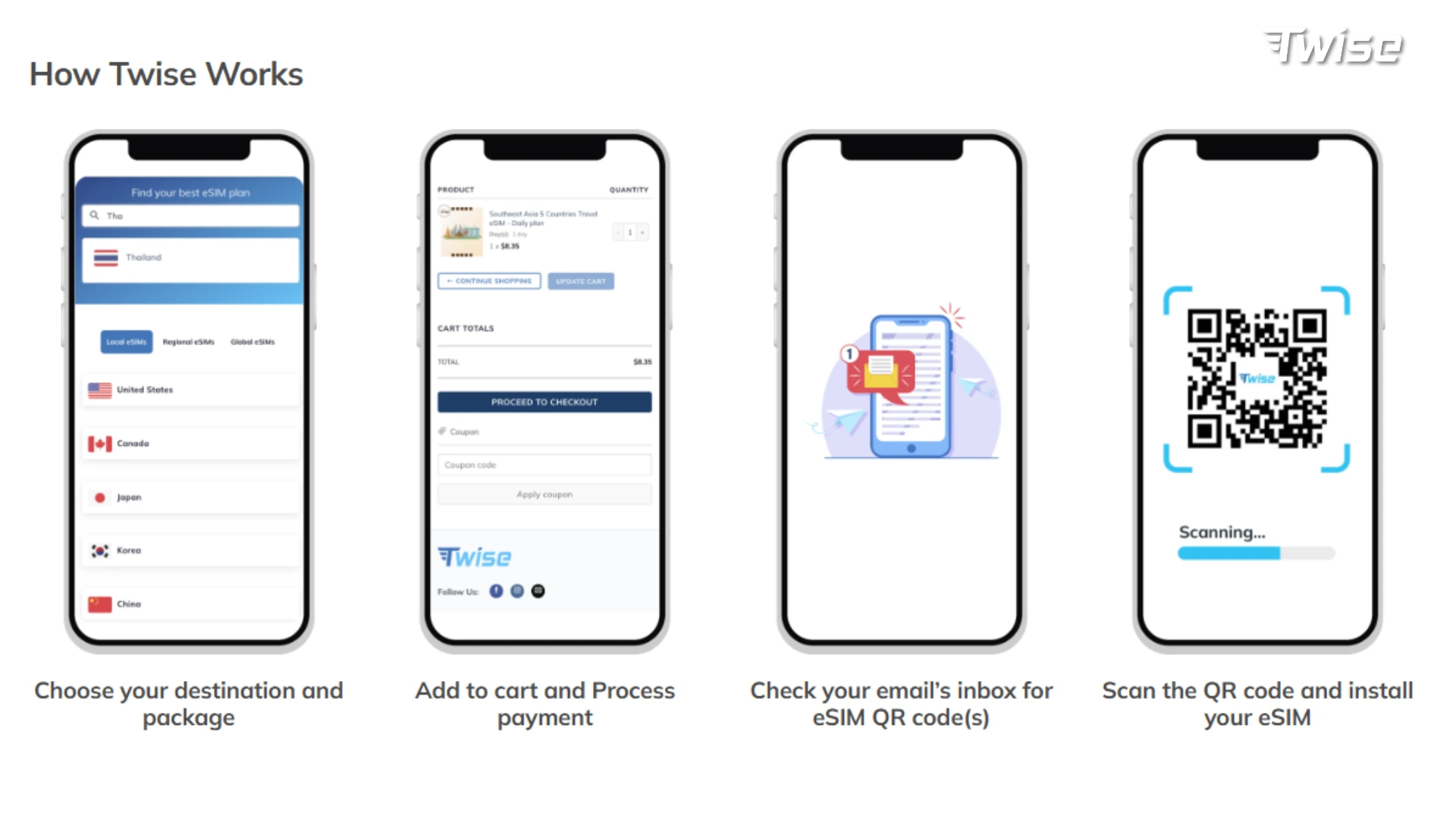
Check the exact model and regional version of your phone for eSIM compatibility and unlocked status via Twise’s device guide — an eSIM-compatible phone can still reject another profile when locked to the home carrier.
Purchase the plan and save the QR code, order number, manual installation information, and support contact somewhere accessible offline. Install it on stable Wi-Fi before departure, provided installation doesn’t conflict with the supplied instructions. Keep the eSIM line off until it should activate — the plan starts when activated in a supported country, so leave it disabled until arrival unless told otherwise.
Configure dual-SIM settings:
- Select Twise for cellular data
- Turn data roaming on for the Twise line when required
- Turn data roaming off for the home line
- Disable automatic cellular-data switching
- Keep the home SIM active only when calls or OTP messages are needed
Don’t delete the profile while troubleshooting — a QR code may not be reusable after deletion. Try network and APN troubleshooting first.
What to Do After Landing in Sri Lanka
The five-minute airport connection sequence:
- Turn off Airplane Mode
- Enable the Twise eSIM line
- Select it for cellular data
- Enable data roaming for that line
- Keep the home SIM’s data roaming off
- Wait several minutes for network registration
- Test a lightweight map or web page
- Keep airport Wi-Fi connected until mobile data works
Open essential services first: accommodation address, airport pickup messages, maps, ride-hailing or taxi communication, train and bus information, booking confirmations, and translation or payment verification.
Pause automatic downloads — delay app updates, cloud backups, and photo uploads until hotel Wi-Fi is available. Save an offline exit plan: a screenshot of the hotel address, driver contact, booking number, and directions before leaving the airport.
What to Do When the Sri Lanka eSIM Has No Signal
- Confirm Twise is selected for mobile data — the profile may be active while the phone still tries to use the home SIM.
- Check data roaming — international travel profiles commonly require roaming to reach the partner network.
- Toggle Airplane Mode and restart as a simple reset before touching advanced settings.
- Check network selection — try automatic first, and only select a network manually if the product instructions list an approved partner.
- Check the APN matches exactly what was provided with the Twise order.
- Decide whether it’s configuration or coverage — if the eSIM worked in Colombo but stopped on a highland road, train route, or inside a park, that’s more likely local network availability than an installation failure.
If you contact support, have ready: order number, phone model, location, eSIM settings, APN, selected network, and whether the service worked earlier in the trip.
When a Local Sri Lankan SIM Is the Better Choice
- You need a Sri Lankan number — a local plan suits regular local calls, SMS, and number-dependent services.
- Your trip may extend — since Twise’s product can’t be renewed, a renewable local prepaid plan handles an open-ended stay more easily.
- Your route is highly remote — choose a carrier based on current local guidance from your guesthouse, driver, or tour operator.
- Your phone doesn’t support eSIM — use a physical tourist SIM, pocket Wi-Fi, or home roaming instead.
- You want direct carrier support — a local connection is easier to top up or troubleshoot at a carrier outlet.

FAQs
Dialog currently leads on coverage breadth and reliability in independent testing, while SLT-Mobitel leads on raw speed — the better choice depends on whether your route is remote or city-based.
Speed drops to 128Kbps until the next daily reset.
In parts — hills, valleys, and tunnels along the route can interrupt signal, so download your journey details in advance.
Coverage inside and around the park can be inconsistent — confirm pickup and meeting details with your guide beforehand.
Confirm the eSIM is selected for data, check roaming is enabled, toggle Airplane Mode once, and verify the APN before assuming a fault.
Dialog tends to suit travelers prioritizing broad coverage, including rural and highland routes; SLT-Mobitel tends to suit those prioritizing speed in cities — both offer tourist SIM/eSIM access at the airport.
More useful tips for your Sri Lanka journey
How to Call Internationally on WhatsApp – Free or Not?
How Much Does a Travel Hotspot Cost? Pocket Wi-Fi vs Phone Hotspot vs eSIM
Top 3 Value Southeast Asia eSIM | Unlimited Data 4G/5G