



Buy Korea eSIM Before Arrival: Setup & Data Guide
Aug
You can buy Korea eSIM before departure, but don’t scan this SKT eSIM’s QR code until you arrive in South Korea. After landing, connect to airport Wi-Fi to install it, select it as your mobile data line, and follow the roaming instructions in the confirmation email.
Buying early still helps, even though installation waits:
- The plan is already paid for
- The QR code email is ready and waiting
- Device compatibility can be confirmed before departure
- There’s no need to queue at a SIM counter on arrival
- Travel apps can be downloaded and registered in advance
Compare Korea eSIM plans before you fly so the QR code is sitting in your inbox by the time you board.
Korea’s Mobile Networks at a Glance: Why SK Telecom is the best option
South Korea’s mobile infrastructure runs on three national operators: SK Telecom (SKT), KT, and LG U+. Any travel eSIM or tourist SIM you buy connects through one of these networks, so it helps to know the basics before comparing products.
| Network | Market position | Relevance for travelers |
| SK Telecom (SKT) | Largest network by subscribers | Common host network for data-only tourist eSIMs, including Twise |
| KT | Major national operator | Some tourist products bundle a 010 number alongside data |
| LG U+ | Third major operator | Offers tourist SIM, eSIM, and related travel services |
All three networks cover Seoul, Busan, Incheon Airport, and the KTX rail corridor well. The practical differences for tourists usually come down to what the product includes — data-only versus voice, number or no number — rather than which network performs marginally better on a given street corner.
Can You Buy Korea eSIM Before Arrival?
Yes. You can purchase the eSIM before flying, but purchase, installation, and activation are three separate steps — and mixing them up is the most common setup mistake.
What You Can Do Before Departure
Purchase the plan, confirm your phone supports eSIM, download the travel apps you’ll need, and save the QR code instructions somewhere accessible offline.
What Must Wait Until You Reach Korea
This specific Twise SKT QR code should not be scanned outside Korea. Installation and activation are designed to happen after landing.
Why This Product Has a Location-Specific Rule
According to the supplied product instructions, scanning the QR code outside the supported destination may cause the profile to malfunction. There’s no need to guess at the technical reason — the instruction itself is what matters operationally.
Twise Korea SKT eSIM at a Glance
| Feature | Twise Korea SKT eSIM |
| Network | SK Telecom |
| Data | Unlimited-style 5G/4G, subject to confirmed product terms |
| Duration | 1–90 days |
| Calls | Not included |
| SMS | Not included |
| Korean number | Not included |
| Renewal | Not available |
| QR validity | Install within 180 days of purchase |
| Activation | Begins in a supported country |
| Timezone | UTC+9 |
| Device | Compatible smartphones only |
| Tablet/router use | Not recommended |
Who This Plan Suits
Travelers who mainly need data for maps, messaging, translation, browsing, bookings, and transport.
Who Should Choose Another Product
Travelers whose main requirement is a 010 number, regular Korean calls, or SMS-based verification should compare a voice-enabled local product instead.
What “Unlimited” Means
Confirm the high-speed data allowance, fair-use threshold, and any speed-management policy directly on the product page before purchase — these terms determine real-world performance more than the word “unlimited” does.
SK Telecom vs KT vs LG U+ for Travelers
| Carrier | Tourist option | Main distinction |
| SK Telecom | Data-only and voice-enabled tourist products | Twise’s plan uses SKT data access |
| KT | Data-only and data/voice tourist eSIMs | Selected products include a 010 number |
| LG U+ | Tourist SIM, eSIM, and related travel services | Alternative local carrier option |
SK Telecom, KT, and LG U+ all operate major national mobile networks, and independent testing doesn’t consistently support presenting one operator as the outright winner across every category.
Why the Underlying Network Matters
A travel eSIM company isn’t the mobile tower operator — it resells or partners with one of these three networks, so the eSIM’s real-world performance depends on which network it runs on.
Why SKT Is Relevant to Twise
The Twise Korea eSIM uses SKT data access. That’s a factual detail about the product, not a claim of universal best coverage everywhere in the country.
When KT or LG U+ May Be Better
A different local product may fit better when a required phone number, SMS access, or a different service structure matters more than data alone.
What to Prepare Before Flying to Korea
Confirm eSIM compatibility. The phone must support eSIM and be unlocked from its home carrier.
Save the QR code correctly. Keep the original email, a screenshot of the instructions, and either a printed QR code or a second device for scanning. Do not scan the code before arrival.
Download essential Korea travel apps:
- Naver Map
- Papago
- k.ride
- KakaoTalk
- A rail or transport app
- Your hotel and airline apps
Register apps before departure. Some services send verification codes to your home phone number — completing registration before flying avoids relying on a connection you don’t have yet.
Save offline arrival details. Keep the hotel address in both English and Korean, airport-transfer instructions, and emergency contact information accessible without data.
How to Install the Twise Korea eSIM After Landing
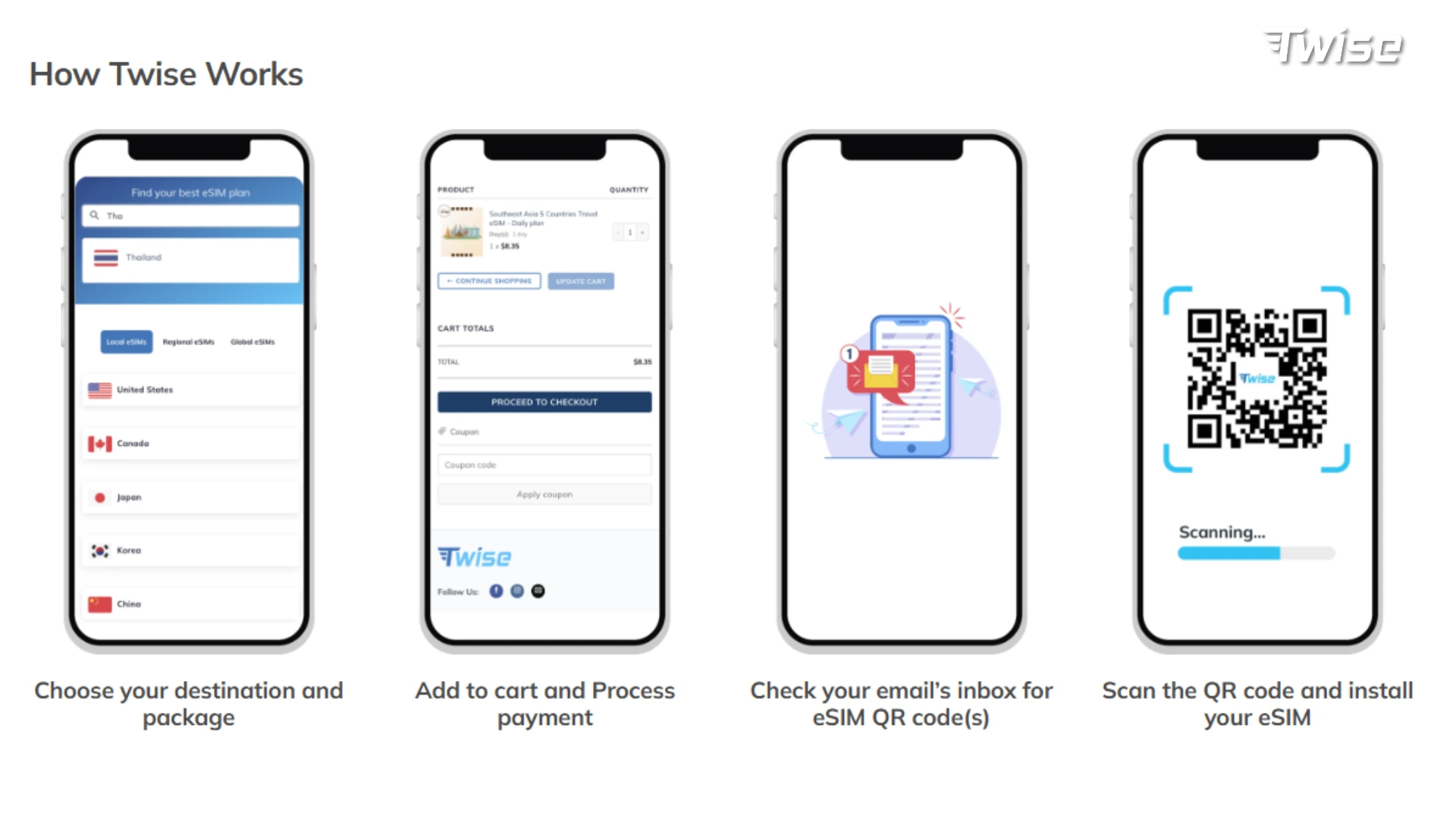
Step 1: Connect to airport Wi-Fi. Use it only for installation and essential setup.
Step 2: Scan the QR code.
- iPhone: Settings → Cellular or Mobile Service → Add eSIM → Use QR Code
- Android: Settings → Connections or Network & Internet → SIM Manager → Add eSIM
Menu wording can vary slightly by manufacturer and operating-system version.
Step 3: Label the line. “Korea Data” or “Twise SKT” keeps it easy to identify later.
Step 4: Select it for mobile data. Make the new eSIM the active data line.
Step 5: Configure data roaming. Enable data roaming for the travel eSIM when required. Keep data roaming disabled on your home SIM, and turn off automatic cellular-data switching.
Step 6: Test the connection. Open a lightweight webpage or Naver Map before leaving the terminal.
Your First Connected Tasks After Arriving in Korea
Find the airport train or bus. Use mobile data to confirm terminals, platforms, departure times, and the correct city stop.
Request a taxi. Apps like k.ride and Kakao T help with this, though data alone doesn’t bypass every account or registration requirement some ride apps enforce.
Open your hotel address. Korean addresses are often easier for drivers or staff to recognize when saved in Korean.
Message your accommodation. KakaoTalk, WhatsApp, email, or the booking platform all work over data.
Navigate with Naver Map. International map apps often underperform in Korea — Naver Map provides local place information, transit routes, and more accurate journey time estimates.
Do You Need a Korean Phone Number?
Most first-time tourists can manage with data-only service, but a Korean number can still be useful for calls, SMS, reservations, and select local services.
What works with data-only service: maps, browser searches, translation, messaging apps, email, and most booking access.
What may require a Korean number: local phone calls, SMS verification, certain restaurant reservation systems, and some app functions.
When to choose a local carrier eSIM instead: if a phone number is your primary requirement, a voice-enabled SKT, KT, or LG U+ product will serve you better than a data-only plan.
How Much Korea Data Do You Need?
| Traveler behavior | Suitable plan approach |
| Maps, messages, and tickets | Light or fixed-data plan |
| Frequent maps, translation, and social media | Daily or unlimited-style plan |
| Video uploads and streaming | Unlimited-style plan with confirmed fair-use rules |
| Remote work and hotspot | Check tethering and sustained-speed conditions |
| Mostly hotel Wi-Fi use | Smaller fixed-data option may offer better value |
Light city traveler: a few days in Seoul checking maps, messaging, and restaurant search rarely needs a large allowance.
Multi-city traveler: a Seoul–Busan–Gyeongju or Seoul–Jeju route adds train navigation, luggage logistics, and more frequent map use between stops.
Remote worker or content creator: hotspot, video calls, and regular uploads justify a higher-data or unlimited-style plan, with hotel Wi-Fi as backup for large file transfers.
If you’re unsure which size fits your itinerary, view current Korea data options and match the plan to your actual daily habits rather than the biggest number on the page.
What to Do When the Korea eSIM Does Not Connect
- Confirm you’re in Korea. The product shouldn’t be scanned or activated outside the supported destination.
- Check the active data line. Make sure the SKT eSIM is enabled and selected for data.
- Turn on data roaming for the eSIM. Keep roaming off on the home SIM.
- Toggle airplane mode. Wait roughly 30 seconds before reconnecting.
- Restart the phone. Allow a few minutes for SKT network registration.
- Check APN or network instructions. Use only the settings supplied by Twise.
- Do not delete the eSIM. Many QR profiles can’t be reinstalled after deletion — contact support first.
- Use an airport telecom counter as backup. Incheon Airport lists carrier service counters in both terminals, including 24-hour SKT and LG U+ locations.
Twise SKT eSIM vs Local SIM, Roaming and Pocket Wi-Fi
| Option | Best for | Main benefit | Main limitation |
| Twise SKT data eSIM | Travelers needing mobile data | Buy online before departure | Scan only in Korea; no calls or SMS |
| Local carrier eSIM | Travelers needing a 010 number | Local voice and SMS options | May require passport verification |
| Physical tourist SIM | Travelers needing local service | Available at airports | Requires pickup and SIM swapping |
| Home roaming | Very short or included-roaming trips | No separate installation | Can be expensive |
| Pocket Wi-Fi | Families or several devices | Shared data connection | Separate device and battery to manage |
If a Korea plan isn’t the right fit for your route, it’s worth comparing how Twise structures data elsewhere too — you can explore travel eSIMs by destination if this trip includes other countries.
Smart Backups for Your Korea Trip
- Airport Wi-Fi
- Downloaded hotel addresses
- Offline translation packs
- Saved train or airport-transfer information
- Screenshots of bookings
- A charged power bank
- Home roaming, kept for emergencies only
- Carrier counters when local voice service is required
- The 1330 Korea Travel Helpline
The Korea Tourism Organization runs the 1330 helpline by phone and real-time chat in multiple languages — a useful fallback that doesn’t depend on your eSIM working perfectly from the first minute.

FAQs
Yes, you can purchase it in advance, though this Twise SKT plan should only be installed and activated once you’re in Korea.
Yes, Naver Map works over data alone and doesn’t require a Korean phone number for basic navigation.
Confirm you’re in Korea, check that the eSIM is selected for data with roaming enabled, restart your phone, and use an airport carrier counter as backup if needed.
More useful tips for your Korea journey
Korea eSIM with Phone Number: Do You Really Need It in %curentyear%?
Korea Unlimited Data eSIM: Is It Worth It for Tourists?
Korea Travel eSIM Guide: Local Carrier vs Travel eSIM for Tourists
