

Do You Need a Korea eSIM with Phone Number Support?
May
You’re planning a trip to Seoul, maybe Busan or Jeju, and the travel forums are unanimous: “You MUST have a Korean phone number.” So you search for a Korea eSIM with phone number, find one that promises a +82 local number, buy it before your flight, and assume you’re set. Then you land at Incheon — and discover that the number doesn’t actually work yet. Not until you go through a passport verification process that runs on Korean time, between 8AM and 10PM KST, and requires a top-up before you can make a single outgoing call. This guide explains what’s actually involved, whether you genuinely need it, and what most tourists should be doing instead.
The Reality of a Korea eSIM with Phone Number
The phrase “eSIM Korea with phone number” covers a specific product: an eSIM that assigns you a Korean 010 local number, allowing you to receive calls and SMS within South Korea. It sounds straightforward. The reality involves a distinction that most product listings bury in the FAQ section.
There are two separate stages to having a working Korean number:
Stage 1 — Purchasing: You can buy the eSIM from outside Korea, receive the QR code by email, and install the profile on your device before you board. This part works fine. Your data connection activates when you land. But here is the critical detail almost no listing leads with: the phone number is dormant at this stage. You can use data. You cannot receive or make calls or texts.
Stage 2 — Activation of the number: To unlock voice and SMS, Korean law requires you to verify your passport. This is a separate step that can only be completed after you have physically entered South Korea. The verification window is 8AM to 10PM KST. Outside those hours — including early morning arrivals on overnight flights — verification is unavailable online, and you would need to visit the SKT roaming center at the airport in person.
The scenario nobody warns you about: You land at Incheon at 6AM on an overnight flight. You try to verify your passport to activate your Korean number. The online system doesn’t open until 8AM. The SKT roaming center at the airport is open, but it’s a counter you need to find, queue at, and submit your documents to — before you’ve cleared customs, found your luggage, or had coffee. This is the moment travelers realize the “Korea eSIM with phone number” product is more complicated than the product page suggested.
The KYC Passport Hurdle: What Activation Actually Involves
South Korean law requires real-name registration (KYC — Know Your Customer) for any SIM or eSIM that includes calling and SMS functions. This is a government mandate, not a carrier policy — and it applies regardless of which provider you purchased from, whether it’s SKT, KT, LG U+, or a third-party reseller.
Here is what the verification process actually looks like for a foreign traveler:
- Enter Korea first — verification is only possible inside the country
The passport verification system (skroaming.com/passport/) checks your device’s network connection. Attempting verification from overseas before crossing immigration triggers an error. You must be physically inside South Korea with an active connection to a Korean carrier tower.
Cannot be done before departure
- Verify during the 8AM–10PM window
Online verification is only available between 8:00AM and 10:00PM Korea Standard Time (KST). Outside these hours, the online portal is unavailable. The alternative is visiting the SKT roaming center at Incheon (Terminal 1 & 2), Gimpo, or Gimhae airports in person.
Time-restricted
- Submit your passport details online
You enter your rental contract number, assigned Korean phone number, full name, passport number, date of birth, and nationality. One foreign passport can only be verified for one eSIM line. If you purchased multiple eSIMs, only one can be registered.
Can be done online after entering Korea
- Wait for approval and receive incoming call capability
Once verified, incoming calls and texts are enabled and free to receive within Korea. However, outgoing calls require a separate step — topping up a voice credit balance before you can dial out.
Outgoing calls still not available until you top up
Important Note for Vietnamese Passport Holders: The SKT passport verification system accepts all foreign passports — including Vietnamese passports. However, the process must be completed inside Korea, and the online system is only available between 8AM–10PM KST. You cannot complete the KYC process remotely from Vietnam before your trip.
Additionally, Korean passports are explicitly excluded from this verification process. If you hold dual citizenship including Korean nationality, voice and SMS services may be restricted regardless of which passport you present for verification.
The Outgoing Call Trap: What You’re Really Paying For
Even after completing passport verification, most travelers encounter a surprise: outgoing calls are not included in the plan price. This is the detail that makes the “Korea eSIM with phone number” value proposition significantly weaker than it appears.
Here is how the voice credit structure typically works on SKT-based eSIMs with a number:
| Call Type | Status After Passport Verification | Cost |
| Incoming calls (within Korea) | Enabled — free to receive | No charge |
| Incoming SMS (within Korea) | Enabled — free to receive | No charge |
| Outgoing calls (within Korea) | Requires additional top-up | Charged per minute (KRW) |
| Outgoing SMS | Requires additional top-up | Charged per message |
| International outgoing calls | Requires top-up + international rate | Higher per-minute rate |
| VoIP calls (WhatsApp, KakaoTalk) | Works via data — no voice credit needed | Free (data only) |
The top-up for outgoing voice must be paid separately, in Korean Won, via a credit card accepted in Korea. The unused balance expires at the end of your eSIM’s validity period — meaning if you top up 10,000 KRW for a 7-day trip and use 3,000 KRW, the remainder is forfeited.
The math that most travelers miss: If you’re paying a premium for a “Korea eSIM with phone number” plan over a data-only plan — typically $5–12 more — and then need to top up separately for outgoing calls, the actual cost of a traditional phone call can be higher than using WhatsApp voice over data. For most tourists whose call needs are covered by VoIP apps, the premium for a local number plan represents real money spent on a feature they will rarely use as intended.
Do You Actually Need a Korean Number for Reservations and Apps?
The core argument for getting a best eSIM Korea with phone number rests on a belief that Korean apps and services require a local +82 number to function. Let’s test that claim against the actual apps tourists use most.
- KakaoTalk (No Korean number needed)
Works with your existing home number. Set up your account before you leave — once registered, KakaoTalk runs over data and doesn’t require a Korean +82 number for messaging or voice calls.
- Naver Maps / Kakao Maps (Data only — no number needed)
Both mapping apps are fully data-driven. No account required for basic navigation. Works the moment your data connection activates at the airport.
- KakaoT (Taxi) (Works with international cards)
KakaoT now accepts international credit cards for payment and does not strictly require a Korean phone number for the basic taxi hailing service. The app works over data.
- Restaurant Waitlists (CatchTable, Tabling) (Email or walk-up often sufficient)
Many popular restaurants in Seoul now accept reservation via email or the global version of CatchTable. In-person queuing at the host stand also remains common. A Korean number is helpful but rarely mandatory for tourists.
- WhatsApp / iMessage (Data only — use your home number)
All messaging with friends and family back home runs over data using your existing home number. No Korean +82 number involved.
- Coupang Eats / Korean Delivery Apps (Korean number usually required)
Most domestic Korean delivery apps do require a +82 number for registration and OTP verification. This is the clearest genuine use case for a local number — relevant for longer stays, not typical tourist trips.
The honest summary: The two activities that genuinely require a Korean phone number — Korean app OTP verification and domestic delivery services — are relevant to residents and long-stay visitors, not tourists. For a 5–14 day trip to Seoul, Busan, or Jeju covering standard tourist activities, a data connection covers virtually everything you need.
The Seamless Alternative: Twise SKT Data-Only eSIM
If the phone number process involves passport verification after landing, time-restricted windows, a separate top-up step for outgoing calls, and a premium plan price — the natural question is: what does a data-only eSIM actually give up in exchange for eliminating all of that?
For most tourists, the answer is: almost nothing that matters in practice.
Why SKT is the right network for this
SK Telecom (SKT) is South Korea’s #1 carrier by network quality. Ranked first by Opensignal for 5G performance, SKT operates the most comprehensive coverage in Korea — including inside the Seoul subway system (one of the most challenging environments for consistent indoor signal), elevators, and underground venues. It also provides the most reliable coverage in regional areas and on Jeju Island.
Twise‘s data-only eSIM connects to the SKT network through international roaming — meaning you get SKT tower quality with none of the domestic SIM registration requirements. No passport upload. No waiting for approval. No time window to hit.
The key advantages over a local number eSIM
Zero KYC: Activate by scanning the QR code. Data is live within seconds of your phone connecting to the SKT tower at Incheon. No forms, no passport submission, no waiting for a verification window to open.
Privacy: Your passport details stay with you. You are not uploading biometric ID information to a third-party provider’s database or a carrier’s registration system for the purpose of making calls you could make for free over data anyway.
Cost efficiency: You are not paying the premium for a voice capability that you will use via WhatsApp or KakaoTalk over data regardless. That money buys more data — which is the resource that actually powers your navigation, communication, and content sharing throughout the trip.
VoIP works perfectly: KakaoTalk voice calls, WhatsApp calls, FaceTime Audio, Zoom — all of these run over the SKT data connection without any local number required, and at significantly better audio quality than a standard carrier voice call in most cases.
Full Comparison: Local Number eSIM vs. Data-Only eSIM
| Feature | Korea eSIM with Phone Number | Twise Data-Only SKT eSIM |
| Registration required | Passport scan / KYC | None — instant |
| When can you activate? | Data: on landing
Number: after KYC (8AM–10PM KST) |
Data: immediately on landing |
| Incoming calls/SMS | Free after passport verification | Via KakaoTalk / WhatsApp over data |
| Outgoing calls | Requires separate top-up (paid) | Via VoIP apps — included in data |
| Network | Usually SKT (single carrier) | SKT — Korea’s #1 carrier |
| Korean number for app OTP | Yes (after verification) | No |
| Privacy | Passport data submitted to carrier | No ID submitted anywhere |
| Setup time at airport | KYC queue or kiosk visit | Zero — data activates automatically |
| Best for | Long-stay residents, ARC holders, delivery app users | Tourists, business travelers, short stays |
Practical Tips for a Data-Only Trip to Korea
- Set up KakaoTalk before you leave home
KakaoTalk registration requires an SMS verification code sent to your existing home number. Do this before you depart — once your account is active, KakaoTalk runs over data with no Korean number needed. Many Korean businesses, restaurants, and tour services use KakaoTalk for communication with international visitors, so having it ready from day one matters.
- Enable data roaming before landing
Twise’s SKT eSIM is an international roaming product. Your phone must have data roaming enabled to connect to the SKT tower network. Go to Settings → Mobile Data / Cellular → Data Roaming and toggle it on before your flight. This is the single most important setup step — without it, the eSIM will not connect even though it is correctly installed.
- Install the eSIM profile at home, on Wi-Fi
eSIM profile installation requires a stable internet connection. Do it at home or at your departure airport while connected to Wi-Fi — not on the plane or after landing in Korea where you would need connectivity to install the product designed to give you connectivity. Once installed, the eSIM activates automatically when your phone detects the SKT network at Incheon.
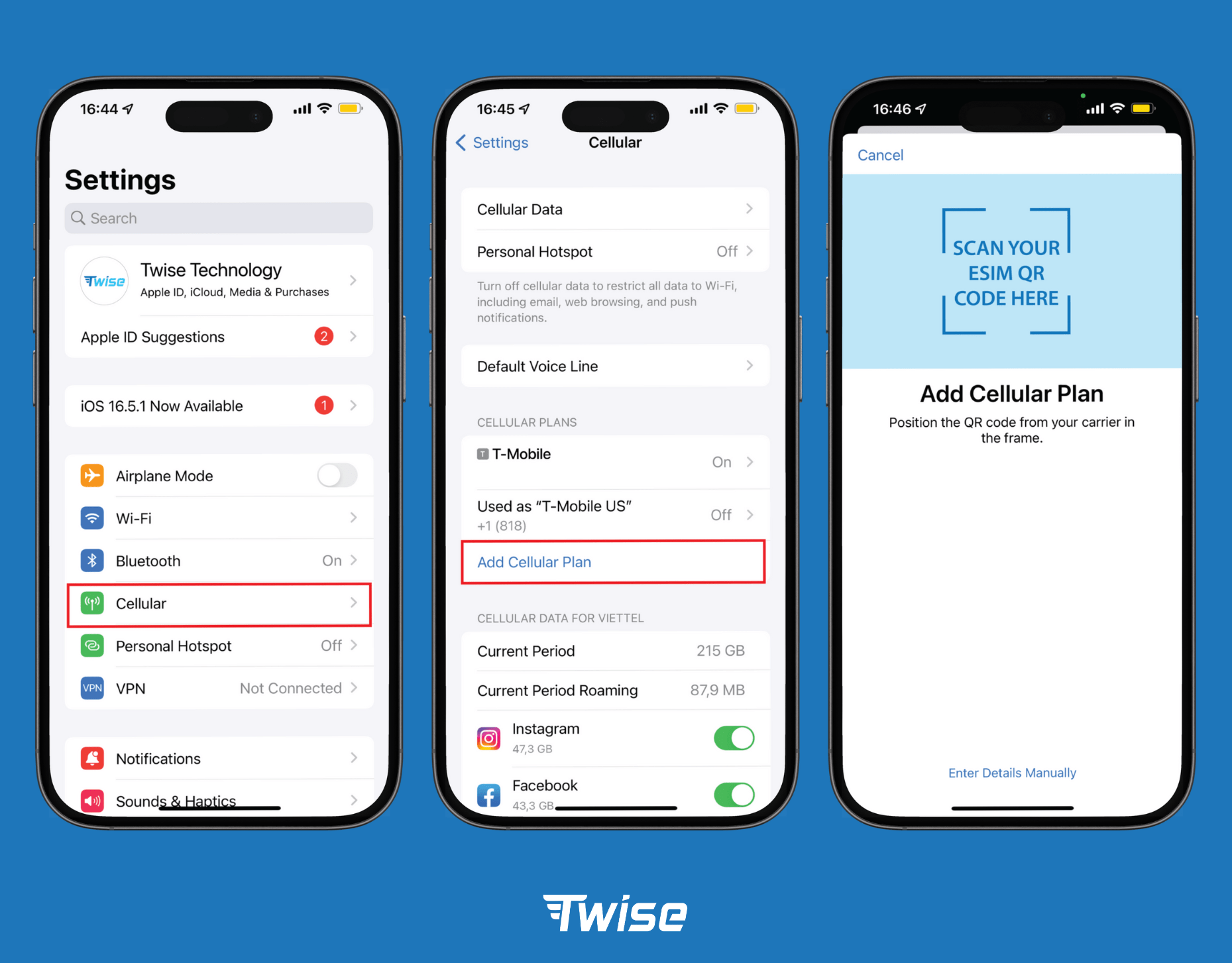
Read more: Install eSIM on iPhone: A Step-by-Step Guide
- Download offline Naver Maps and Kakao Maps before departure
SKT’s network coverage in Korea is excellent, including in subway stations and most indoor venues. But having offline maps for Seoul, Busan, or Jeju downloaded before you travel is a sensible backup for underground areas with brief signal gaps. Both Naver Maps and Kakao Maps support offline map downloads.
- Keep your home SIM active for emergency calls
Emergency calls (112 for police, 119 for fire and medical) can generally be placed from any mobile device in Korea regardless of SIM plan. If your device supports dual SIM (physical SIM + eSIM), keeping your home physical SIM active alongside the Twise eSIM ensures your home number remains available for calls from family or 2FA SMS messages from services back home.
- Use Naver Maps over Google Maps for Korean navigation
Unlike in many countries, Google Maps data for Korea is notably incomplete due to South Korean data sovereignty laws restricting map exports. Naver Maps and Kakao Maps have significantly more accurate transit routes, walking directions, and business listings for Korea. Both are free, data-driven, and require no phone number registration.
Final Verdict: Who Actually Needs a Korean Phone Number?
The honest answer is that a Korean phone number is a genuinely useful thing — for a specific type of visitor. The question is whether you are that type of visitor.
Who actually needs a Korea eSIM with phone number?
| ✓ Get the number if you are:
Staying more than 30 days Using Korean domestic delivery apps (Coupang Eats, Baemin) Opening a Korean bank account Registering for apps requiring +82 OTP Working or studying in Korea long-term ARC (Alien Registration Card) holders |
✗ Skip the number if you are:
A tourist on a 5–14 day trip Already using KakaoTalk, WhatsApp, iMessage Primarily navigating with Naver/Kakao Maps Paying by international credit card Prioritizing fast, friction-free activation at the airport Privacy-conscious about sharing passport data |
The pattern is clear. The local Korean number has genuine value for long-term residents and visitors who need to integrate into Korea’s domestic app ecosystem. For a tourist trip — even a well-planned one covering multiple cities — the passport verification process, the time-restricted windows, the separate voice top-up requirement, and the privacy implications of submitting biometric ID to a carrier’s registration database add up to meaningful friction in exchange for a feature that VoIP apps already provide for free over data.
A Twise SKT data-only eSIM activates the moment you connect to the Korean network at Incheon. No queue. No forms. No waiting until after 8AM. Your maps load, your KakaoTalk works, your Instagram posts go up — and you can focus on the trip rather than the telecom administration.
That is what “staying connected in Korea” actually looks like for most travelers now. The number is optional. The data is not.
