

China iPhone vs International iPhone: Top Things Travelers Should Know
A China iPhone is an authentic Apple device designed for mainland China, but it may differ from an international iPhone in eSIM support, physical SIM configuration, FaceTime features, network bands, warranty service, and resale value. This guide explains how to identify a China model using its part number, model number, EID, SIM tray, and Add eSIM menu. It also compares real-world use for international travel, app access, local connectivity, and support. Learn whether a China iPhone works abroad, when a physical SIM is required, and what to check before purchasing a travel data plan.
What Is a China iPhone?
A China iPhone is an official iPhone configured by Apple for the mainland China market. It is not automatically counterfeit, refurbished, or made by an unrelated Chinese manufacturer.
The term describes the phone’s original sales region—not its current location or the nationality of its owner. An iPhone purchased from an overseas reseller in Canada, Vietnam, the United States, or Europe can still be a mainland China model.
China-market models are commonly identified by a part number ending in CH/A. Depending on the generation, practical differences may include:
- Two physical nano-SIM slots
- No conventional eSIM support
- Region-specific model numbers
- Different cellular band combinations
- Restrictions on some FaceTime functions
- Different warranty or repair arrangements abroad
The exact configuration changes between generations. For example, it is no longer accurate to state that every China iPhone lacks eSIM. Apple currently documents limited eSIM support for particular newer mainland China models, subject to compatible Chinese carriers and local activation requirements.
A China iPhone still runs iOS and can use the App Store, iCloud, iMessage, Apple Pay where supported, and other normal Apple services. Regional hardware or software limitations should be evaluated individually.
How to Check If an iPhone Is a China Model
The most reliable method is to examine the identifiers in Settings > General > About and compare the hardware model with Apple’s regional specifications.
Do not rely only on:
- The language currently displayed
- The seller’s country
- The Apple Account region
- The packaging language
- The presence of Chinese apps
- Whether the phone was assembled in China
Most iPhones are assembled in a small number of manufacturing locations. Assembly location does not determine the intended sales market.
1. Check Model Number in iPhone Settings
Open:
Settings > General > About > Model Number
The first value shown is usually the part number. A mainland China-market device commonly has a suffix such as CH/A.
Tap the displayed part number once to reveal the shorter hardware model number beginning with A, such as Axxxx. Apple uses this number to distinguish regional hardware variants.
Check both identifiers:
- Part number: Helps indicate the original sales region
- A-number: Identifies the specific hardware model and supported configuration
Apple’s official iPhone model identification guide lists regional A-numbers for each generation. This is more reliable than using an unofficial suffix list alone.
Also review:
- Carrier Lock: An unlocked phone should normally show “No SIM Restrictions.”
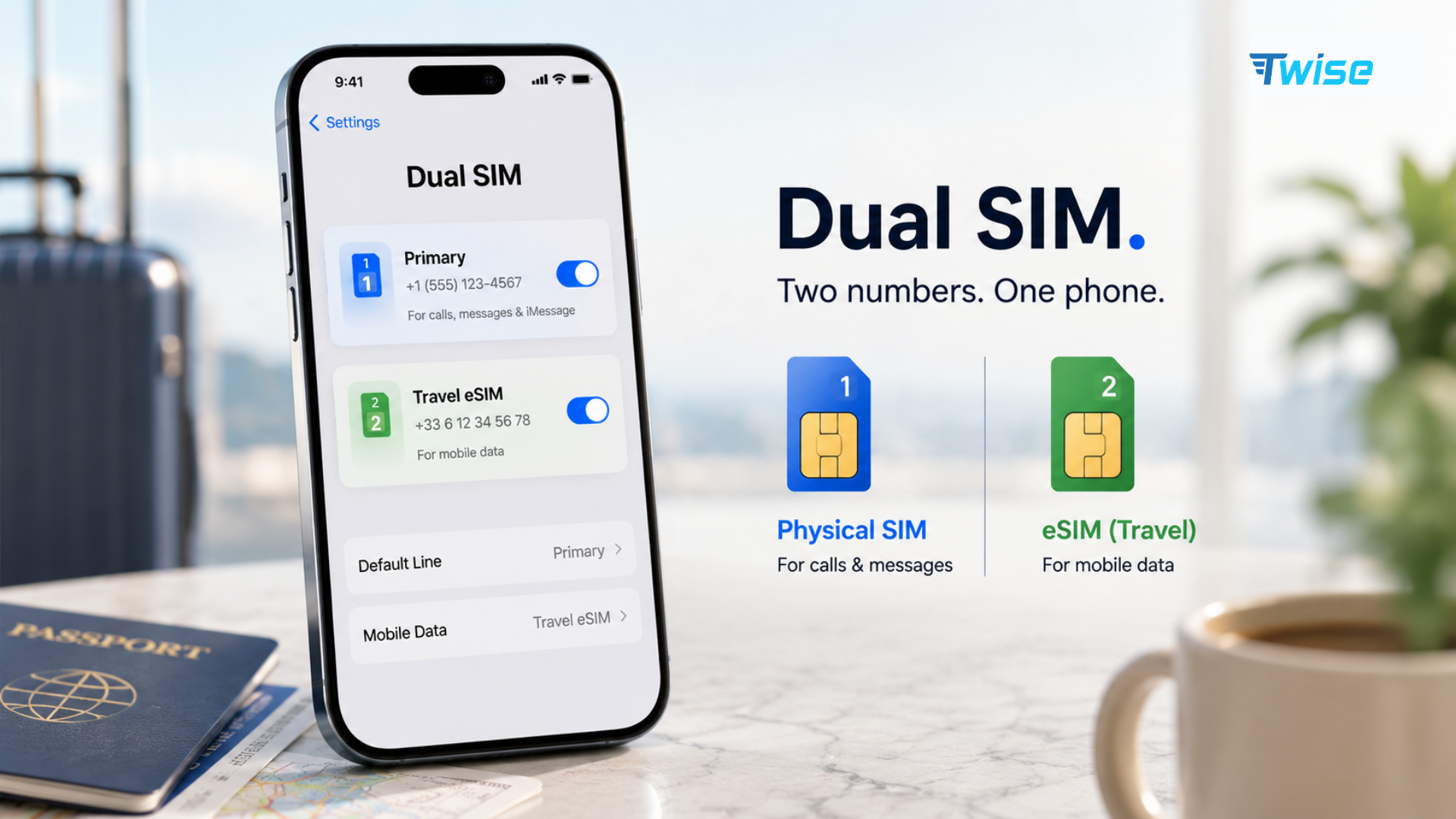
- IMEI: Dual-physical-SIM models may display identifiers for both lines.
- EID: This identifier is associated with eSIM-capable hardware.
Do not publish your IMEI, serial number, or EID in a public forum. Share them only through an official support channel when necessary.
2. eSIM Test
An eSIM test helps confirm whether the device can add a digital mobile plan.
Open:
Settings > Cellular or Mobile Service > Add eSIM
If Add eSIM appears, continue by checking whether the phone has an EID under Settings > General > About. You do not need to purchase a plan merely to inspect these menus.
If the option is missing:
- Update iOS.
- Restart the phone.
- Confirm that Screen Time or device-management restrictions are not hiding cellular settings.
- Check the exact A-number against Apple’s specifications.
- Confirm that the phone is not carrier-locked.
A missing Add eSIM menu on a mainland China model often indicates that conventional travel eSIM installation is unsupported. However, menu availability alone should not replace a model-number check.
Apple’s current guidance says only certain newer models support eSIM activation in mainland China, with eligible local carriers and in-person identity verification. Meanwhile, international eSIM-compatible iPhones visiting China can generally install plans from worldwide providers. See Apple’s updated eSIM guidance for mainland China.
China iPhone vs International iPhone: Full Comparison Table
The term “international iPhone” covers several regional versions, including devices sold in Europe, Canada, Australia, Japan, and other markets. US versions may also differ because recent US models are eSIM-only.
| Feature | Mainland China iPhone | Typical international iPhone | What travelers should check |
| Authenticity | Genuine Apple product when sold through legitimate channels | Genuine Apple product when legitimately sourced | Verify serial number, condition and seller |
| Physical SIM | Commonly dual nano-SIM on many generations | Usually one nano-SIM; recent US models may have none | Inspect the tray and regional specifications |
| eSIM | Commonly unavailable on earlier models; limited newer exceptions | Widely supported on compatible models | Look for EID and Add eSIM |
| Dual SIM | Often two physical SIMs | Nano-SIM plus eSIM or two active eSIMs | Confirm the exact generation |
| FaceTime | Some functions are restricted | Broader feature availability in supported regions | Check FaceTime Audio, links and group calling |
| App access | iOS apps supported, subject to App Store region and local internet controls | Depends on Apple Account and destination | Separate device limits from network restrictions |
| Cellular bands | Regional band configuration | Regional band configuration | Compare bands with the destination carrier |
| Warranty and repair | Service options may vary outside the sales region | Service options may still vary internationally | Ask Apple before importing |
| Resale | May be less attractive where eSIM is expected | Usually easier to sell in its intended region | Disclose regional model clearly |
| Travel setup | May require a physical SIM | Often supports digital plan installation | Verify before buying an eSIM |
No regional model is universally superior. The more useful question is whether its SIM configuration, supported bands, service options, and software features match where the owner lives and travels.
Key Differences in Practice
The most noticeable difference is usually SIM flexibility.
A traveler with an eSIM-compatible international iPhone can buy a plan online, install it before departure, and keep the home line available for verification messages. A traveler using an older mainland China iPhone may need to obtain a physical SIM or rely on home-carrier roaming.
Conversely, two physical SIM slots can be useful for people who regularly use carriers that still issue affordable physical plans. They can keep a home card installed while adding a local destination card without depending on eSIM support.
FaceTime requires more careful explanation. Apple states that Group FaceTime, FaceTime Audio, and FaceTime links are not supported in mainland China. It also notes that creating FaceTime links is not supported on iPhones purchased there, even when those phones are used elsewhere. Availability can therefore depend on both the device’s original market and its present location.
Cellular band support can differ too. A China iPhone may work abroad but lack a band used by a particular carrier. This usually affects coverage in specific rural, indoor, or high-capacity areas rather than making the phone completely unusable.
How Restrictions Affect Real-World Use
Regional differences are easy to ignore at home. They become more visible when the owner crosses a border, changes carriers, replaces a damaged device, or tries to sell it.
1. Travel Convenience
An international eSIM-compatible model generally offers more flexibility for frequent travel. A plan can be installed without opening the SIM tray, finding a mobile shop, presenting identification at a store, or handling a tiny physical card after a long flight.
Consider two common situations:
- A traveler lands in Shanghai late at night and needs mobile data for a hotel message and ride-hailing. An international eSIM-compatible iPhone may use a prepaid travel plan installed before departure.
- A traveler with an older China iPhone arrives in France without roaming. If the phone cannot add an eSIM, the traveler must use airport Wi-Fi until obtaining a compatible physical SIM.
Dual physical SIM can still be practical. It is especially useful where local prepaid SIM cards are inexpensive and easily purchased. The disadvantage is that availability, registration requirements, and store hours become part of the travel plan.
Before purchasing connectivity through Twise eSIM, check for an EID and confirm that Add eSIM is present. A plan cannot add eSIM capability to unsupported hardware.
2. App Access
A China iPhone does not inherently remove Google Maps, Gmail, WhatsApp, Instagram, or other international apps merely because it is a China-market device.
App availability and operation can instead depend on:
- The Apple Account country or region
- App Store distribution rules
- The user’s current location
- Local internet controls
- The mobile or Wi-Fi network
- Developer restrictions
- Employer or school device management
This distinction matters when troubleshooting. If Gmail works in Thailand but stops loading after arrival in mainland China, the hardware has not suddenly become incompatible. The network environment is the more likely factor.
Changing the App Store region is not always instant. Apple may require the user to spend remaining account credit, cancel subscriptions, leave Family Sharing, add an accepted payment method, or wait for active rentals and pre-orders to finish.
Download essential travel apps before departure. Also save:
- Hotel address in Chinese
- Booking confirmations
- Offline maps
- Translation packs
- Transport screenshots
- Provider installation instructions
- Emergency contact details
3. Network Performance
A China iPhone can connect to foreign networks if it is unlocked and supports the required technologies and bands. The phone’s country of origin does not automatically make its signal weaker.
Real-world performance depends on:
- Supported LTE and 5G bands
- Carrier aggregation combinations
- Local carrier coverage
- Network congestion
- Roaming-partner priority
- Building materials and terrain
- Whether 5G roaming is available
- Carrier settings and APN configuration
A missing band may be barely noticeable in a city center but more important during a road trip. Low-frequency bands are often used for wider rural coverage and better indoor penetration.
Before importing a phone, compare its exact A-number with the network bands published by the intended carrier. Do not compare only the marketing name “iPhone Pro” or “iPhone Pro Max.”
4. Resale and Support
A mainland China model may be harder to resell in markets where buyers expect eSIM. The reverse can also happen: dual-physical-SIM models may attract buyers who specifically want two removable cards.
A responsible listing should disclose:
- Regional model
- Part number suffix
- Physical SIM configuration
- eSIM support
- Carrier-lock status
- Repair history
- Battery condition
- Remaining warranty coverage
Apple’s limited warranty is not a promise of identical worldwide service. Repair options can depend on parts, regional specifications, consumer law, proof of purchase, and whether an equivalent replacement model is available.
Before buying an expensive imported device, ask Apple or an authorized service provider whether that exact model can be serviced locally.
Which Model Is Better?
For most frequent international travelers, an unlocked international iPhone with eSIM support is the more flexible choice. It allows digital installation, easier carrier switching, and Dual SIM setups without removing the home card.
A China iPhone may be preferable when:
- Two physical nano-SIM slots are important
- Local carriers primarily issue physical SIMs
- The user rarely travels
- The price advantage is meaningful
- The user does not need the affected FaceTime functions
- Local warranty access is available
An international model is usually preferable when:
- The user travels across several countries
- Travel eSIM installation is a priority
- Remote setup before arrival matters
- The phone will be resold in an eSIM-focused market
- Full FaceTime functionality is important
- Local repair compatibility is uncertain
For a resident of mainland China who occasionally travels, dual physical SIM may be entirely practical. For a digital nomad visiting several countries each month, losing conventional eSIM flexibility creates repeated operational friction.
Common Buying Mistake: Assuming Every iPhone Is Global
The most common mistake is assuming every device with the same product name has identical hardware.
An “iPhone 16 Pro” listing does not tell you whether the phone is:
- A mainland China model with dual physical SIM
- A US model without a physical SIM tray
- A European model with nano-SIM and eSIM
- A carrier-locked imported device
- A refurbished phone with replacement parts
Before paying, request:
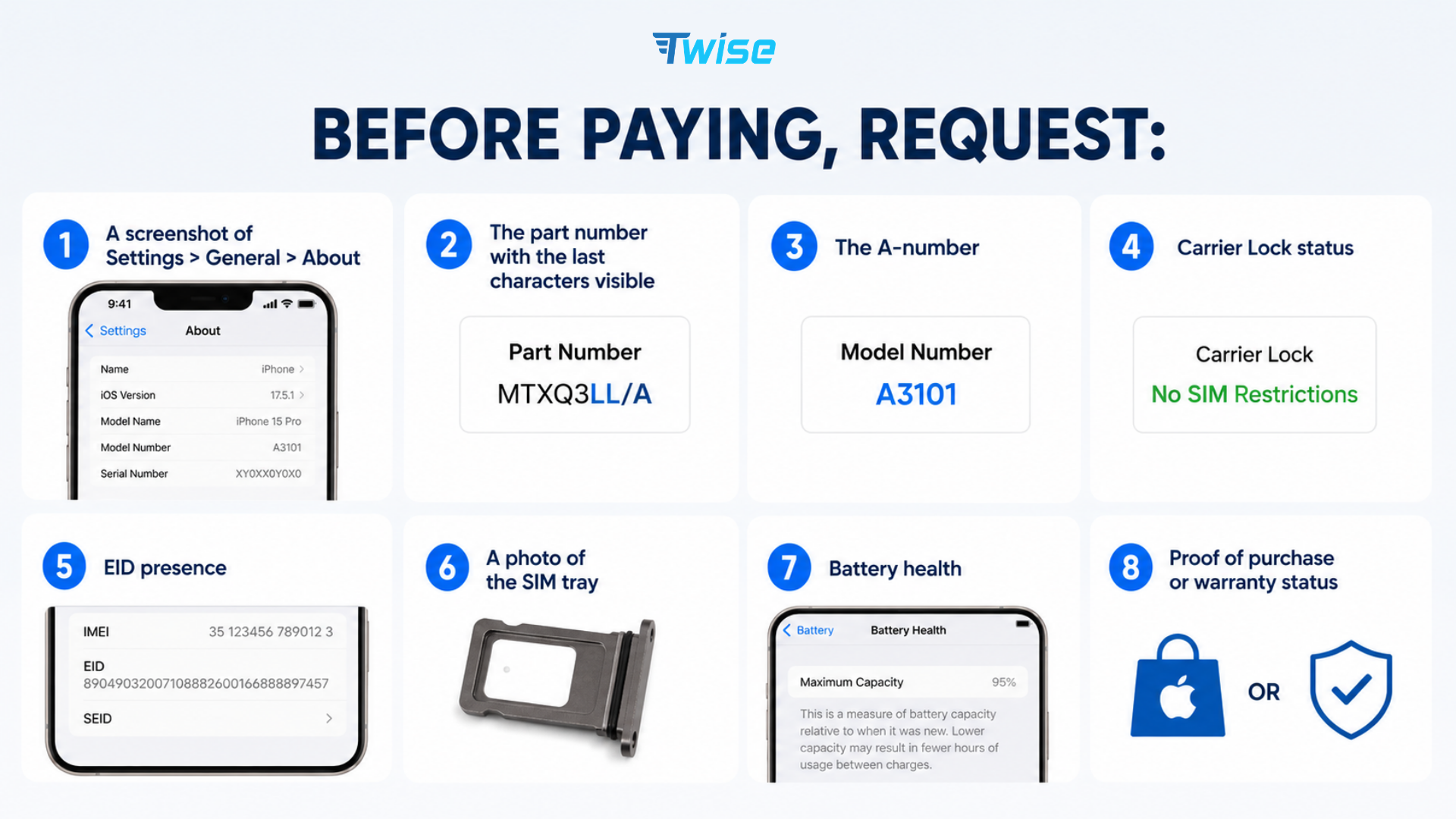
The seller should conceal the serial number and most digits of the IMEI in a public listing. You can inspect the full identifiers privately at purchase.
A low price may reflect a legitimate regional difference rather than fraud. However, the saving can disappear if the device needs an overseas repair, cannot use the intended plan, or has a lower resale value.
Traveling to China? What This Means for Your Data Plan
Travelers using an eSIM-compatible international iPhone can generally arrange a prepaid China travel plan before departure. According to Apple, visiting users may obtain prepaid data eSIMs from worldwide service providers, provided their device supports eSIM and is unlocked.
Before buying a China travel eSIM, verify:
- The phone displays an EID
- Add eSIM appears in cellular settings
- Carrier Lock shows no SIM restrictions
- The plan covers mainland China
- The activation date matches the trip
- Data roaming requirements are understood
- Hotspot use is permitted if needed
- Installation can be completed before arrival
A sensible setup is to install the plan on stable Wi-Fi before departure but activate it according to the provider’s instructions. Some plans begin validity on installation; others begin when they first connect to a supported Chinese network.

Once installed:
- Label the plan China Travel.
- Select it for cellular data.
- Disable data roaming on the home line.
- Enable roaming on the travel line if instructed.
- Turn off cellular data switching.
- Keep the home line active only if verification messages are needed.
Travelers with a China iPhone that does not support eSIM should compare a physical prepaid SIM, a home-carrier roaming package, and portable Wi-Fi. Do not purchase a digital plan based only on the phone’s generation.
| Device situation | Most practical option |
| Unlocked international iPhone with eSIM | Pre-install a compatible China travel plan |
| China iPhone without eSIM | Physical SIM, carrier roaming or portable Wi-Fi |
| Carrier-locked iPhone | Contact the original carrier before departure |
| Dual SIM with active home number | Use the travel line for data and disable home-line data roaming |
| Short airport transit | Airport Wi-Fi may be sufficient, but check access requirements |
| Long or data-heavy trip | Compare allowance, top-ups, speed and hotspot policy |
Travelers who need maps, translation, hotel messages, ride-hailing, or payment verification should avoid making airport Wi-Fi their only connectivity plan. Explore destination options through the Twise eSIM homepage before departure, while there is still time to confirm compatibility.
Frequently Asked Questions
Always check the exact A-number, EID, and Add eSIM menu. Do not assume all China iPhones follow the same rule.
Connectivity depends on the model’s supported bands, carrier compatibility, SIM format, and plan. Local internet restrictions still apply to traffic using ordinary Chinese networks.
Also inspect the SIM tray, EID field, Add eSIM menu, and carrier-lock status.
If the apps are installed but stop connecting only in mainland China, investigate the network environment rather than assuming a hardware fault.
An overseas seller’s address does not prove that the phone was produced for that market.
Counterfeit and altered phones can exist in any market. Verify the seller, serial information, activation status, components, proof of purchase, and warranty rather than judging authenticity from the regional suffix.
Compare the final price for the same model, storage, condition, and warranty—not merely the headline listing.
Check the exact A-number with the intended carrier before purchase.
It can still be a sensible purchase for someone who values two physical SIM slots and understands the regional limitations. The model is not inherently inferior; it is optimized for a different market.
The safest rule is simple: never buy or prepare travel connectivity based only on the words “China iPhone” or “international iPhone.” Verify the exact model, SIM configuration, carrier lock, EID, supported bands, and service options first.
