Tiếng Việt
A New Zealand eSIM lets an unlocked, compatible smartphone use mobile data without swapping out the physical SIM. Twise offers data-only daily, fixed, and unlimited-style New Zealand eSIM plans built for maps, transport apps, hotel messaging, and internet calls. It doesn’t include a New Zealand phone number, ordinary calls, or SMS. Coverage is strongest around cities and towns and can drop out on mountain roads or remote routes, so it’s worth downloading offline maps and saving key trip details before you set off.
New Zealand’s Mobile Networks at a Glance: Why Spark is the strongest national coverage
| Network | Key strength | What to keep in mind |
| Spark | Led Opensignal’s October 2025 Coverage Experience measurement — the strongest current national coverage result | No operator delivers uninterrupted signal on every rural road; coverage strength varies by region, not just by carrier |
| One NZ | Fastest overall download speeds in recent testing, plus satellite messaging features | Satellite services only work on eligible One NZ plans with a compatible phone — not a blanket network feature |
| 2degrees | Strong app-based speed performance in urban areas, plus a visitor package with calls, texts, a local number, and data | Best suited to travelers who want a bundled local plan rather than data-only use |
| Vodafone New Zealand | N/A — rebranded | Vodafone New Zealand became One NZ in 2023; any “Vodafone” label on a SIM, box, or listing refers to the same network |
| Rural Connectivity Group | Shared cell towers that multiple carriers use to extend rural reach | Shared infrastructure improves rural coverage overall, but doesn’t guarantee identical coverage for every carrier at every site — plan and roaming agreements still matter |
| 3G shutdown | New Zealand now runs entirely on 4G and 5G | Your phone needs current 4G/5G bands and VoLTE support to make or receive any voice calls |
What Is the Best eSIM for New Zealand?
Best for Auckland, Wellington, and Christchurch
A data-only travel eSIM usually covers everything a city-based traveler needs: transport apps, maps, bookings, and messaging.
Best for a North and South Island road trip
Pick based on the local partner network, your route, and plan validity — not data volume alone.
Best for a local New Zealand number
A One NZ, Spark, or 2degrees local service is the better fit.
Best for heavy data use
An unlimited-style plan may work, but check the fair-use and hotspot conditions first.
Best for Australia and New Zealand
Use a verified two-country product instead of a New Zealand-only plan.
Best for long stays
A renewable domestic prepaid plan is usually more practical than a non-renewable Twise profile.
| Traveler need | Usually the better option | Why | Check first |
| 5–14-day city trip | Twise data eSIM | Fast online setup | Data allowance |
| Both islands by car | Travel eSIM on suitable partner | Route coverage matters | Partner network |
| Local calls and SMS | Local operator plan | +64 number | Onboarding |
| Heavy streaming | Unlimited-style plan | Less data tracking | Fair-use terms |
| Remote hiking | Local plan plus safety backup | Satellite or coverage options | Device eligibility |
| Australia + New Zealand | Regional eSIM | One profile for both | Country list |
| Long stay | Local prepaid service | Renewal and top-up | Plan length |
| Non-eSIM phone | Physical travel SIM | Device requirement | Airport availability |
Twise New Zealand eSIM Plans: What Do You Get?
Daily data plans give a set high-speed allowance each day; once it’s used, speed drops rather than stopping. Fixed-data plans suit travelers whose data use shifts day to day instead of staying steady. Unlimited 4G plans are defined by their fair-use and hotspot terms, not by promotional language — always check the fine print before assuming truly limitless use.
What 128 Kbps can realistically support
Basic messaging often still works. Maps, weather updates, photos, and video become slow or unusable.
When the daily allowance resets
High-speed data resets at 00:00 UTC — around noon in New Zealand during standard time and 1 p.m. during daylight saving.
Data only means no New Zealand number
Internet calls through apps like WhatsApp or FaceTime work over data. Ordinary calls and SMS don’t, since there’s no assigned local number.
Hotspot support
Tethering is allowed, but laptops and tablets can burn through a daily allowance fast.
QR validity and activation
- Install the profile within 90 days of purchase.
- The plan starts once activated in a supported country.
- Validity is calculated in UTC.
- The eSIM can’t be renewed.
- It’s built for smartphones.
Travel eSIM vs Local New Zealand eSIM, SIM Card, and Roaming
| Option | Local number | Standard calls/SMS | Pre-trip setup | Renewal | Main limitation |
| Twise eSIM | No | No | Yes | No | Data-only and route-dependent |
| One NZ Travel eSIM | Yes | Plan-dependent | Online purchase available | Plan-dependent | Local plan terms |
| Spark prepaid eSIM | Yes | Available by pack | Local activation process | Yes | Carrier onboarding |
| 2degrees visitor SIM | Yes | Included by current plan | Delivery or local purchase | Extra days available | Physical SIM product |
| Home roaming | Keeps home number | Home-carrier service | Already active | Carrier-dependent | Potential cost |
| Pocket Wi-Fi | No | No | Rental process | Rental-dependent | Battery and device management |
One NZ sells a visitor eSIM for stays of up to 90 days, with local-service features depending on plan. Spark offers a free eSIM with prepaid service, a New Zealand number, and travel packs. 2degrees’ visitor product bundles unlimited calls and texts to standard New Zealand and Australian numbers with data and a number of its own.
Travelers continuing to Australia or another destination can compare broader Twise travel eSIM options before choosing a New Zealand-only plan.
Calls, SMS, WhatsApp, and Satellite Messaging
Can Twise make regular calls? No — Twise’s New Zealand products are data-only.
Which calls still work? WhatsApp, FaceTime, Messenger, Telegram, and similar apps work over data when coverage and speed hold up.
Can I keep my WhatsApp number? Yes, switching to Twise for data doesn’t require changing your WhatsApp-registered number.
How do I receive home-number OTPs? Keep your home SIM enabled for texts, but turn off its data roaming and disable automatic cellular switching.
Does Twise include One NZ satellite service? No. Satellite features require an eligible One NZ plan, a compatible device, and current plan eligibility — not just any data eSIM.
When is a local +64 number useful? For restaurant bookings, campsites, tour operators, and any service that calls back.
How Much Data Do You Need in New Zealand?
| Travel style | Planning range | Typical activity |
| Light | 500MB–1GB per day | Maps, messages, bookings |
| Standard | 1–2GB per day | Social media, music, internet calls |
| Heavy | 3GB+ per day | Video, work, hotspot use |
| Campervan trip | Moderate plan, longer validity | Navigation, weather, campsites |
| Hotel-Wi-Fi-supported trip | Smaller allowance | Data mainly during transport |
| Remote work | Larger or unlimited-style plan | Video calls, files, tethering |
Road trips burn more data than city stays because travelers keep checking routes, weather, fuel stops, and accommodation. More data can’t fix a coverage gap, though — an unlimited plan still won’t reach behind a mountain or outside the partner network’s footprint. Planning uploads around the local noon/1 p.m. reset, rather than New Zealand midnight, can stretch a daily allowance further.
How to Install and Activate a New Zealand eSIM
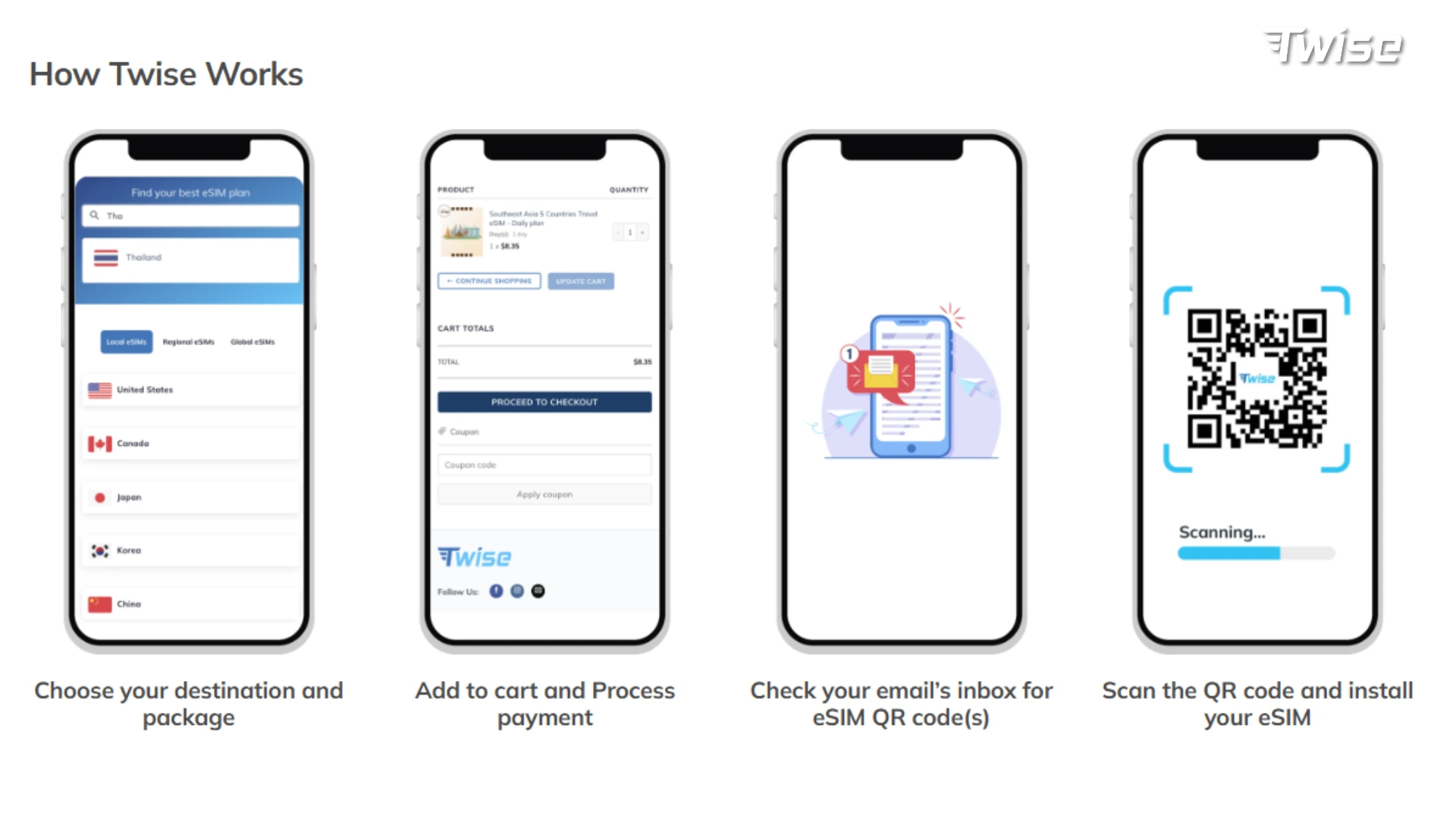
- Confirm compatibility and unlocked status. Since New Zealand has fully shut down 3G, your phone needs to properly support current 4G/5G bands.
- Purchase and save your order details — QR code, manual installation info, order number, support contact — somewhere offline.
- Install on reliable Wi-Fi, within the 90-day QR window.
- Keep the line off until activation is appropriate if you install before departure.
- Configure dual-SIM settings: select Twise for data, enable roaming on that line when required, disable roaming on your home SIM, turn off automatic cellular switching, and label both lines clearly.
- Don’t delete the eSIM while troubleshooting — a removed QR profile may not be reusable.
If you’re unsure your device qualifies, check whether your phone supports eSIM before purchasing.
What to Do After Landing in New Zealand
Five-minute airport sequence: turn off Airplane Mode, enable the Twise eSIM, select it for mobile data, enable roaming on that line if needed, keep the home SIM’s roaming off, wait a few minutes for network registration, then test a lightweight site or map. Keep airport Wi-Fi on until mobile data confirms it’s working.
Open essential services first: accommodation address, airport transfer message, maps, public transport, car-rental details, ferry or flight booking, payment verification, weather.
Download your next route before leaving the city — especially before Fiordland, the West Coast, Coromandel, or remote hikes.
Pause automatic backups and app updates until you’re back on trusted Wi-Fi.
What to Do When the New Zealand eSIM Has No Signal
Check that your phone is actually using the Twise line for data, not the home SIM. Confirm data roaming is turned on — international profiles usually need it. Toggle Airplane Mode and restart the phone. Let the network selection stay automatic unless Twise names an approved partner to select manually. Double-check the APN matches what was supplied with your order.
If the eSIM worked in Auckland but stopped on a remote South Island route, terrain is the more likely explanation than a setup error. Don’t delete the profile — wait for support guidance. When contacting support, have your order number, phone model, location, screenshots, APN, and visible networks ready.
When a Local New Zealand SIM Is Better
- You need a +64 number for calls, SMS, or local callbacks.
- You want eligible satellite communication — this requires an eligible One NZ plan and compatible handset, not a travel eSIM.
- You might extend your trip — a renewable local plan beats a non-renewable Twise profile.
- You need high-volume hotspot use — a local unlimited or larger package may have clearer long-term terms.
- Your phone doesn’t support eSIM — go with a physical travel SIM instead.
- Your route is especially remote — ask hosts, guides, or rental companies which network currently works along that exact stretch.
FAQs
Yes, using Twise for data doesn’t require changing your registered WhatsApp number.
Generally yes in populated areas, with variable coverage on remote roads and routes on either island.
The towns themselves are usually well covered; surrounding mountain routes are less reliable.
Signal at the trailhead doesn’t guarantee coverage along the trail — plan accordingly.
Yes, though tethered devices consume the allowance quickly.
More useful tips for your New Zealand journey:
How Much Does a Travel Hotspot Cost? Pocket Wi-Fi vs Phone Hotspot vs eSIM