Tiếng Việt
Singapore is one of the most connected cities in the world, which makes the eSIM decision less about “will I have signal” and more about “which plan actually fits how I’ll use my phone here.” This guide walks through what a Singapore eSIM covers, where Twise’s SIMBA-based option fits, and the specific setup steps that get you online before you clear Changi’s arrival hall.
What Is the Best eSIM for Singapore?
The best Singapore eSIM gives you a setup you can finish before you fly, reliable mobile data for the length of your stay, clear validity terms, hotspot support if you need it, and honesty about what it doesn’t include.
Twise’s Singapore eSIM runs on the SIMBA network — a budget-friendly option built for travelers who want data ready at arrival without paying for features they won’t use.
Data-only vs. a local number: worth knowing upfront — most travel eSIMs, including budget options like this one, are data-only. That covers WhatsApp, Grab, maps, and everyday browsing, but not traditional cellular calls or SMS to a Singaporean number. If you specifically need local calls or SMS, an official tourist SIM/eSIM from Singtel or StarHub is the better fit.
Singapore-only or regional? A Singapore-only eSIM is fine for a city-focused trip. If your itinerary includes a border crossing to Johor Bahru, or onward travel to Indonesia or Thailand, check whether a regional eSIM makes more sense than buying a second plan mid-trip.
Singapore’s Mobile Landscape: Why Network Choice Still Matters
Singapore’s networks are dense, modern, and largely interchangeable in terms of raw coverage — so network choice matters less for “will it work” and more for what’s included in the plan.
| Provider | Traveler relevance | What to know |
| Singtel | Major established operator | Official tourist SIM/eSIM options often bundle local calls, SMS, and data |
| StarHub | Major established operator | Tourist SIM/eSIM plans typically include data, calls, SMS, and IDD options |
| M1 | Long-running local operator | One of Singapore’s original mobile networks; relevant for long-stay comparisons |
| SIMBA | Budget-friendly challenger network | Known for cost-conscious data plans and eSIM support; the network behind Twise’s Singapore eSIM |
On network generation: Singapore has been retiring 3G entirely. IMDA reported that more than 99.9% of the country’s mobile subscribers were already on 4G/5G before the phase-out began in August 2024, with 3G users making up less than 0.1%. In practical terms, any reasonably recent, unlocked smartphone will connect without issue — the real question is whether your specific device is eSIM-capable.
Why “fastest network” claims matter less here than plan fit: Singapore is compact and uniformly well-covered, so the deciding factors for most travelers are price, data allowance, whether calls/SMS are included, hotspot rules, and how quickly you can get set up — not marginal speed differences between operators.
Indoor and underground realities: Singapore’s MRT tunnels, basement malls, and high-rise hotel interiors can still cause brief signal dips, the way they would with any carrier. It’s rarely a dealbreaker, but it’s why saving your hotel address and MRT route offline is a smart five-second habit rather than a sign something’s wrong.
Twise Singapore eSIM: Which Fits Your Itinerary?
Changi Airport arrival and first day: this is where the eSIM earns its cost — Grab booking, hotel messages, maps to your accommodation, MRT route planning, airline app access, and a quick message home all happen in the first hour.
Short city break: Google Maps, Grab, WhatsApp, hotel apps, QR code menus, and attraction ticket access cover nearly everything a 3–5 day trip needs.
Family trip or theme-park itinerary: useful for pulling up Sentosa or Universal Studios Singapore tickets, coordinating rides at Gardens by the Bay or the zoo, and keeping a group chat running between family members who split up during the day.
Business trip: hotspot support handles email and quick browsing between meetings; save video calls and large file transfers for hotel or office Wi-Fi.
Singapore + Malaysia or regional trip: a Singapore-only eSIM generally stops working once you cross into Malaysia or fly onward. If your route includes Johor Bahru, Kuala Lumpur, or a wider Southeast Asia loop, check a regional eSIM before you leave rather than buying a second plan at the border.
Plan Comparison at a Glance
| Need | Best option | Why |
| Online setup before arrival | Twise Singapore eSIM | Skips the airport SIM counter |
| Budget-friendly data | Twise SIMBA eSIM | Built for cost-conscious, app-first travel |
| Regular calls/SMS | Official tourist SIM/eSIM | Travel eSIMs are typically data-only |
| Local phone number | Official local SIM/eSIM | Useful for local services or callbacks |
| Short city trip | Singapore eSIM | Simple data for maps, Grab, hotel messages |
| Singapore + Malaysia | Regional eSIM | Avoids buying a second plan mid-trip |
| Heavy business hotspot | eSIM with hotspot, or a local plan | Check sharing limits before relying on it |
| Non-eSIM phone | Physical SIM | eSIM won’t install on incompatible devices |
When SIMBA’s budget value makes sense: if you don’t need premium tourist bundles — no IDD calling, no local number — and just want dependable data at a lower price point, SIMBA-based access is a reasonable fit. It’s not positioned as the plan for travelers who need calls, SMS, or heavy guaranteed hotspot capacity.
Does eSIM Work in Singapore?
Yes — as long as your phone is eSIM-compatible, unlocked, and 4G/5G-ready. Check Twise’s device compatibility guide if you’re not sure.
With a Singapore eSIM, you can typically use Grab, Google Maps, MRT navigation apps, WhatsApp, hotel messaging, QR-code attraction tickets, payment app verification, email, and hotspot where supported.
What it usually doesn’t include: cellular calls, SMS, a local phone number, tourist-bundle perks, a physical SIM fallback, or regional roaming unless the plan specifically covers it.
Data roaming setting: many travel eSIMs need data roaming turned on for the eSIM line specifically — this is separate from your home SIM. Keep your home SIM’s data roaming off if you want to avoid its charges while your eSIM handles data locally.
Singapore eSIM Coverage: What to Expect in Real Travel Situations
| Travel situation | eSIM usefulness | Backup |
| Changi Airport arrival | High | Airport Wi-Fi |
| Central Singapore (CBD, Orchard, Marina Bay) | High | Hotel Wi-Fi |
| MRT and underground areas | High, but can dip briefly indoors | Offline route screenshot |
| Sentosa / attractions | High | Venue Wi-Fi |
| Cruise terminals | Medium-high | Terminal Wi-Fi |
| Singapore + Malaysia | Depends entirely on plan type | Regional eSIM |
| Crowded events | Variable under heavy network load | Offline tickets |
Marina Bay, Orchard Road, Chinatown, Little India, Bugis, and Sentosa are all reliably covered. The main variables are indoor congestion in basements or dense malls, and crossing outside Singapore’s borders — not gaps in the domestic network itself.
Twise Singapore eSIM vs. Tourist SIM: Which Should You Choose?
Choose Twise eSIM if you want online setup, app-first data, and to skip SIM-shop friction at Changi.
Choose an official tourist SIM/eSIM if local calls or SMS matter. StarHub’s tourist SIM page, for example, advertises bundles that include local data, calls, SMS, roaming, and IDD features — worth comparing if those matter to your trip.
Choose a physical SIM if your phone isn’t eSIM-compatible or is locked to your home carrier.
Choose home roaming only if your carrier’s Singapore rate is clearly stated and reasonable — daily-pass roaming fees can add up fast on a longer trip.
| Option | Best for | Tradeoff |
| Twise Singapore eSIM | Online setup, budget-friendly data | Likely data-first; confirm calls/SMS needs |
| Official tourist SIM/eSIM | Local calls/SMS, bundled features | May require registration or a local purchase step |
| Physical SIM | Non-eSIM phones | SIM swap or pickup needed |
| Home roaming | Convenience | Can get expensive fast |
| Pocket Wi-Fi | Groups or laptop-heavy use | Extra device to carry, charge, and return |
Practical Tips for Using Your eSIM in Singapore
- Install before departure, on stable Wi-Fi — see how to place an eSIM with Twise.
- Set the Twise eSIM as your mobile data line in your phone’s cellular settings.
- Turn on data roaming for the eSIM line if required, and keep your home SIM’s roaming off if you want to avoid its fees.
- Test Grab, Maps, and WhatsApp before leaving Changi — a two-minute check that saves confusion at the taxi stand.
- Save your hotel address and MRT route offline, useful if an app loads slowly underground.
- Keep your home SIM available for OTP codes if your bank or payment app needs it.
- Check Singapore-only vs. regional coverage before crossing into Malaysia or continuing your trip elsewhere.
- Avoid deleting the eSIM profile while troubleshooting — most can’t be reinstalled from the same QR code.
https://www.youtube.com/watch?v=PWqiRNd_abI
How Much Data Do You Need for Singapore?
- Light use: maps, WhatsApp, email, and attraction tickets — fits a short, mostly-walking city trip.
- Moderate use: Grab, daily maps, social apps, QR tickets, payment verification, and general browsing — covers most first-time visitors.
- Heavy use: hotspot, video calls, remote work, streaming, and family data sharing — worth checking your plan’s data cap and hotspot rules before you commit.
To stretch your allowance, use hotel Wi-Fi for app updates, cloud backups, and streaming, and check your usage through your phone settings or how to check your roaming data consumption. Twise’s guide on how to save mobile data and money and how to calculate what you need can help you size a plan before buying rather than guessing.
How to Set Up a Singapore eSIM Before Travel
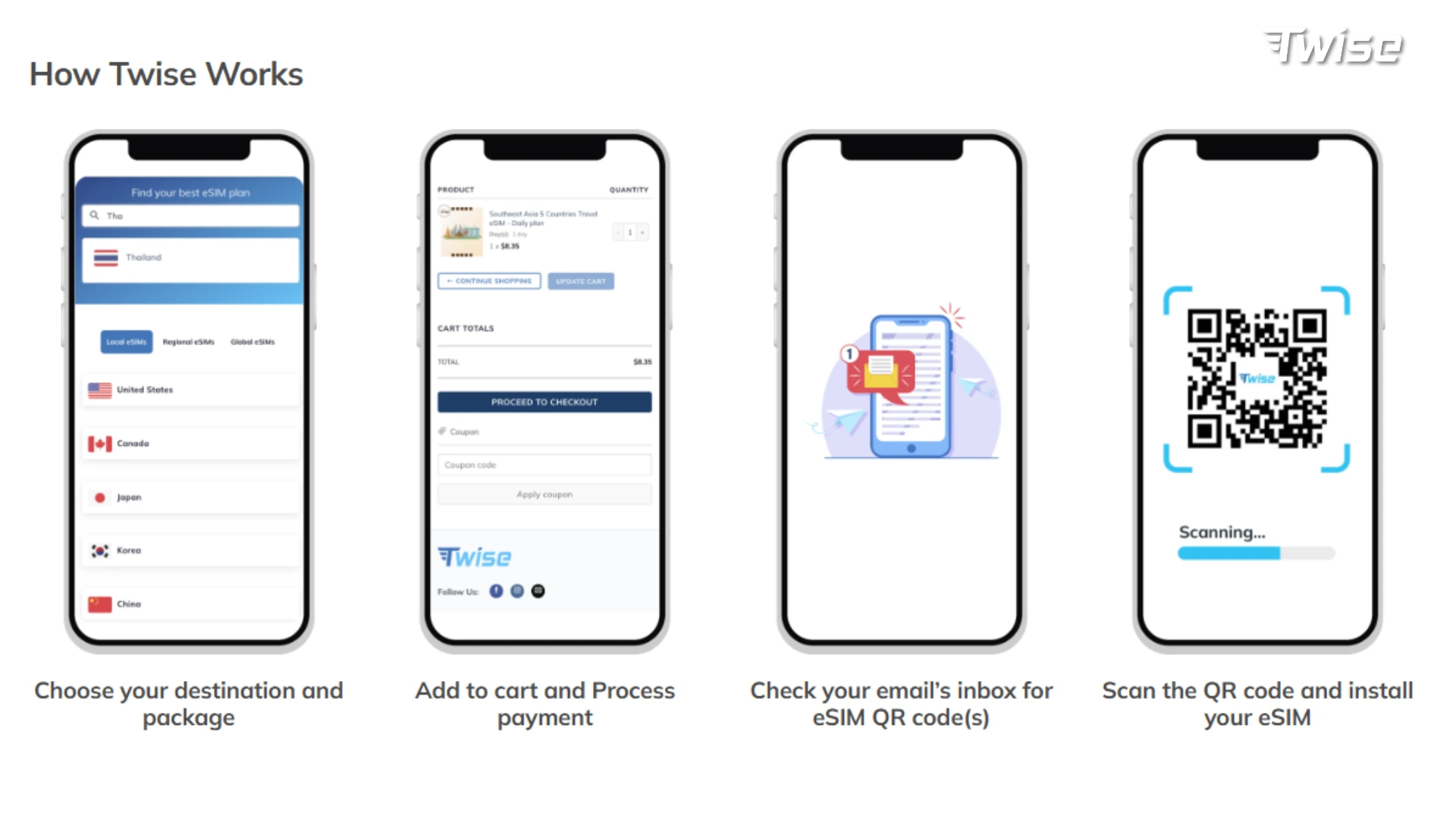
- Check your phone’s eSIM compatibility.
- Buy your Singapore eSIM before departure.
- Install it over stable Wi-Fi, via QR code or manual setup.
- Set it as your mobile data line.
- Turn on data roaming for the eSIM line if prompted, keeping your home SIM’s roaming off.
- After landing, test your browser, Maps, Grab, WhatsApp, email, and hotspot before leaving Wi-Fi.
If you’d rather follow along visually, Twise has a step-by-step video setup guide.
Best Travel Apps to Use with a Singapore eSIM
- Maps and MRT navigation: Google Maps, Apple Maps, or Citymapper for real-time transit routing.
- Ride-hailing: Grab is the default; Gojek is a common alternative depending on availability.
- Messaging: WhatsApp and email for hotel and tour coordination.
- Payments: bank apps, card alerts, and QR payment flows — keep your home SIM available for OTPs.
- Attractions: Gardens by the Bay, Sentosa, zoo, and museum apps for QR ticket entry.
- Regional travel: Malaysia transport, ferry, or airline apps if your trip crosses borders.
Before Leaving Changi Airport: Connectivity Checklist
- Confirm the eSIM line is active and selected for data
- Load your hotel address in Maps
- Test your ride-hailing app
- Save your MRT route
- Confirm WhatsApp or hotel messages are going through
- Keep airport Wi-Fi as a backup while you test
- Screenshot your booking confirmations
Common Singapore eSIM Mistakes to Avoid
- Buying before checking phone compatibility
- Confusing a data-only eSIM with a local phone number
- Forgetting to set the eSIM as your mobile data line
- Leaving home SIM data roaming switched on
- Assuming a Singapore-only eSIM works once you cross into Malaysia
- Deleting the eSIM profile too early while troubleshooting
- Relying only on public Wi-Fi during airport arrival instead of testing your eSIM
If something isn’t working as expected after setup, Twise’s refund request process is there as a fallback.
Where Twise eSIM Fits: Singapore Data Without SIM-Shop Friction
Twise’s Singapore eSIM runs on the SIMBA network — a budget-friendly, flexible option rather than a premium tourist bundle. It’s built for app-first Singapore travel: Changi arrival, Grab, MRT navigation, hotel messages, maps, attraction access, and payment verification, all set up online before you fly.
Use it with realistic expectations: confirm whether you need calls or SMS, check regional coverage if you’re crossing borders, verify hotspot support, and set your data roaming correctly. For the connected, app-driven parts of your Singapore trip, it’s a straightforward fit — keep Wi-Fi or offline backups ready for crowded venues, deep indoor spaces, or cross-border legs. You can browse other destinations on Twise’s eSIM page.
Singapore eSIM Setup Checklist Before Departure
- Check your phone’s eSIM compatibility and unlock status
- Confirm your phone is unlocked
- Buy your Singapore eSIM before travel
- Install it over stable Wi-Fi
- Save your setup instructions
- Set the eSIM as your mobile data line
- Turn on eSIM data roaming if required
- Keep home SIM roaming off if avoiding fees
- Test Grab, Maps, WhatsApp, and email at Changi
- Save your hotel address and MRT route offline
- Check whether your plan covers Malaysia or other countries if crossing borders
Final Decision Guide: Should You Get an eSIM for Singapore?
Get a Singapore eSIM if you want easy data for Changi arrival, Grab, maps, MRT navigation, hotel messages, bookings, WhatsApp, and avoiding roaming fees.
Consider a tourist SIM/eSIM if you need local calls, SMS, a Singaporean phone number, or an official bundled plan.
Prepare a backup if you’ll be underground for long stretches, inside large malls, at crowded events, on ferries, or crossing into Malaysia.
Choose Twise if you want a budget-friendly, SIMBA-based eSIM for data-first Singapore travel with setup you can finish before you fly.

FAQs
Yes — with an unlocked, eSIM-compatible, 4G/5G-ready phone, you can get mobile data across Singapore, including at Changi Airport and throughout the MRT network.
It depends on whether you need calls/SMS or just data. For app-first travel — Grab, maps, WhatsApp, bookings — a data-first eSIM like Twise’s SIMBA-based option is usually enough.
It’s a solid choice for budget-conscious, data-first travelers who don’t need premium tourist bundles like local calls or SMS.
Yes — WhatsApp, and similar internet-based calling apps, work normally over mobile data.
Confirm the eSIM line is enabled and set as your data line, toggle airplane mode once, and check your data roaming setting before assuming there’s a fault. If it still doesn’t work, Twise’s refund process is available.
More helpful tips for your Singapore journey
Regional eSIM Asia Guide: Connect in Malaysia, Thailand, Singapore & More