

Data Roaming Explained: 5 Questions Travelers Should Know
Aug
Data roaming allows your phone to connect to another mobile network when traveling outside your carrier’s coverage area. This guide answers five essential questions about how data roaming works, what it costs in Europe and elsewhere, whether travelers should enable it, and how to manage roaming settings on iPhone and Android. It also explains practical ways to avoid unexpected charges, including travel eSIMs, roaming passes, local plans, data limits, and offline preparation. Learn when data roaming should be on or off, how Dual SIM settings affect billing, and which option best fits your destination, trip length, and mobile data needs.
Roaming Data: Key Takeaways
Data roaming is not a separate type of mobile data. It is the use of mobile data through a network other than your home carrier’s own network.
The essential points are:
- Data roaming is usually required when your SIM connects to a partner network abroad.
- Turning it on allows apps to use mobile data on that partner network.
- Turning it off does not disable calls or SMS automatically.
- Charges depend on your carrier, destination, plan, and usage.
- European roaming rules apply only to eligible customers and destinations.
- Switzerland, Andorra, Monaco, Turkey, cruise ships, and aircraft may not be included in standard EU roaming.
- Many travel eSIMs require data roaming to be enabled.
- With Dual SIM, roaming must be configured separately for each line.
- A roaming pass, local plan, or travel eSIM can be more predictable than pay-per-use roaming.
- Disabling data roaming on your home SIM is one of the simplest ways to prevent unintended data charges.
The safest approach is not always to leave data roaming off. It is to identify which SIM should use roaming and understand how that plan will be billed.
1. Data Roaming: What Is It?
Data roaming is the process that allows a phone to access mobile internet through another carrier’s network when the user’s regular network is unavailable.
For example, a traveler with a German SIM arrives in Japan. The German carrier does not operate its own towers there, so the phone connects to a Japanese partner network. That partner provides the local radio connection, while the German carrier manages the customer’s account and charges.
Data roaming can support:
- Web browsing
- Messaging apps
- Google Maps and Apple Maps
- Ride-hailing apps
- Translation
- Social media
- Cloud synchronization
- Hotel and airline apps
- Mobile hotspot use
Data roaming is different from mobile data. Mobile data is the general internet connection supplied through a cellular network. Roaming describes the situation in which that connection comes from a partner network.
You may see a roaming symbol in the status bar, but this varies by phone and carrier. Some devices connect without displaying an obvious notification.
Domestic roaming also exists. A carrier may use another operator’s network in rural or low-coverage areas within the same country. Whether domestic roaming creates an additional charge depends on the carrier.
2. Mobile Data Roaming: How Does It Work?
When your phone leaves its home network, it searches for available networks that have a roaming agreement with your carrier.
The basic process works like this:
- Your phone detects available mobile networks.
- A partner carrier checks the SIM or eSIM credentials.
- Your home carrier confirms that the account may roam.
- The partner network supplies the mobile connection.
- Usage information is passed back to the home carrier.
- The home carrier deducts data or applies the relevant charge.
The user normally does not need to select the network manually. Automatic network selection allows the phone to choose a compatible partner.
Manual selection may help when:
- The phone connects to a weak partner
- The provider specifies a preferred network
- The automatic connection fails
- The plan works with only certain local carriers
Roaming agreements influence coverage and speed. Two travelers standing in the same place may have different service because their plans use different partner networks.
A phone may show 4G or 5G but still have no usable internet if:
- Data roaming is disabled
- The selected SIM is not the data line
- The plan has expired
- The data allowance has been exhausted
- The APN is incorrect
- The carrier has not authorized roaming
- The phone connected to an unsupported network
Travel eSIMs also use roaming agreements in many destinations. This is normal. The important question is whether roaming is included in the purchased plan, not whether the roaming toggle is on.
3. How Much Does Data Roaming Cost Abroad?
There is no universal data roaming price. Costs depend on the customer’s home carrier, destination, billing zone, contract, and data consumption.
Carriers typically use one of four models:
| Charging model | How it works | Main risk |
| Included roaming | Data is deducted from the regular allowance | Fair-use limits may be lower abroad |
| Daily roaming pass | A fixed daily fee activates after roaming use | A small background connection can trigger the daily charge |
| Data package | A fixed allowance is purchased before travel | Additional data may be expensive after the package ends |
| Pay per use | Charges apply per MB or GB | Background activity can create a large bill |
A plan that costs little for occasional messages may become expensive when used for video, hotspot sharing, automatic photo uploads, or software updates.
Check these details before departure:
- Whether the destination is included
- The price per day, MB, or GB
- Whether taxes are included
- When a daily pass is triggered
- Whether incoming calls create charges
- Whether tethering is allowed
- What happens after the allowance is used
- Whether the carrier automatically renews the pass
- Whether maritime and in-flight networks are excluded
Do not assume neighboring countries belong to the same roaming zone. A European itinerary can include destinations with completely different pricing rules.
Data Roaming Charges in Europe
Eligible customers traveling between EU and European Economic Area countries can generally use calls, messages, and mobile data under the “Roam Like at Home” framework.
This usually means domestic rates and allowances continue to apply during periodic travel. It does not always mean unlimited roaming data.
Carriers may apply a fair-use policy when:
- A domestic plan is unusually inexpensive
- The plan includes unlimited data
- The customer spends more time abroad than at home over a monitored period
- The SIM appears to be permanently used in another country
The European Commission explains that fair-use limits and regulated surcharges may apply in certain circumstances. The current framework is scheduled to continue until 2032. Travelers can review the official EU roaming rules and fair-use guidance.
The EU framework generally covers the 27 EU member states plus Iceland, Liechtenstein, and Norway. The United Kingdom is no longer covered automatically by EU law, although some carriers still include it voluntarily.
Switzerland, Andorra, Monaco, San Marino, Turkey, and several European territories may be treated differently. Always check the carrier’s country list.
Cruise ships and aircraft create another risk. A phone may connect to a satellite-based maritime or aviation network when terrestrial coverage disappears. Standard European roaming allowances usually do not cover these networks.
Before boarding a ship:
- Turn on Airplane Mode
- Re-enable Wi-Fi if the ship provides it
- Confirm that cellular service remains off
- Avoid automatic network selection near offshore areas
Data Roaming Charges Outside of Europe
Outside regulated roaming zones, charges vary widely. A carrier may offer an affordable daily pass in one destination and expensive pay-per-use billing in another.
Common charging structures include:
- A daily fee for a fixed allowance
- A regional package covering several countries
- A monthly international add-on
- A small free allowance followed by overage charges
- Per-megabyte billing
- Automatic roaming passes triggered by the first connection
The last model deserves attention. Background notifications, email synchronization, or a weather widget may activate the pass even if the traveler does not intentionally open an app.
Before using a home SIM outside Europe, calculate the total trip cost. A daily pass that seems convenient may cost more over a two-week trip than a destination-based plan.
Also consider what is included. Some roaming passes preserve calls and SMS, while many travel data plans do not provide a traditional phone number. The best choice depends on whether the traveler needs only internet access or also expects local calls.
4. Should You Enable Data Roaming?
Enable data roaming when the selected plan includes or requires roaming. Leave it off when your home carrier charges expensive rates and another line will handle mobile data.
The correct setting depends on the SIM:
- Home SIM with included roaming: Data roaming can normally be enabled within the covered zone.
- Home SIM without a roaming package: Keep data roaming disabled unless mobile internet is urgently needed.
- Travel eSIM: Enable data roaming if the provider instructs you to do so.
- Local SIM using its own domestic network: Data roaming may not be necessary.
- Dual SIM setup: Enable roaming only on the line intended for travel data.
A practical Dual SIM configuration is:
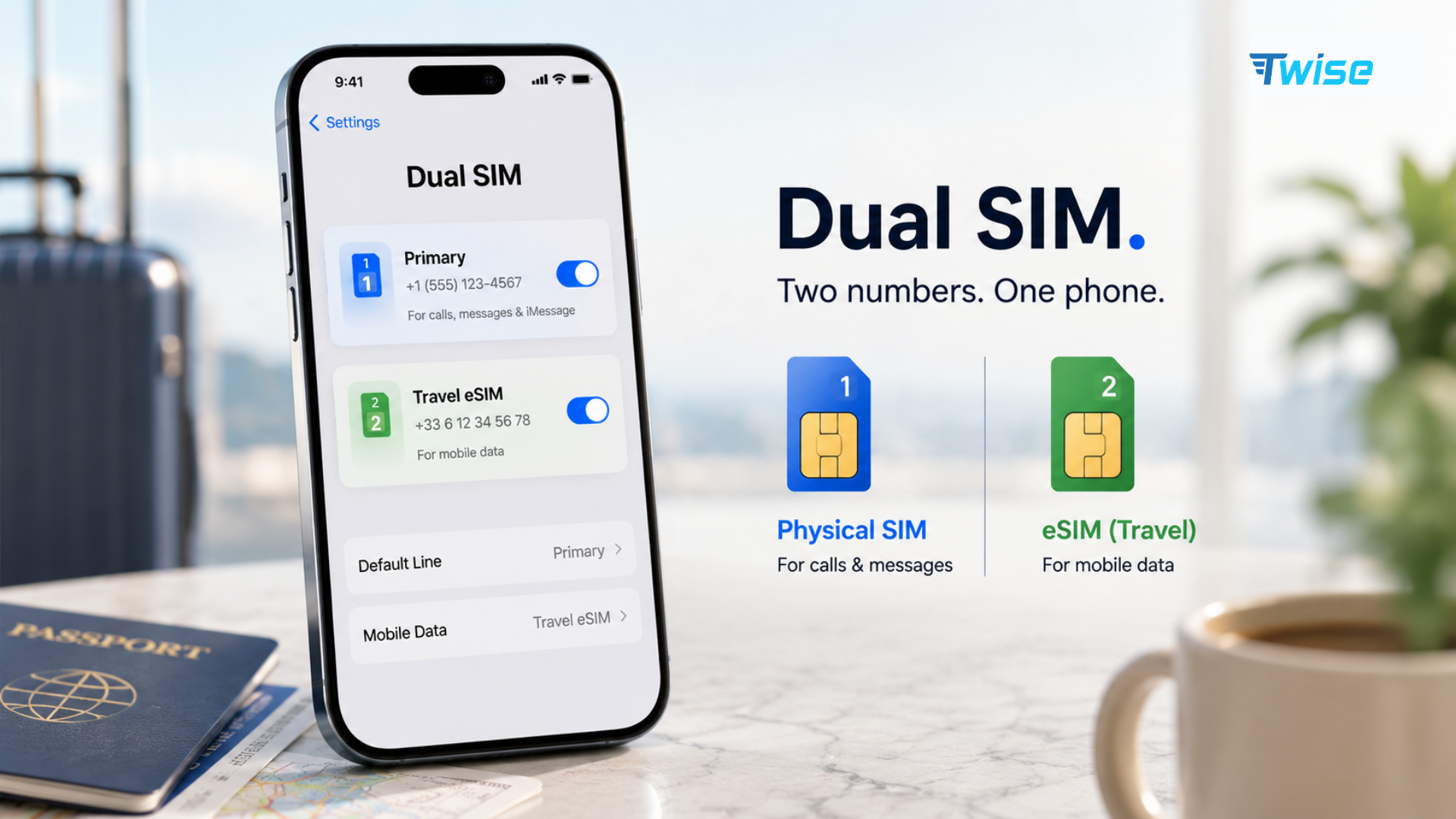
- Keep the home line active for SMS verification.
- Turn off data roaming on the home line.
- Select the travel line for cellular data.
- Enable roaming on the travel line if required.
- Disable cellular data switching.
Cellular data switching allows the phone to use the other line when the selected data line has poor coverage. This can be useful at home but may create roaming charges abroad.
Keeping a home line active can still create costs through calls, voicemail, or carrier-specific services. Check the home provider’s conditions if the number must remain reachable.
Money-Saving Tip: How Can You Avoid Roaming Charges?
The most reliable method is to prevent your home SIM from using chargeable mobile data while arranging a separate connection for the trip.
Useful options include:
- Purchase a roaming package before departure.
- Install a travel eSIM and select it as the data line.
- Buy a local SIM after arrival.
- Use an eligible European roaming allowance.
- Turn off data roaming on the home line.
- Disable automatic cellular data switching.
- Use Low Data Mode or Android Data Saver.
- Download offline maps and translation languages.
- Pause cloud photo backups.
- Disable automatic app updates.
- Monitor usage through both the phone and carrier app.
Public Wi-Fi alone is rarely a complete travel strategy. It may not be available when leaving an airport, finding accommodation, requesting a ride, opening a digital ticket, or completing payment verification.
The goal is not to avoid mobile data completely. It is to use a connection with clear pricing and enough data for real travel needs.
5. How Do You Enable or Disable Data Abroad?
Data roaming is controlled through the settings for each SIM or eSIM. On a Dual SIM phone, changing the setting for one line does not automatically change it for the other.
Before departure, review:
- Which line is selected for data
- Whether roaming is enabled on that line
- Whether cellular data switching is active
- Which apps can use mobile data
- Whether automatic backups are enabled
Menu names can vary by device, operating system, manufacturer, carrier, and language.
Enable Data Roaming on an iPhone
For an iPhone with one SIM or eSIM:
- Open Settings.
- Tap Cellular or Mobile Data.
- Select Cellular Data Options.
- Turn Data Roaming on or off.
For an iPhone using Dual SIM:
- Open Settings > Cellular.
- Select the line you want to configure.
- Tap Cellular Data Options.
- Turn Data Roaming on or off.
- Return to Cellular Data and confirm which line is selected.
Apple recommends disabling data roaming when a traveler wants to avoid carrier roaming charges. It may need to remain enabled when an international plan or travel eSIM relies on roaming. See Apple’s current iPhone data roaming instructions.
Consider turning on Low Data Mode. It can reduce background activity, automatic downloads, cloud synchronization, and streaming quality.
Usage figures in iPhone settings may cover a long period unless they are manually reset. Reset the statistics at the beginning of the trip if you want a clearer estimate of travel usage.
Enable Data Roaming on Android
Android menus differ between Google Pixel, Samsung Galaxy, Xiaomi, Motorola, and other manufacturers.
On many Android phones:
- Open Settings.
- Tap Network & Internet or Connections.
- Select SIMs, Mobile Network, or SIM Manager.
- Choose the relevant SIM.
- Turn Roaming or Data Roaming on or off.
On a Google Pixel:
- Open Settings.
- Tap Network & Internet.
- Select SIMs.
- Choose the line.
- Turn Roaming on or off.
Google’s mobile data management guidance also explains data warnings, usage limits, Data Saver, and roaming controls.
Android users can set a warning or hard data limit. This is helpful with a fixed travel allowance, although the provider’s measurement may differ slightly from the phone’s estimate.
Data Roaming Abroad: Good or Bad Idea?
Data roaming is useful when it operates under a suitable plan. It becomes a poor choice when pricing is unknown or uncontrolled.
| Situation | Recommended approach |
| Short trip within an included EU zone | Use the domestic allowance and check fair-use limits |
| Destination covered by an affordable carrier pass | Compare the total pass cost with alternative plans |
| Long trip with expensive daily roaming | Consider a local or travel plan |
| Multi-country itinerary | Use a regional plan with confirmed coverage |
| Need to retain a home number | Use Dual SIM and disable home-line data roaming |
| Cruise or flight | Use Airplane Mode to prevent satellite-network connections |
| Heavy hotspot or video use | Choose a plan with enough data and clear tethering rules |
The decision should be based on total cost, not only convenience. Multiply a daily pass by the number of travel days and compare it with other available options.
For a weekend trip, the carrier pass may be easiest. For a month abroad, the same daily fee may become unnecessarily expensive. Travelers also need to compare network coverage, hotspot rules, validity, top-ups, and whether calls are included.
FAQs
