

FIFA World Cup 2026 Travel Guide: The Complete Fan Handbook
If you’re planning your FIFA World Cup 2026 travel, now is the time to start. The 2026 edition is the biggest, most ambitious World Cup ever staged — 48 teams, 104 matches, and 16 host cities spread across the United States, Canada, and Mexico. Whether you’re flying in from Europe, South America, Asia, or anywhere else, navigating three countries over five weeks requires serious planning. This guide walks you through everything: tickets, transport, visas, accommodation, staying connected, and what to expect on match day — so you can focus on the football and leave the logistics stress behind.
What Makes FIFA World Cup 2026 Travel Different From Every Previous Tournament
This isn’t just a bigger World Cup. It’s a fundamentally different kind of event.
For the first time in history, a World Cup is being co-hosted by three nations. The tournament runs from June 11 to July 19, 2026, with matches split across the USA (11 cities), Canada (2 cities), and Mexico (3 cities). The jump from 32 to 48 teams means 104 matches total — up from 64 in Qatar — and a longer group stage that gives fans more opportunities to see their side in action.
The three-country format also creates an unusual dynamic: if your team advances through the bracket, you may find yourself crossing international borders to follow them. A supporter watching their team’s group stage games in Vancouver could end up in Dallas for the Round of 16 and New Jersey for the Final. That’s two countries, three cities, and weeks of cross-continental travel. Planning accordingly isn’t optional — it’s essential.
The 16 Host Cities at a Glance
| Country | City | Stadium | Approx. Capacity |
| USA | New York/New Jersey | MetLife Stadium | 82,500 |
| USA | Los Angeles | SoFi Stadium | 70,000 |
| USA | Dallas | AT&T Stadium | 80,000 |
| USA | San Francisco Bay Area | Levi’s Stadium | 68,500 |
| USA | Miami | Hard Rock Stadium | 65,000 |
| USA | Atlanta | Mercedes-Benz Stadium | 71,000 |
| USA | Seattle | Lumen Field | 69,000 |
| USA | Boston | Gillette Stadium | 65,000 |
| USA | Kansas City | Arrowhead Stadium | 76,000 |
| USA | Philadelphia | Lincoln Financial Field | 69,000 |
| USA | Houston | NRG Stadium | 72,000 |
| Canada | Toronto | BMO Field (expanded) | 45,000+ |
| Canada | Vancouver | BC Place | 54,500 |
| Mexico | Mexico City | Estadio Azteca | 87,000 |
| Mexico | Guadalajara | Estadio Akron | 49,000 |
| Mexico | Monterrey | Estadio BBVA | 53,000 |
Most fans will need to travel between at least two countries if they intend to follow their team beyond the group stage. Plan for that possibility from day one.
Pre-Trip Planning: Tickets, Flights, and Visas
Getting Your Match Tickets
The only safe place to buy official FIFA World Cup 2026 tickets is FIFA.com. Secondary market platforms like Viagogo and StubHub exist, but prices are significantly inflated and fraud risk is real — if you use them, buy only from verified sellers and use payment methods with buyer protection.
The tournament format moves from a group stage (3 matches per team) through the Round of 16, Quarter-Finals, Semi-Finals, and Final. If your team advances, later-stage tickets are not confirmed in advance, so many fans book accommodation first and wait to see which cities become relevant before finalizing travel.
Tip: Book your accommodation before locking in match tickets. Hotels and short-term rentals in host cities are already filling up — having a base first gives you flexibility.
Flying Between Host Cities
Direct flights between most host cities exist, but prices around match dates are already elevated and will rise further as the tournament approaches. Book early.
Key travel corridors to know:
- Toronto ↔ New York: Regular flights; also accessible via bus or a long drive.
- Vancouver ↔ Seattle: Only about 2.5 hours by car; the Amtrak Cascades train also runs this route.
- Monterrey ↔ Texas: Just 2–3 hours by road from San Antonio or Laredo — driveable for fans based in Texas.
- Mexico City ↔ US cities: Requires a flight from most US departure points.
- Northeast US corridor (NYC–Philadelphia–Boston): Amtrak is fast, reliable, and often cheaper than flying — a strong option for fans based in that region.
Build a budget buffer for flights. Even if you book now, prices will climb as each match date approaches.
Visa and Entry Requirements
Entry requirements for the USA, Canada, and Mexico are completely separate. Having permission to enter one country does not grant access to another.
- United States: Most nationalities require an ESTA (Electronic System for Travel Authorization). Apply well in advance at the official CBP website.
- Canada: An eTA (Electronic Travel Authorization) is required for most non-US passport holders. Apply at the IRCC website.
- Mexico: Most nationalities can enter visa-free. However, a tourist card (FMM — Forma Migratoria Múltiple) is required on entry; this is typically issued at the border or on arrival.
Start your visa applications as early as possible. ESTA and eTA processing is usually quick, but volumes may be higher during the tournament period.
Accommodation: Where to Stay and When to Book
Host city hotels are operating at a premium. For major match dates in cities like New York, Miami, and Mexico City, even budget options are filling fast. General advice:
- Book 3–6 months in advance at minimum for host cities.
- Airbnb is worth considering for multi-night stays, especially when you know which cities you’ll be in for consecutive matches.
- Satellite bases work well: San Antonio (TX) for fans attending matches in Monterrey; Seattle for fans with games in Vancouver. Both have better accommodation availability and manageable travel distances.
Staying Connected Across Three Countries
This is where a lot of travellers make a costly mistake — and it’s entirely avoidable.
The Roaming Problem
When you cross a border, your phone switches to a local carrier’s network. Unless your home plan includes free roaming (most don’t), you’ll be charged either a daily fee ($10–$15/day is standard for many carriers, significantly more for others) or a per-MB rate. Over a five-week tournament spanning three countries, roaming charges can easily exceed $350–$500 — just for data.
Stadium environments make this worse. 70,000–80,000 phones all trying to connect at once creates severe network congestion, regardless of which carrier you’re on. Speeds drop, messages lag, and mapping apps stall exactly when you need them most.
The Solution: A North America eSIM
An eSIM is a digital SIM built directly into your phone — no physical card required. You activate a plan remotely before you travel, and your phone seamlessly connects to local networks in each country as you cross borders.
For FIFA World Cup 2026 travel across the USA, Canada, and Mexico, this is the cleanest solution available. Rather than buying a new SIM at every border (and losing your number each time), a single North America eSIM keeps you connected throughout the entire tournament with no manual changes needed.
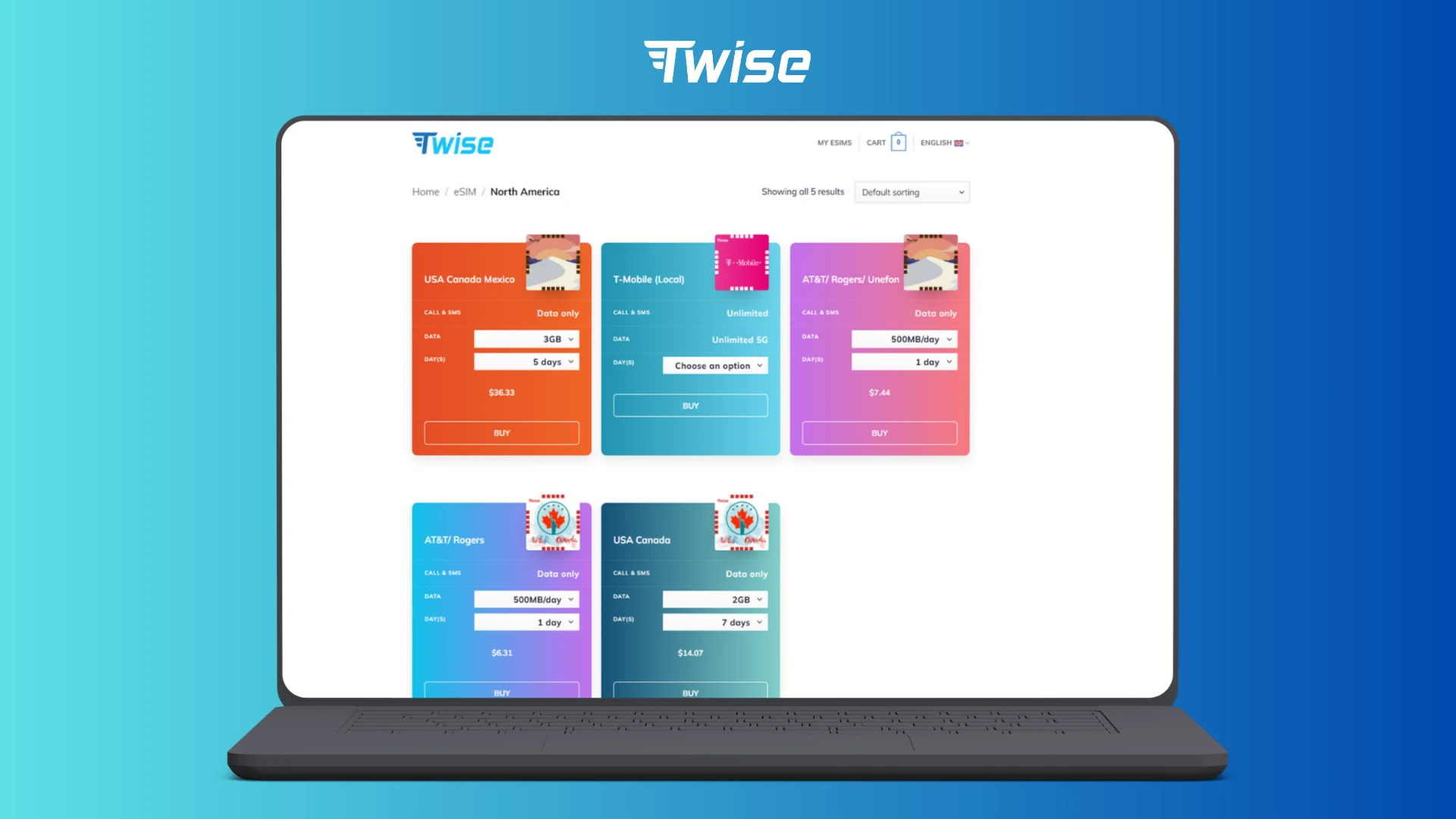
Twise offers eSIM plans built for exactly this kind of multi-country trip. Their North America eSIM covers the USA, Canada, and Mexico in a single plan — the data switches automatically as you move between countries.
Why You Need a Working Number Before You Land
Beyond just data access, having a real phone number matters:
- Many services (banking apps, accommodation platforms, ticket systems) require SMS verification.
- Airport Wi-Fi is unreliable and public hotspots are a security risk.
- Buying a local SIM at the airport wastes time and money, and you’ll lose your contacts’ ability to reach you on your regular number.
With an eSIM activated before departure, you step off the plane connected and ready.
How to Set Up Your eSIM
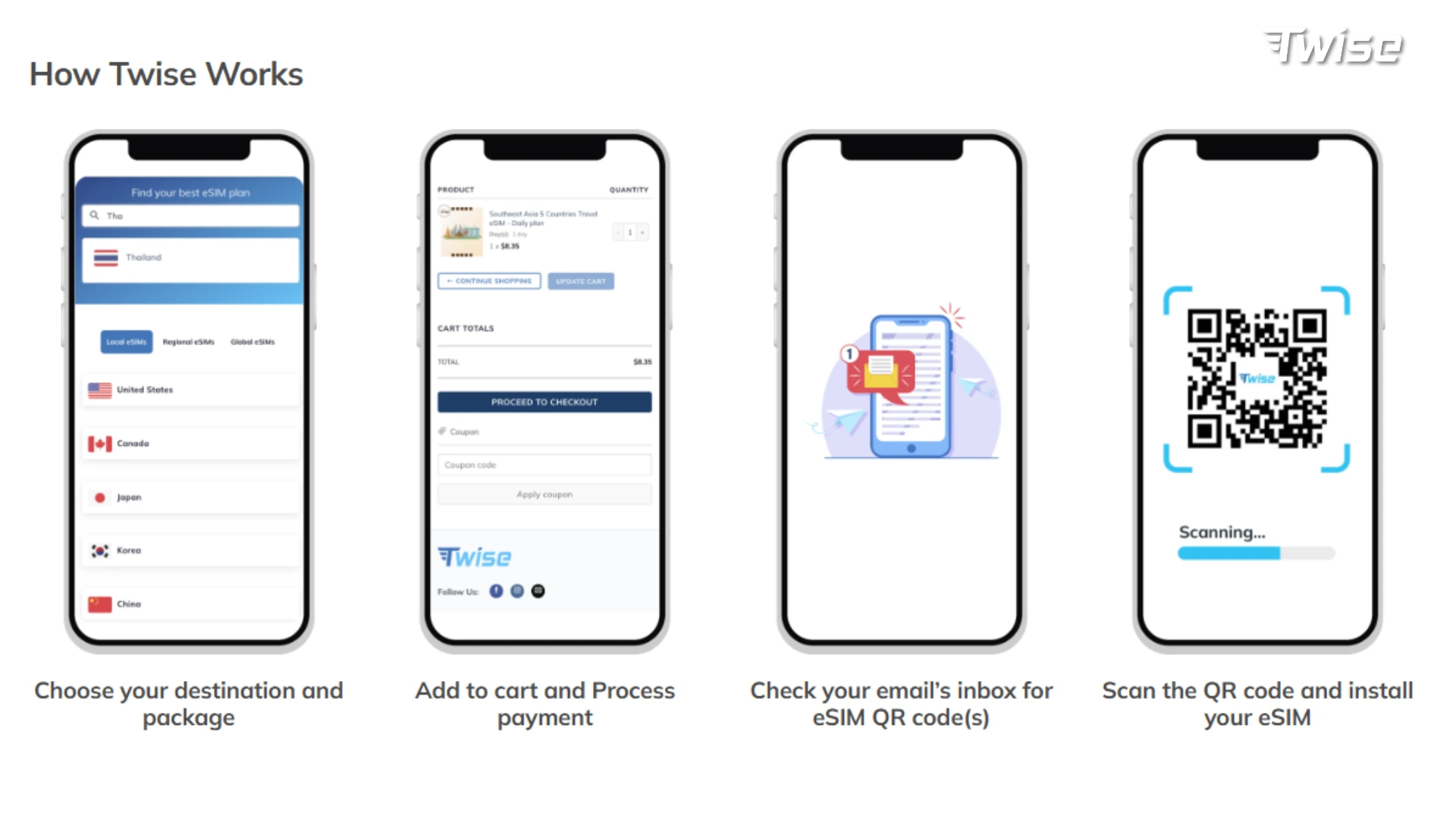
- Check compatibility: iPhone XS or later; most Android flagships from 2019 onward.
- Visit twise.tech and browse available plans.
- Select your destination (USA, Canada, or North America) and filter by validity period and data allowance.
- Choose your plan based on how long you’re travelling and how data-heavy your usage will be.
- Complete payment and receive your eSIM QR code by email.
- Activate your eSIM on your device before departure — detailed guides are available on the Twise website for both iPhone and Android.
See more:
Install eSIM on iPhone: A Step-by-Step Guide
Installing eSIM on Android Phones: A Step-by-Step Guide
Match Day: What to Expect
Getting to the Stadium
Arrive at least 2–3 hours before kickoff. Security queues at World Cup venues are long, and getting caught outside at kickoff is a real risk if you underestimate them. Rideshares drop off at designated zones — check the FIFA app for exact drop-off points, as they vary by stadium.
Download your tickets to the FIFA Tickets app before you arrive. Stadium Wi-Fi is unreliable; you don’t want to be loading a QR code from email while 40,000 people push through the gates.
Bag restrictions apply at all venues. Many World Cup stadiums only allow small, clear bags. Check venue-specific rules on FIFA.com before you pack.
Inside the Venue
Even with Distributed Antenna Systems (DAS) installed at most major stadiums, connectivity inside the venue during peak match moments will be limited. The practical approach:
- Download everything you need before entering: transport options, nearby restaurants, post-match maps.
- Use WhatsApp for communication — it’s lightweight on data compared to video calls.
- Switch to Low Power Mode to extend your battery through a long match day.
After the Final Whistle
Rideshare surge pricing after major matches is significant. Queue for your ride before the game ends, or plan to use public transit — which is the most reliable option after matches in cities like New York, Boston, Atlanta, and Vancouver.
In Mexican cities, stick to Uber or inDrive after dark and avoid unmarked taxis.
Crossing Borders: A Practical Checklist
USA ↔ Canada:
- Both ESTA (US) and eTA (Canada) must be valid separately.
- Main road crossing for World Cup fans: Niagara Falls (Buffalo–Toronto).
- Allow extra time — border traffic during the tournament will be elevated.
USA ↔ Mexico:
- US citizens need a valid passport and a tourist card (FMM) on entry to Mexico.
- US auto insurance does not cover Mexico — buy a separate Mexican vehicle insurance policy before crossing if driving.
- Most practical crossing for World Cup fans: Texas → Monterrey (2–3 hours).
If you’re following a team that could play matches across all three countries, plan your eSIM and border documentation from the start. The last thing you want mid-tournament is a data blackout or a border delay.
Final Checklist Before You Go
- ✅ FIFA.com tickets confirmed (or strategy for later-round purchases)
- ✅ Passport valid for at least 6 months beyond tournament end
- ✅ ESTA (US), eTA (Canada), and/or FMM (Mexico) sorted
- ✅ Accommodation booked in host cities or nearby base cities
- ✅ Flights booked with budget buffer for price increases
- ✅ North America eSIM activated — get yours at twise.tech
- ✅ FIFA Official App and FIFA Tickets App downloaded
- ✅ Home bank informed of travel dates and countries
- ✅ Mexican vehicle insurance arranged (if driving across the border)
FIFA World Cup 2026 travel is a once-in-a-generation experience — a tournament on this scale, in this format, will not happen again for decades. The logistics are manageable if you plan early. Get your documents in order, book accommodation before it’s gone, and make sure your phone keeps up with you across every border. The football does the rest.
Activate Your Mexico eSIM Before You Fly — Get Instant QR Delivery at Twise.tech
Questions? Chat with Twise Support on WhatsApp: (+1) 818-915-0777 or Fanpage Twise on Facebook
