

How to Avoid Roaming Charges When Traveling Abroad – Best Tips
Learn how to avoid roaming charges while traveling abroad by choosing the right mobile setup before departure. This guide explains international roaming, common fees, Wi-Fi, carrier travel passes, local SIM cards, and travel eSIM options. Follow practical steps to disable data roaming, prevent automatic cellular switching, manage calls and voicemail, and configure an iPhone or Android for international travel. You will also learn which solution suits short trips, longer stays, and multi-country itineraries. Prepare your phone before takeoff so maps, messages, ride-hailing, hotel bookings, and essential travel apps remain available without unexpected charges from your home carrier.
What Is Roaming?
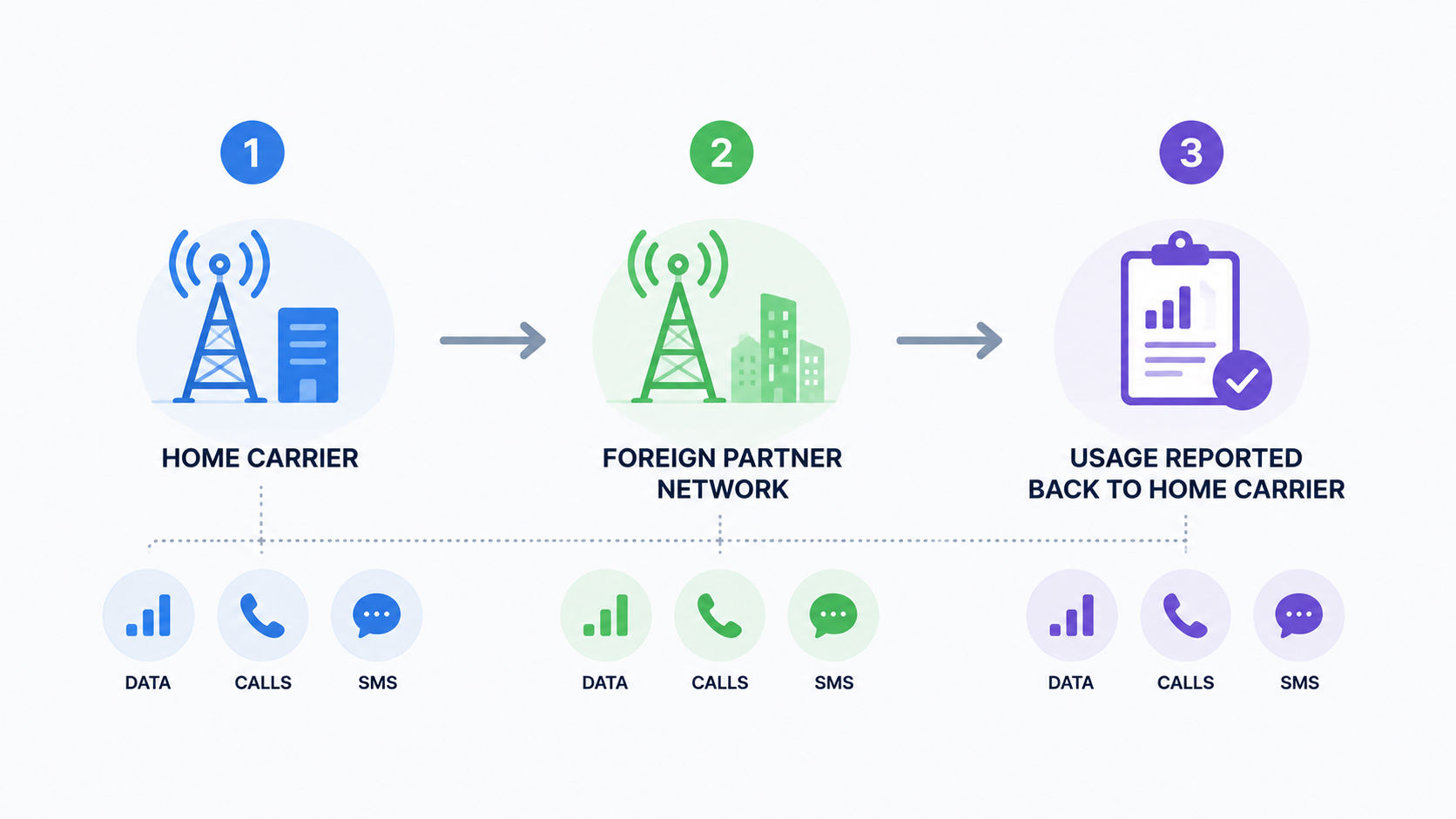
Roaming is the use of another mobile network when your home carrier does not provide direct coverage in your current location. When you travel abroad, your phone may connect automatically to a foreign partner network for data, calls, and text messages.
The foreign network records your usage and sends it to your home carrier. Your home carrier then applies the relevant international roaming rates or travel-pass fees.
Roaming can cover several different services:
- Mobile data
- Outgoing calls
- Incoming calls
- Sent text messages
- Voicemail access
- Picture and multimedia messages
- Connected devices such as smartwatches
- Personal hotspot use
These services may be priced differently. A plan that includes roaming data does not necessarily include calls, voicemail, or premium numbers.
Roaming is also different from making an international call. If you call France from your home country, that is an international call. If you use your home SIM while physically in France, that is roaming.
Some regions apply special rules. For example, eligible European Union and European Economic Area subscribers can generally use domestic allowances during periodic travel within participating countries, subject to fair-use conditions. The European Commission provides current information about the EU roaming framework.
What Are Roaming Charges?
Roaming charges are fees applied when a phone uses mobile service outside its home network’s normal coverage area.Depending on the carrier and plan, you may be charged through:
- A fixed daily roaming fee
- A weekly or monthly travel add-on
- Per-megabyte data rates
- Per-minute call rates
- Per-message SMS or MMS rates
- Charges for receiving calls
- Voicemail forwarding or retrieval
- Out-of-plan usage after reaching a limit
The most important detail is that roaming can happen in the background. You do not need to open a video or actively browse the internet to consume data.
Cruise ships, ferries, and aircraft may use satellite-based mobile networks. These networks can follow different and substantially higher rates than normal terrestrial roaming. A country roaming pass may not cover maritime or in-flight networks.
The FCC recommends checking international rates before travel, tracking usage, restricting automatic downloads, and understanding Wi-Fi security risks in its international roaming guidance.
How To Avoid Roaming Charges When You Travel
To avoid roaming charges, prepare your connection before departure and prevent the home SIM from using chargeable services abroad.
The main options are:
| Option | Main advantage | Main limitation | Best for |
| Wi-Fi | Usually free | Not continuously available | Light and occasional use |
| Carrier roaming pass | Keeps your usual number and setup | Daily fees can accumulate | Short trips and business travel |
| Local SIM card | Local pricing and possible local number | Requires purchase and SIM replacement | Longer single-country stays |
| Travel eSIM | Digital installation and quick arrival access | Requires a compatible unlocked phone | Most connected travelers |
| Airplane Mode | Prevents cellular roaming completely | No ordinary mobile service | Travelers using Wi-Fi only |
Before departure:
- Check your home carrier’s international rates.
- Confirm whether your plan already includes roaming.
- Ask what activity triggers a daily pass.
- Download offline maps, tickets, and hotel details.
- Turn off automatic photo backups and app updates.
- Disable roaming on connected watches and tablets.
- Install an alternative plan while you have reliable Wi-Fi.
- Save support details somewhere accessible offline.
Rely On Wi-Fi
Wi-Fi is the lowest-cost option when you only need occasional access at hotels, airports, cafés, libraries, and accommodation.
To avoid cellular fallback:
- Turn on Airplane Mode.
- Turn Wi-Fi back on manually.
- Confirm that the cellular icon has disappeared.
- Disable Wi-Fi Assist on iPhone.
- Keep mobile data off.
- Use downloaded maps when moving between Wi-Fi locations.
Wi-Fi works well for checking email, sending messages, downloading tickets, or making app-based calls. It is less practical when you need live navigation, ride-hailing, transport disruption alerts, translation, or communication outside a building.
Public Wi-Fi can also be unreliable or require SMS verification. Avoid entering sensitive banking or work information on unknown networks, and confirm that the hotspot name belongs to the hotel, airport, or business offering it.
Daily Roaming Plan or Add-On
A carrier roaming pass allows you to continue using your home SIM abroad, often with familiar data, call, and SMS allowances.
This option is practical when:
- The trip lasts only a few days.
- Your employer covers the expense.
- You must remain reachable on your usual number.
- Your bank or workplace relies on SMS verification.
- You want minimal setup.
Before purchasing, ask:
- What is the daily or monthly price?
- Which countries are included?
- What activity triggers the charge?
- Is a day measured by calendar date or 24-hour period?
- Are incoming calls included?
- Does voicemail trigger a charge?
- Is high-speed data capped?
- Are hotspot and smartwatch use covered?
- Are cruise and in-flight networks excluded?
- Does the pass renew automatically?
A multi-country itinerary also needs careful checking. A plan may cover France and Germany but exclude Switzerland, Türkiye, or a connection through another country.
Buy a Local SIM Card
A local physical SIM can offer domestic pricing, local network access, and sometimes a local phone number.
It may suit travelers who:
- Are staying several weeks or months
- Need local calls and SMS
- Have a phone without eSIM support
- Prefer purchasing directly from a mobile operator
- Need a large domestic data allowance
The practical drawbacks include finding a legitimate store, presenting identification where required, changing the physical SIM, and keeping the home SIM safe.
Before buying, confirm:
- Your phone is carrier-unlocked.
- The plan is prepaid and has no ongoing commitment.
- Registration documents are accepted.
- Activation can be completed immediately.
- Hotspot use is allowed.
- The advertised validity matches your stay.
- Coverage includes the places you will visit.
- The plan does not renew automatically.
Removing the home SIM prevents it from roaming, but it also means you may not receive banking codes or ordinary calls to your usual number.
Get an eSIM
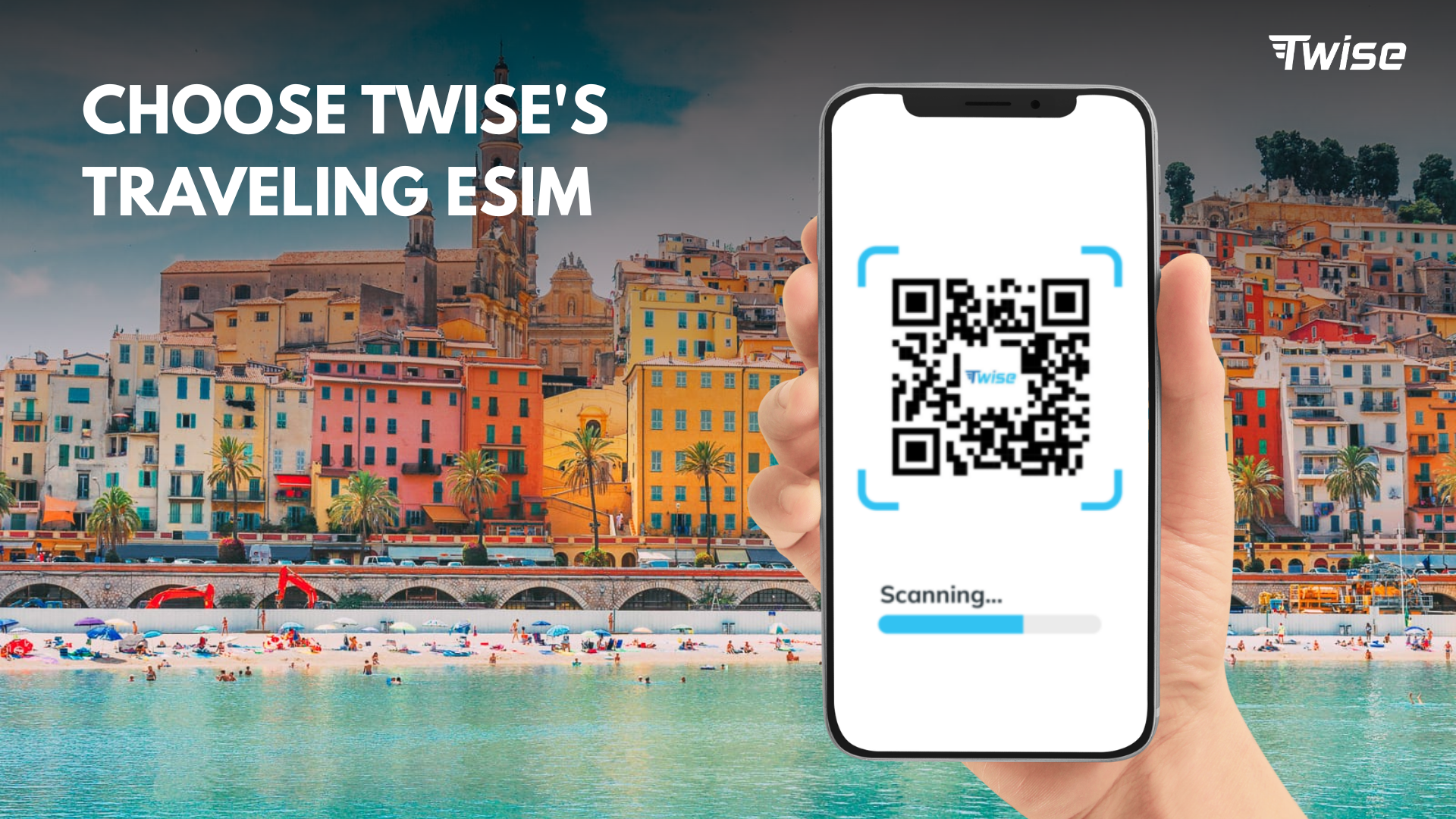
A travel eSIM is a digital alternative that can be installed without replacing the home SIM. It is especially useful when travelers need maps, booking messages, ride-hailing, and transport apps immediately after landing.
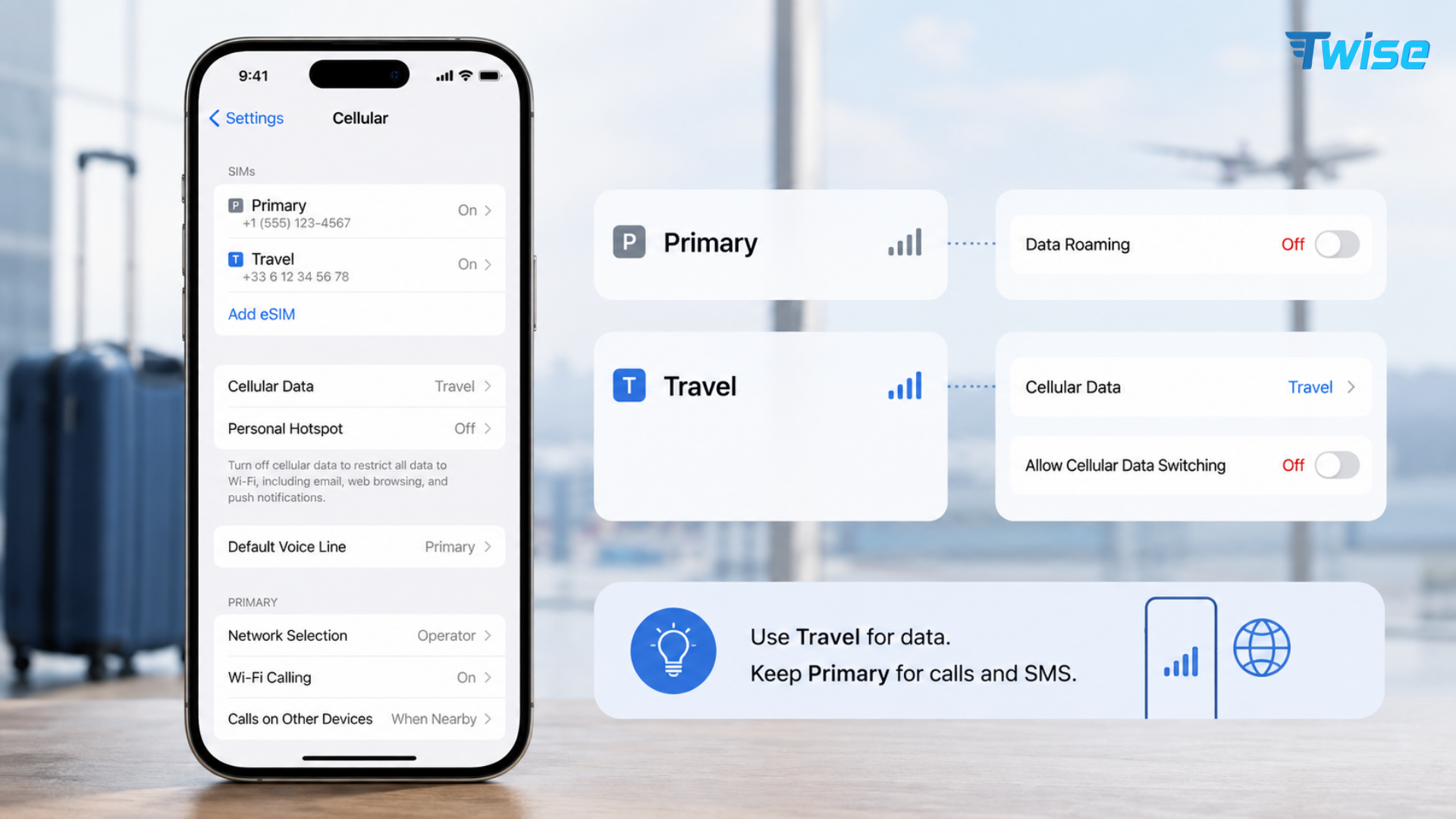
A practical Dual SIM configuration is:
- Home SIM kept on for essential calls or texts
- Data Roaming turned off on the home line
- Travel line selected for mobile data
- Data Roaming enabled on the travel line if required
- Automatic cellular data switching turned off
- Home line avoided for outgoing calls unless included
Not every plan includes the same services. Check whether it is:
- Data-only
- Data with calls and SMS
- Assigned a local number
- Valid in one country or several
- Activated upon installation or first connection
- Subject to speed or hotspot restrictions
If you are traveling to the United States, compare USA travel plans based on the underlying network, trip length, data allowance, and need for a local number. For a multi-country European itinerary, review Europe connectivity options and confirm that every destination is included.
Install the plan before departure when the provider permits it. Do not delete an installed profile simply because it shows “No Service” at home. It may only connect inside the covered destination, and many QR codes cannot be reused.
Turn Off Your Carrier’s Data Line
Turning off Data Roaming is the most important device setting, but it is not always the same as disabling the line completely.
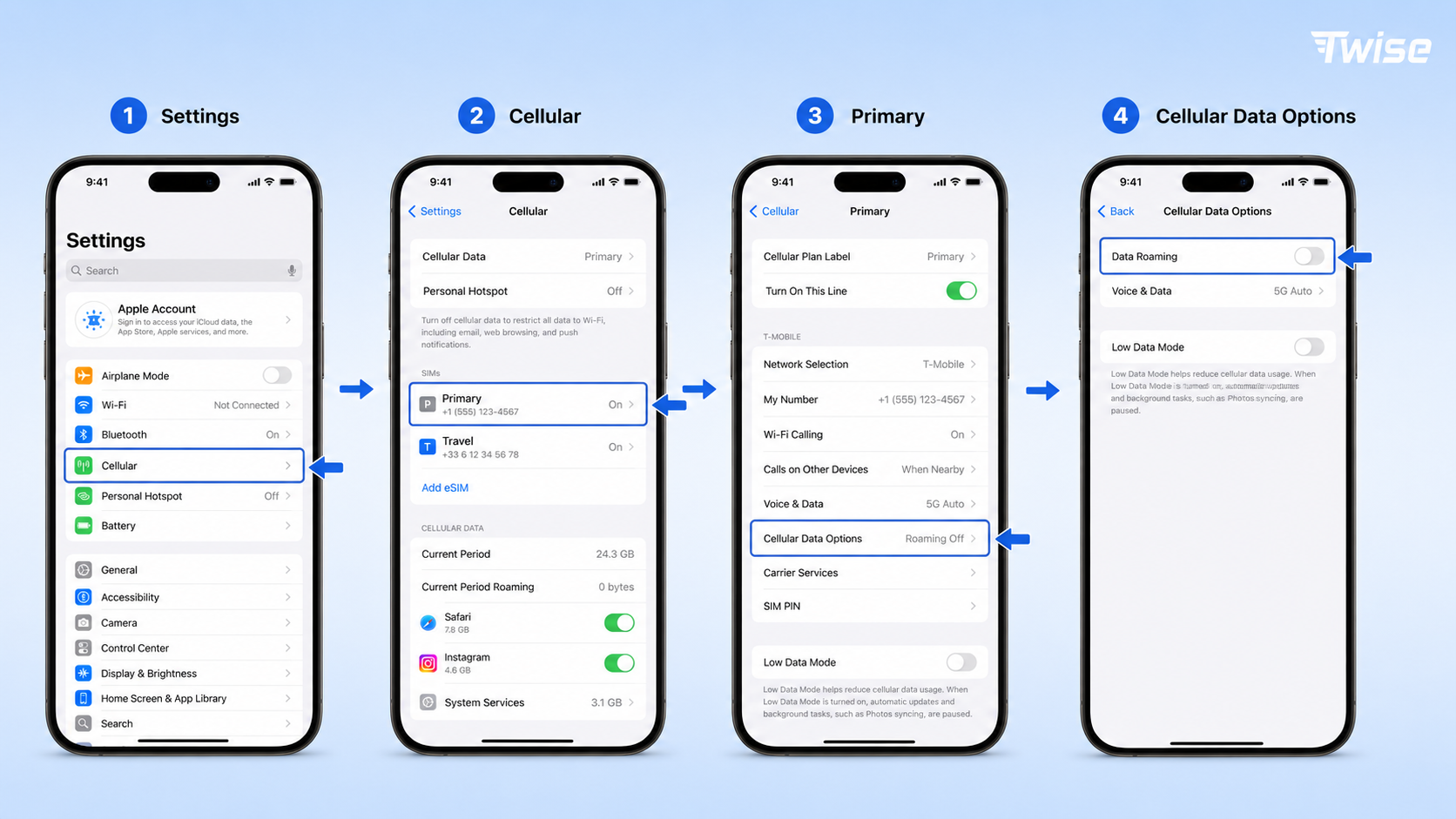
On iPhone:
- Open Settings.
- Tap Cellular or Mobile Service.
- Select your home line.
- Tap Cellular Data Options.
- Turn Data Roaming off.
- Return to Cellular.
- Tap Cellular Data.
- Select the travel line or choose Off.
- Turn Allow Cellular Data Switching off.
On Android:
- Open Settings.
- Tap Network & Internet, Connections, or SIM Manager.
- Select the home SIM.
- Turn Roaming or Data Roaming off.
- Select the travel SIM for mobile data.
- Disable automatic data switching where available.
Apple notes that travelers can turn off Data Roaming to avoid international roaming charges, while some international plans require it to remain on. Its current cellular data guidance explains where these settings appear.
| Setting | Recommended home line | Recommended travel line |
| Line enabled | Optional | On after arrival |
| Cellular data | No | Yes |
| Data roaming | Off | On if instructed |
| Automatic data switching | Off | Off |
| Default voice line | Based on call needs | Use if voice is included |
| Wi-Fi Assist | Consider turning off | Consider turning off |
Turning off Data Roaming usually prevents roaming data, but it does not necessarily block:
- Incoming or outgoing calls
- SMS
- MMS
- Voicemail
- Satellite-network registration
- A daily pass triggered by non-data activity
For stronger protection, turn off the home line completely or ask the carrier to block international roaming. The tradeoff is that calls and verification messages sent to the home number will not arrive.
If you keep the line active, avoid answering ordinary calls until you understand the rate. Callers do not pay your roaming fee. The traveler may be charged for receiving the call.
Getting Started With an eSIM
Before installing a plan, confirm:
- Device compatibility: Look for Add eSIM in cellular settings.
- Carrier-unlocked status: On iPhone, check Settings > General > About > Carrier Lock. It should show No SIM Restrictions.
- Destination coverage: Confirm every country on the itinerary.
- Activation policy: Check whether validity starts at installation or first connection.
- Included services: Confirm data, voice, SMS, and phone-number availability.
- Hotspot policy: Check whether tethering is supported.
- Network access: Review the local partner carrier and 4G or 5G availability.
The usual iPhone installation process is:
- Connect to stable Wi-Fi.
- Open Settings > Cellular.
- Tap Add eSIM.
- Select Use QR Code.
- Scan the provider’s code.
- Add the cellular plan.
- Label it by destination.
- Keep the line off until needed if the plan allows advance installation.
- After arrival, select it for cellular data.
- Enable Data Roaming on the travel line if instructed.
A Twise eSIM can be installed digitally before travel where the selected plan permits advance installation. Plan validity, coverage, local number availability, calls, SMS, and roaming requirements should still be checked on the individual product page.
Do not discard the QR code until the plan appears under the phone’s SIM settings. Do not publish it or send it to another traveler, because it may be tied to one device and valid for a single installation.
Frequently Asked Questions
