

Why a Carrier-Locked Phone Blocked a C Corneil’s Travel eSIM
Aug
Warning: Traveling with a carrier-locked phone can leave you unable to install a local or travel eSIM. Without an unlocked backup device or another connection option, you may have to rely on costly roaming or public Wi-Fi.
Corneil purchased a data eSIM for an upcoming international trip but could not add it by scanning the QR code. At first, the QR code appeared to be the problem.
Twise support inspected the device details and checked its network-lock status. The phone was still carrier-locked by the customer’s home network operator, meaning it could not accept an eSIM from another carrier.
Once the cause was confirmed, Twise explained the restriction and guided the customer to contact the original carrier to request a device unlock. This avoided repeated scanning attempts and unnecessary changes to the phone.
Why a Carrier-Locked Phone Cannot Activate a Travel eSIM
A carrier lock restricts a phone to the network operator that sold or financed it. Even if the device supports eSIM technology, that does not necessarily mean it can use an eSIM from another provider.
When a customer scans an eSIM QR code, the phone reads the activation information and attempts to download a mobile plan. If the device is locked, the operating system or carrier policy may reject the new plan because it belongs to a different network.
Depending on the phone, the customer may see a message such as:
- “SIM Not Supported”
- “Unable to Activate eSIM”
- “This eSIM is not compatible with this device”
- “Contact your carrier”
The camera may still recognize the QR code correctly. In such cases, the failure occurs when the phone tries to add or activate the plan—not because the QR code is damaged.
Restarting the phone, resetting network settings or repeatedly scanning the code cannot remove a carrier lock. Only the carrier that locked the device can normally approve and process the unlock.
How Twise Identified and Resolved the Issue
Twise followed a focused troubleshooting process:
1. Reviewed the reported error: The support team confirmed what happened after the customer scanned the QR code.
2. Checked device eligibility: Twise verified that the phone supported eSIM and reviewed its carrier-lock status.
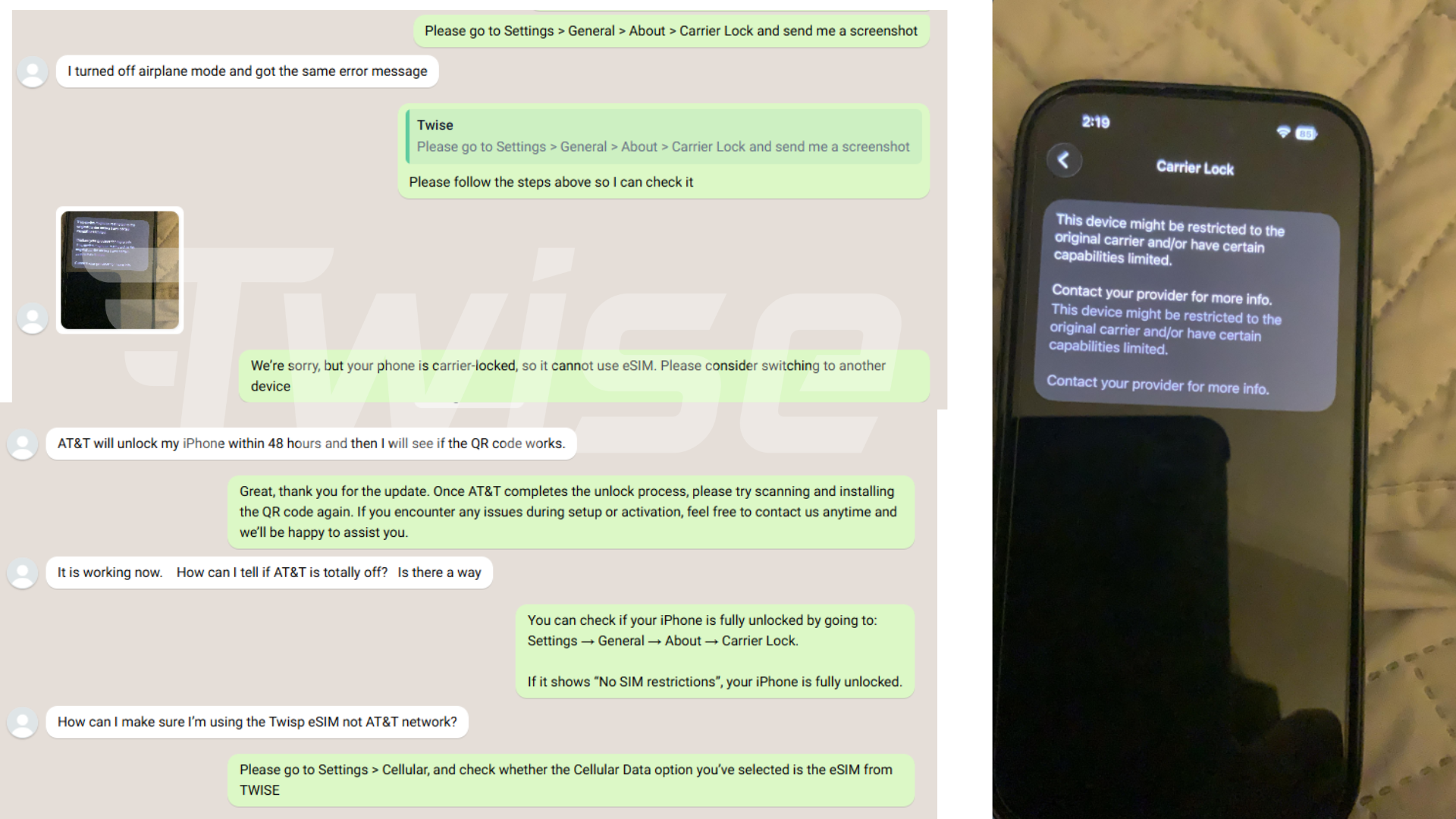
3. Confirmed the root cause: The device was locked to the customer’s home network, preventing installation of another carrier’s eSIM.
4. Explained the correct next step: Twise advised the customer not to keep rescanning or deleting unrelated mobile plans.
5. Guided the customer to the original carrier: The customer was instructed to request a device unlock directly from the home carrier and confirm when the process was complete.
Twise could diagnose the restriction and guide the customer, but it could not unlock the device. Unlock approval remains under the original carrier’s policies and may depend on contract status, payment history or device-financing terms.
How to Check Whether Your Phone Is Carrier-Locked
Check both eSIM compatibility and carrier-lock status before purchasing or activating a travel eSIM.
On iPhone
- Open Settings.
- Tap General.
- Tap About.
- Scroll to Carrier Lock or Network Provider Lock.
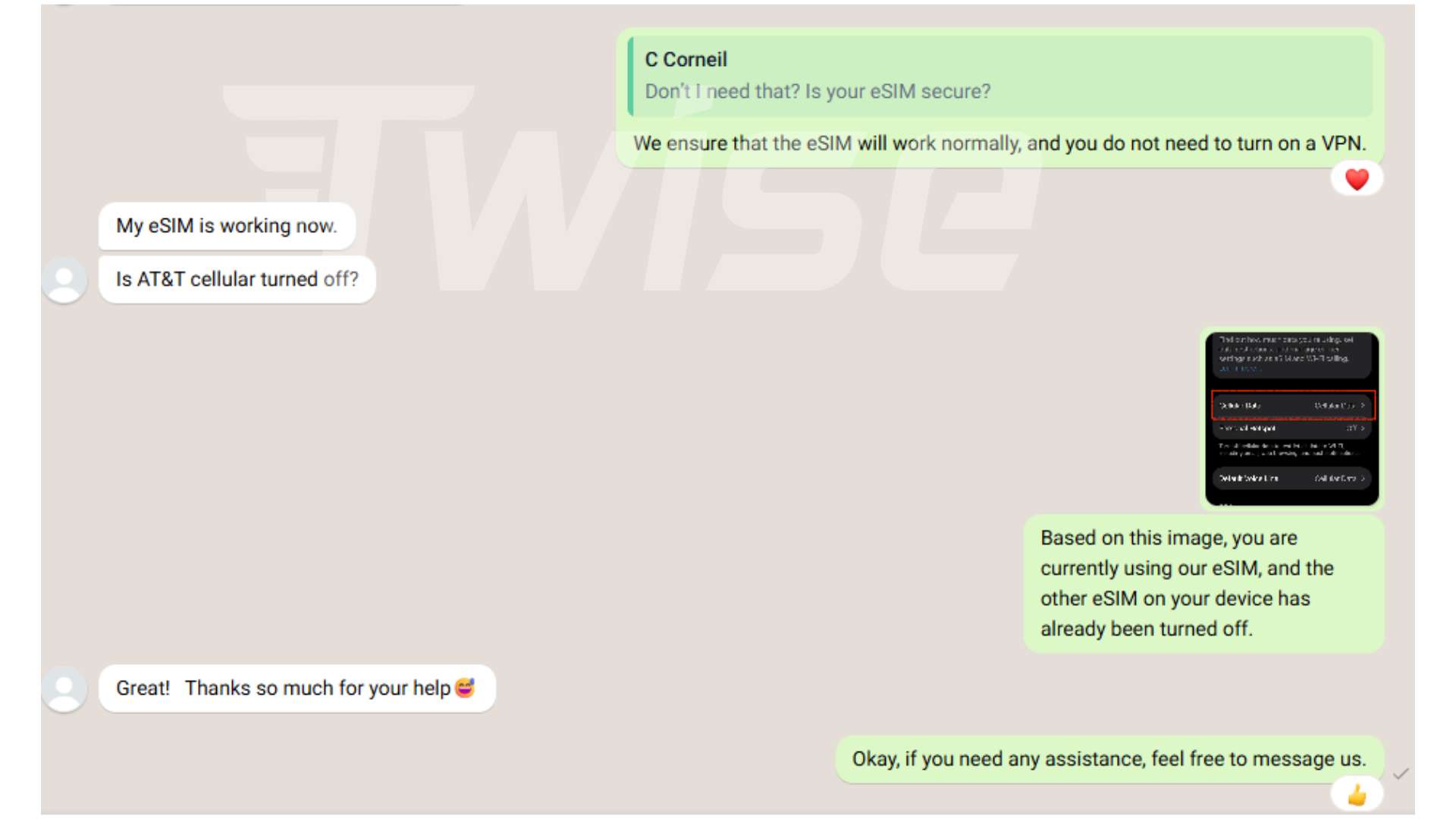
If the screen shows No SIM restrictions, the iPhone is generally unlocked. If it displays a carrier name or another restriction, contact the carrier that supplied the phone.
Menu wording can vary by iOS version and region. If the lock field is missing or unclear, ask the original carrier to verify the device using its IMEI.
On Android
Android lock-status menus vary by manufacturer, model and carrier. Start by checking:
Settings → Connections or Network & Internet → SIM Manager / SIMs / Mobile Network
Look for an option to add an eSIM or another mobile plan. However, seeing this option only confirms eSIM support; it does not prove that the phone is carrier-unlocked.
For a reliable answer:
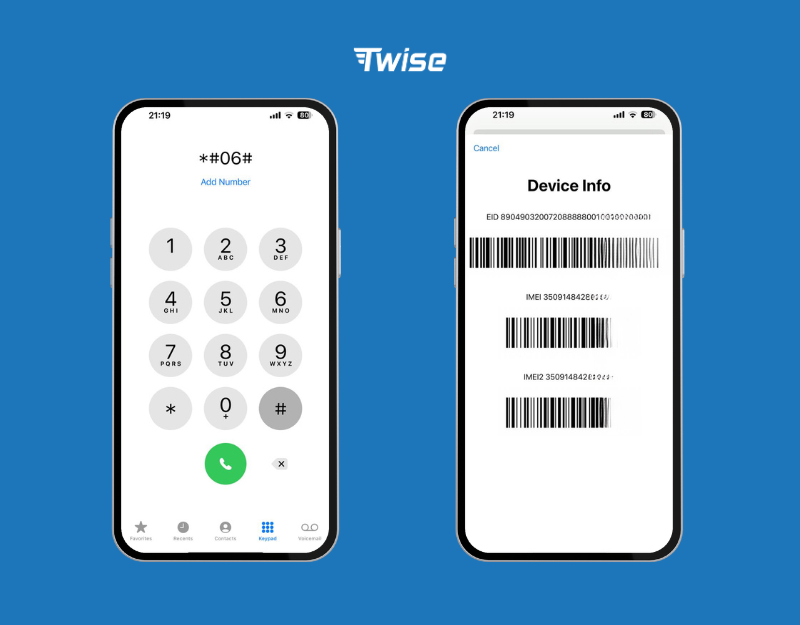
- Find the IMEI under Settings → About phone, or dial *#06# where supported.
- Contact the carrier that originally sold or financed the phone.
- Ask whether the device is network-unlocked and eligible to use another carrier’s eSIM.
Do not rely solely on third-party IMEI-checking websites, as their lock information may be incomplete or outdated.
Other Details to Check Before Trying Again
- Use stable Wi-Fi: The phone needs internet access to download and verify the eSIM profile.
- Contact the original carrier: Twise and the destination network cannot remove a lock applied by the home carrier.
- Confirm unlock eligibility: Some carriers require the phone to be fully paid, the account to be in good standing or a minimum service period to be completed.
- Wait for confirmation: A submitted unlock request does not always take effect immediately. Follow the carrier’s instructions and restart the phone if requested.
- Check eSIM compatibility: An unlocked phone must still support eSIM and the required destination-network bands.
- Avoid repeated scans: Some eSIM QR codes are single-use. Do not repeatedly scan, delete or transfer a profile without support guidance.
- Prepare a backup: Keep offline maps, accommodation details and another connection option available until the eSIM is working.
The Key Lesson From This Experience
An eSIM-compatible phone is not automatically an unlocked phone.
The customer’s QR code was not the underlying problem. The device’s carrier restriction prevented it from accepting a plan from another network. By checking the lock status first, Twise identified the actual cause and directed the customer to the only party authorized to resolve it: the original carrier.
Before buying a travel eSIM, confirm that your phone supports eSIM, is carrier-unlocked and will be connected to stable Wi-Fi during installation. Completing these checks before departure reduces the risk of arriving without mobile data.
Why Buy Your Travel eSIM From Twise?
- 24/7 technical assistance: Twise support is available across time zones to help diagnose installation, activation and connectivity issues.
- Reliable device checks: We help customers review eSIM compatibility and carrier-lock indicators before unnecessary troubleshooting steps are taken.
- Global network partnerships: Twise works with established network partners to provide dependable travel-data options across multiple destinations.
- Delivery within 60 seconds: After successful payment and order processing, eSIM details are typically delivered by email within 60 seconds, so customers can prepare before departure.
- Secure data handling: Customer information is handled using security and privacy practices designed to protect personal data throughout the order and support process.
- Secure Stripe payments: Payments are processed through Stripe, with support for major international cards and eligible digital wallets.
- Clear technical guidance: If an issue comes from a device restriction rather than the eSIM, our team explains the cause and the correct next step.
- Transparent warranty terms: Free replacement may be provided for verified technical defects. Device incompatibility, carrier locks and undisclosed regional restrictions are not covered.
Twise cannot unlock a carrier-locked phone, but our support team can help identify the issue before you lose time on ineffective troubleshooting.
Visit Twise to choose a travel eSIM for your destination. Before purchasing, confirm that your device is eSIM-compatible and carrier-unlocked. If you are unsure, contact Twise support for a device check.

More Helpful Case for Your International Journey
- A QR Code Error Nearly Disrupted Y Nhi’s Japan Trip
- T-Mobile USA eSIM | Unlimited Data Plans for Travelers
- How an Old T-Mobile eSIM Blocked Astrid’s New Plan
- Full Signal, Zero Internet: Daniel’s SoftBank eSIM Problem in Japan
