

How an Old T-Mobile eSIM Blocked Astrid’s New Plan
Aug
Warning: Turning off an Old T-Mobile eSIM does not remove its profile. In some activations, leaving an old T-Mobile profile on the device can conflict with a newly assigned T-Mobile eSIM. Delete only the confirmed expired profile—never the new eSIM—unless support instructs you to do so.
Astrid purchased a new local T-Mobile eSIM from Twise for an upcoming trip to the United States. The plan was assigned to the phone using its IMEI and EID, but the Astrid could not add or activate it.
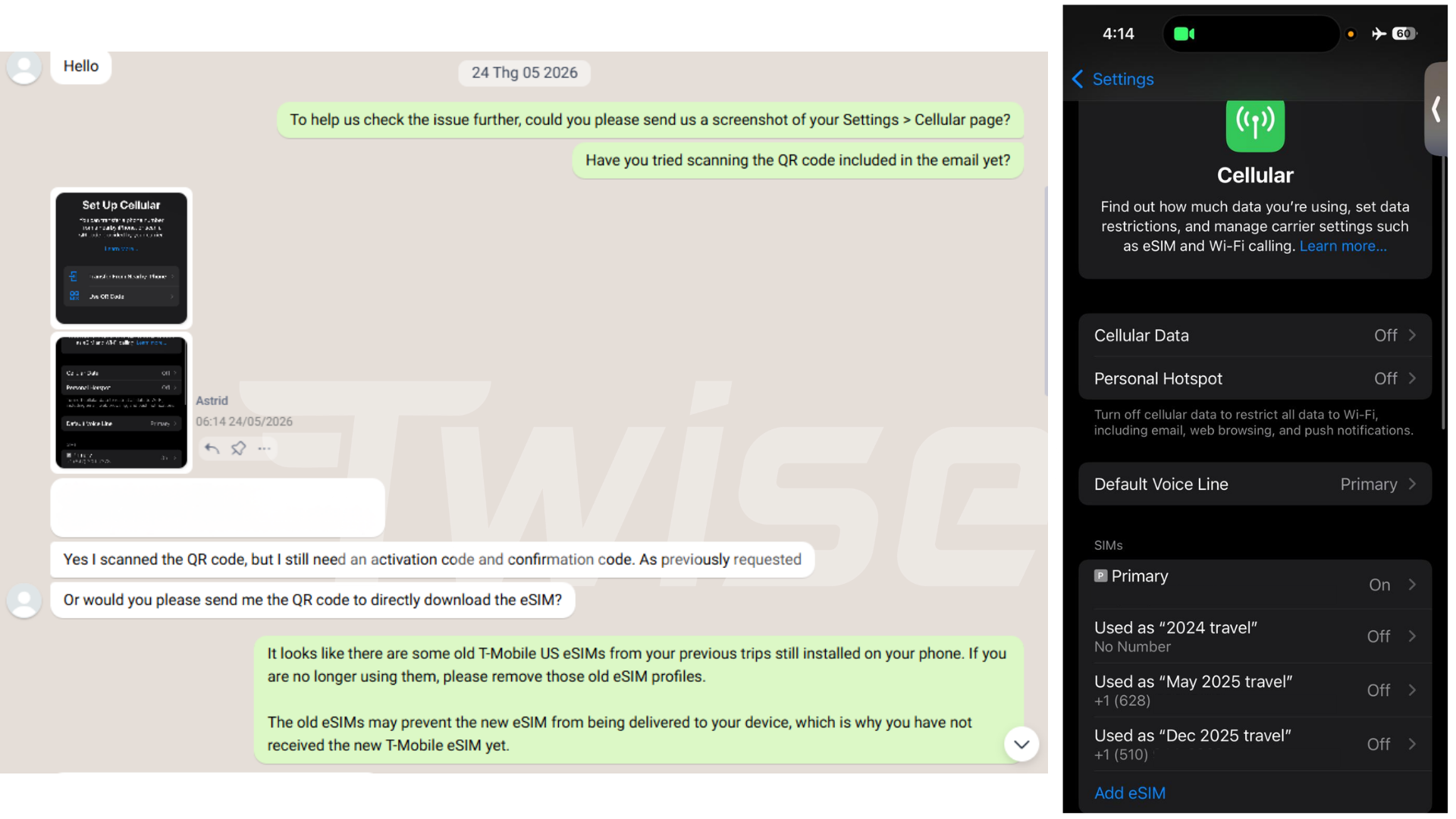
The phone still contained an old T-Mobile travel eSIM that had expired and was no longer used. Although the old line was turned off, its profile remained stored in the device’s cellular settings. This created a conflict when T-Mobile attempted to register the newly assigned line.
Twise identified the old profile, guided the Astrid through its safe removal and confirmed that it had been deleted. The support team then contacted the carrier to have the new T-Mobile eSIM reassigned to the device.
Why the New T-Mobile eSIM Could Not Register
Turning an eSIM line off is different from deleting its profile.
When an eSIM is switched off, its carrier credentials remain stored in the phone’s secure eSIM system. The line is inactive for everyday use, but the device can still present the existing profile during network provisioning.
For this Astrid’s activation, T-Mobile’s provisioning system detected the previous T-Mobile profile and could not complete registration of the new assignment on the same device. Restarting the phone, switching Airplane Mode on and off or rescanning the activation details could not remove that profile-level conflict.
This does not mean every phone is physically incapable of storing more than one T-Mobile profile. However, certain T-Mobile eSIM products and provisioning workflows do not support the old and newly assigned profiles remaining associated with the device during registration. The expired profile therefore had to be removed before the new line could be reassigned successfully.
How Twise Resolved the Activation Issue
Twise used the following troubleshooting process:
- Reviewed the activation failure: Support confirmed that the new T-Mobile eSIM could not complete registration.
- Checked the device information: The submitted IMEI and EID were matched with the phone intended for use in the United States.
- Inspected installed mobile plans: The customer was asked to review every profile listed in Cellular or SIM Manager.
- Identified the conflict: An expired T-Mobile travel eSIM was still stored on the phone.
- Guided safe deletion: Twise helped the customer confirm and delete only the old, unused T-Mobile profile.
- Confirmed the device was ready: The customer verified that the expired profile no longer appeared in the phone’s settings.
- Requested reassignment: Twise contacted the carrier and arranged for the new T-Mobile eSIM to be reassigned to the correct IMEI and EID.
This sequence was important. Deleting the wrong profile—especially a newly issued eSIM—could require additional carrier support or another reassignment.
How to Check and Delete an Old T-Mobile eSIM Safely
Before deleting anything, identify the expired T-Mobile profile using its label, phone number, activation date or previous order details. If you cannot distinguish the old profile from the new one, stop and contact Twise.
On iPhone
- Open Settings.
- Tap Cellular or Mobile Service.
- Review the plans listed under SIMs or Cellular Plans.
- Select the confirmed expired T-Mobile profile.
- Tap Delete eSIM or Remove Cellular Plan.
- Confirm the deletion and check that the old profile has disappeared.
Menu wording may vary by iOS version and region.
On Android
- Open Settings.
- Go to Connections, Network & Internet or a similar network menu.
- Tap SIM Manager, SIMs or Mobile Network.
- Select the confirmed expired T-Mobile eSIM.
- Choose Remove, Delete eSIM or Erase SIM.
- Confirm the deletion and verify that the old plan is no longer listed.
Android menus vary by manufacturer and software version. Samsung, Google Pixel and other devices may use different labels.
Important: Delete only the T-Mobile eSIM that has been confirmed as expired and no longer needed. Do not delete the newly assigned eSIM while troubleshooting. Many eSIM activations cannot simply be downloaded again without support.
Other Technical Details to Check
Confirm the IMEI and EID
The IMEI and EID submitted for activation must belong to the exact phone the customer will use in the United States. Details from a secondary or previous device can cause assignment failure.
On most phones, these identifiers appear under Settings → About. On supported devices, dialing *#06# may also display them.
Use Stable Wi-Fi
Keep the phone connected to reliable Wi-Fi while downloading or registering the eSIM. Weak or interrupted internet access can cause a separate installation error even after the old-profile conflict is resolved.
Confirm Device Eligibility
The phone must support eSIM and be carrier-unlocked. Removing an old profile will not solve an incompatibility or network lock imposed by the home carrier.
Choose the Activation Date Carefully
For a scheduled local U.S. plan, validity may begin on the registered activation date even if the customer has not arrived in the United States or has left the line turned off. Confirm the date before Twise submits the activation request.
Avoid Home-SIM Roaming Charges
After the T-Mobile eSIM connects:
- Select the T-Mobile line for cellular data.
- Turn off data roaming on the home SIM.
- Disable cellular-data switching.
- Check the default lines for calls and messages.
The home SIM may remain enabled for verification messages, but it should not use cellular data unless the customer’s home plan includes U.S. roaming.
The Lesson From This Case
An expired eSIM can still affect a new activation when its profile remains stored on the device.
The customer had stopped using the previous T-Mobile line, but turning it off was not enough. Once Twise identified and removed the old profile, the carrier could reassign the new eSIM to the correct device.
Before activating a new local T-Mobile eSIM, review installed mobile plans, confirm the IMEI and EID, and remove only profiles that are verified as expired. If the plans are difficult to distinguish, contact Twise before deleting anything.
Why Buy a USA eSIM From Twise?
- Direct U.S. network partnerships: Twise works with leading U.S. carriers such as T-Mobile and AT&T to provide stable connectivity and broad coverage.
- Plans for different travel needs: Customers can choose from local calling plans, unlimited options and cost-effective data packages for short or extended stays.
- Delivery within 60 seconds: After successful payment and order processing, eSIM details are typically delivered by email within 60 seconds.
- Professional activation support: Twise supports scheduled activation and local U.S. number assignment, helping service begin when the traveler needs it.
- 24/7 technical assistance: Support is available across time zones to diagnose installation, registration and connectivity problems.
- Reliable device checks: The team can review eSIM compatibility, carrier-lock status, IMEI/EID details and existing-profile conflicts.
- Secure data handling: Customer information is managed using security and privacy practices designed to protect personal data.
- Secure Stripe payments: Stripe processes payments and supports major international cards and eligible digital wallets.
- Transparent warranty: Twise provides free replacement for verified eSIM technical defects. The warranty does not cover device incompatibility, carrier locks, incorrect device information, undisclosed regional restrictions or deletion of a working profile without support guidance.
Visit Twise to choose a USA eSIM for your trip. Before activation, check your existing mobile plans and contact Twise if an old T-Mobile profile is still installed. Our support team can help you identify the correct profile before any deletion takes place.

More Helpful Case for Your International Journey
- Why a Carrier-Locked Phone Blocked a C Corneil’s Travel eSIM
- T-Mobile USA eSIM | Unlimited Data Plans for Travelers
- Full Signal, Zero Internet: Daniel’s SoftBank eSIM Problem in Japan
- A QR Code Error Nearly Disrupted Y Nhi’s Japan Trip
