

How to Turn Off eSIM Without Deleting – Best Tips

Sep
To turn off eSIM service without deleting the profile, open your phone’s cellular settings, select the correct line, and disable its line switch. On iPhone, turn off “Turn On This Line.” On Android, look for “Use SIM” or the switch beside the plan in SIM Manager. The profile remains installed, allowing you to enable it again when needed. However, switching off a line does not normally pause its validity, cancel a subscription, or stop recurring charges. This guide explains the difference between disabling and deleting, with practical steps for iPhone, Samsung Galaxy, and Google Pixel before and after international travel.
What Is an eSIM?
An eSIM is a digital SIM built into a compatible device. Instead of inserting a physical card, you download a subscription profile containing the information your phone needs to access an authorized mobile network.
Depending on the package, that subscription may include:
- Mobile data
- A phone number
- Voice calls
- SMS
- Coverage in one country or several destinations
The installed profile and the purchased allowance are related but separate. A profile can remain on your phone after its data or validity expires. Keeping it installed does not automatically make it reusable.
With a travel eSIM, you can manage the travel subscription separately from your home number on a compatible Dual SIM phone.
For example, after returning home, you might disable Europe Travel and select Home for mobile data. The travel profile stays stored, but it no longer supplies service while disabled.
This is useful when you want to stop using a line temporarily without risking the loss of its installation credentials.
How eSIMs Work
Your phone downloads the profile during installation. When the line is enabled, the device can attempt to register with a supported network.
To use mobile data, the subscription must also have an eligible active package, usable coverage, and appropriate settings.
Four states are worth distinguishing:
- Installed: The profile is stored on the device.
- Enabled: The phone is allowed to use that line.
- Connected: The line has registered with a supported network.
- Plan active: The provider’s package is within its validity and usage conditions.
An installed profile can be disabled. An enabled line can have no service. A valid package can continue counting down while its line is switched off.
What happens when you disable the line?
While disabled, that eSIM no longer provides ordinary cellular data, calls, or SMS on the device. Another enabled SIM or Wi-Fi can still provide connectivity.
Messages and calls to the disabled number follow the carrier’s handling rules. Calls may go to voicemail; delivery of queued SMS after re-enabling is not guaranteed indefinitely.
Internet apps are different. WhatsApp, email, and other signed-in services can generally continue over Wi-Fi or another data line. They do not necessarily need the SIM associated with the account’s number to remain enabled for everyday use. However, account verification may require access to that number again.
Before switching off your home line abroad, check whether you need banking codes or an important call.
When should you switch a travel line off?
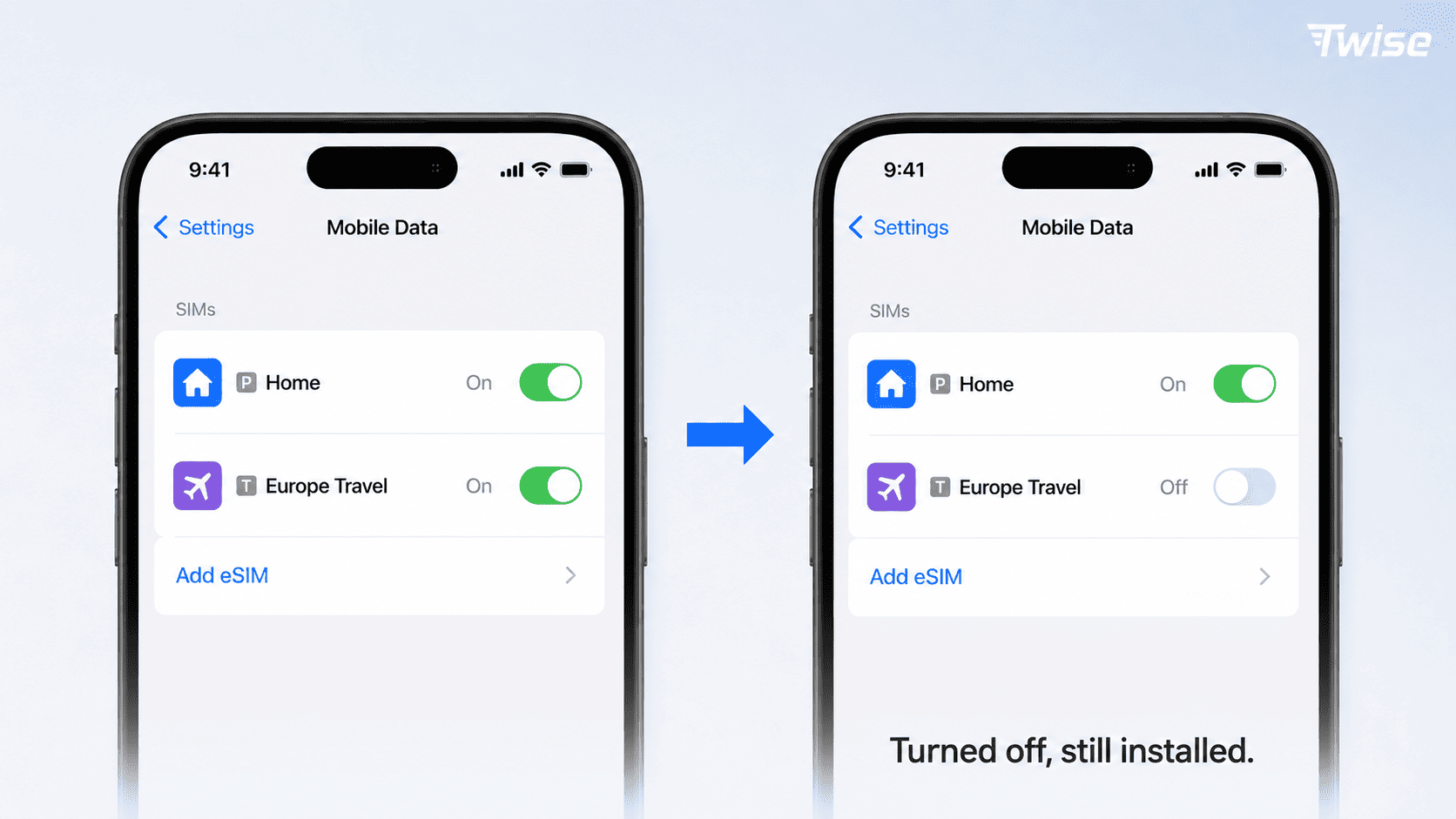
Common situations include:
- Returning home after a trip
- Leaving the plan’s supported region
- Storing a profile before departure, where advance installation is allowed
- Switching to another destination package
- Temporarily disabling an unnecessary second line
- Troubleshooting under the provider’s guidance
For a future trip, compare USA plans or review Europe travel options against the itinerary. Do not assume an old stored profile includes a new allowance or supports every upcoming destination.
How to Turn Off eSIM Without Deleting
Deleting Vs. Turning Off Your eSIM
Turning off an eSIM disables the line while keeping its profile installed. Deleting an eSIM removes the profile from the device.
Neither action should be confused with canceling a paid subscription.
| Action | Profile stays installed? | What changes? | Can you use it again? |
| Turn off the line | Yes | Service through that line stops on the device | Usually by enabling it, if the package remains usable |
| Select another data SIM | Yes | Mobile data uses a different line | The original line may still support calls and SMS |
| Turn off Data Roaming | Yes | Roaming data is restricted | Other services may remain available |
| Delete the eSIM | No | The downloaded profile is removed | Reinstallation or replacement depends on the provider |
| Cancel the subscription | May remain installed | The provider ends service according to its terms | May require a new purchase or subscription |
Explore Flexible Travel Connectivity
Apple advises against erasing an eSIM as a troubleshooting step unless the carrier directs it. It also explains that erasing the profile does not itself cancel the cellular plan. See Apple’s eSIM deletion guidance.
Before turning off any line
Take a moment to identify the correct profile and prepare an alternative connection.
- Connect to Wi-Fi if necessary.
- Check the line’s label.
- Compare the number or profile details with your order information if unclear.
- Confirm which line currently supplies mobile data.
- Decide whether another number must remain reachable.
- Select an appropriate replacement data line when needed.
Use descriptive labels such as Home, Work, or Japan Travel. A generic label like Secondary can become confusing after several trips.
Do not assume that the travel provider’s name will match the carrier name shown in Settings. The profile may display an underlying network or service partner.
How to turn off an eSIM on iPhone
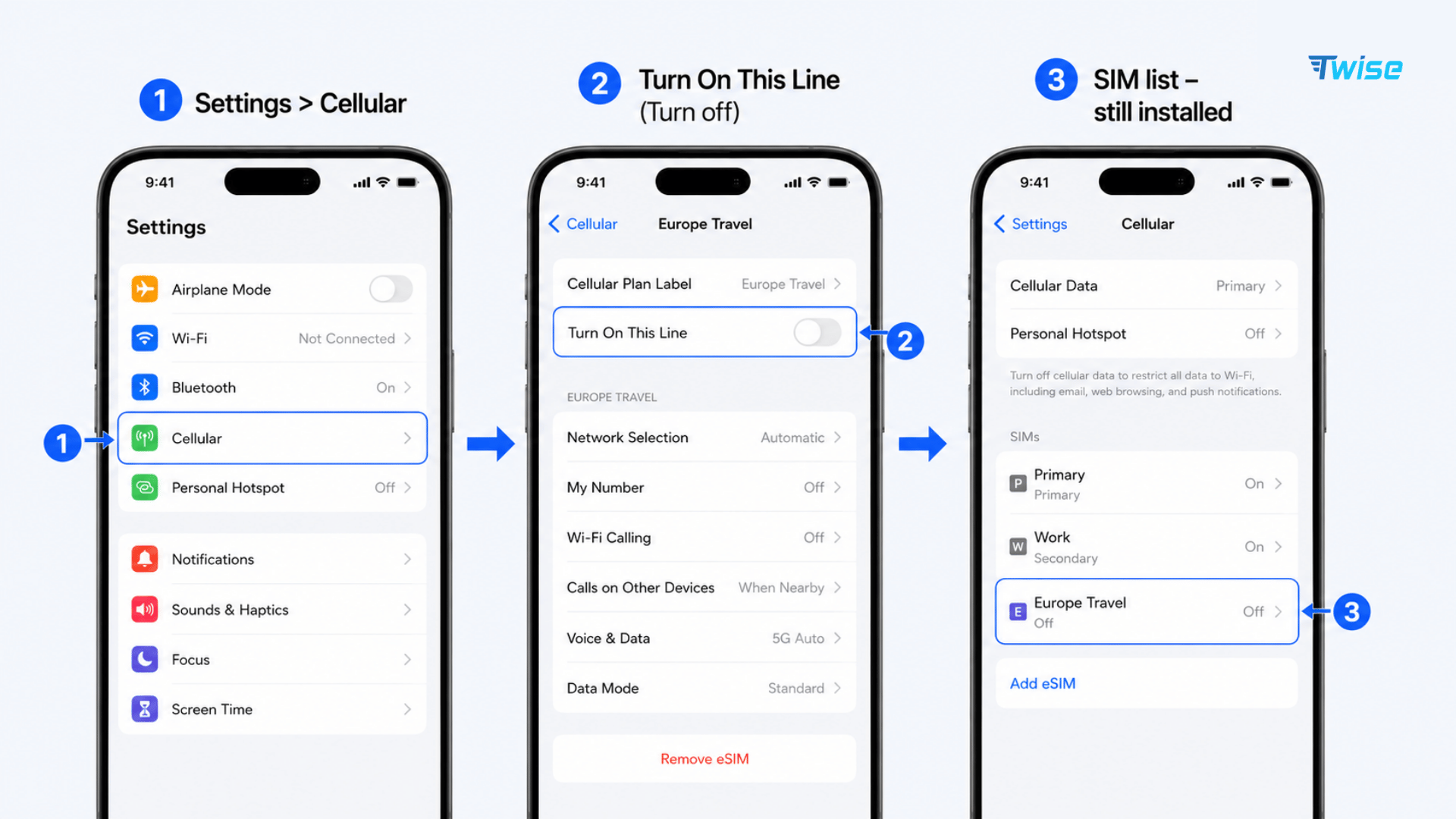
On an iPhone with the line controls available:
- Open Settings.
- Tap Cellular, Mobile Data, or Mobile Service.
- Under SIMs, select the eSIM you want to disable.
- Switch Turn On This Line off.
- Return to the SIM list.
- Confirm that the profile remains listed but is off.
Do not tap Delete eSIM, Delete Plan, or Remove Cellular Plan. Those options remove the profile rather than temporarily disabling service.
If you still need mobile internet, open Cellular Data and select the appropriate enabled line. When abroad, check that this is not an unplanned switch to your home carrier’s roaming service.
Apple’s Dual SIM settings guide explains how to manage individual plans and choose the cellular data line.
If the switch is unavailable or the screen differs, check the device’s software and carrier instructions. Do not substitute the delete option simply because you cannot find the line switch.
How to turn off an eSIM on Samsung Galaxy
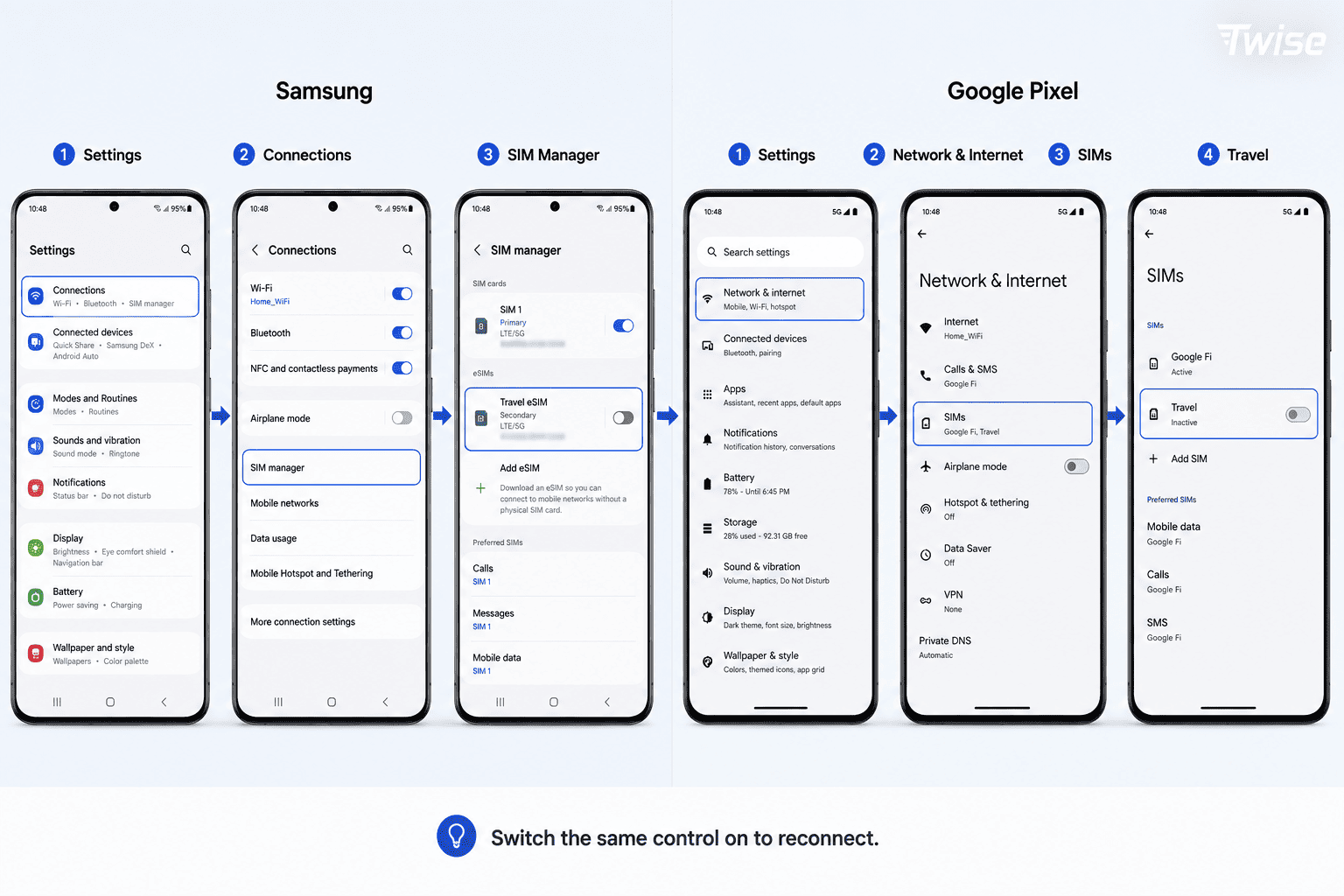
On compatible Samsung Galaxy devices, the control is usually in SIM Manager:
- Open Settings.
- Tap Connections.
- Select SIM Manager.
- Find the relevant eSIM.
- Switch the line off, opening its details first if required.
- Confirm the change if prompted.
- Check that the eSIM still appears in the list.
Depending on the One UI version, the menu may be named SIM Card Manager.
Review the preferred SIM for mobile data, calls, and messages afterward. If the disabled line was your data connection, the phone may ask you to choose another one.
Avoid selecting Remove when your intention is only to stop using the line temporarily.
How to turn off an eSIM on Google Pixel
On Google Pixel, the usual path is:
- Open Settings.
- Tap Network & Internet.
- Open SIMs or Mobile Network.
- Select the eSIM.
- Turn Use SIM or Use this SIM off.
- Confirm if prompted.
Google distinguishes temporarily turning off a SIM from selecting Erase eSIM in its Pixel Dual SIM instructions.
Other Android manufacturers may use different labels. Search Settings for SIMs, SIM Manager, or Mobile Network, then look for the line’s enable/disable control.
How to confirm the eSIM is off, not deleted
The most useful check is the SIM settings screen, not signal bars alone.
A disabled profile should remain listed, with its switch off or an inactive status. You should be able to open its settings and find the option to enable it again.
“No Service” is not proof that the line is disabled. It can also indicate missing coverage, an expired package, or incomplete activation.
If the profile has disappeared completely, check whether it was removed rather than disabled. Contact the provider before trying the original QR code again.
How to turn the eSIM back on
Return to the same settings menu and enable the line switch.
Then:
- Confirm that you are in a supported destination.
- Check that the package is still valid.
- Select the line for mobile data if needed.
- Enable Data Roaming only if the provider requires it.
- Allow time for network registration.
- Temporarily disconnect Wi-Fi and test a webpage.
Turning the line back on is not the same as buying a new plan. If validity has expired, a top-up, renewal, or new profile may be required.
If it does not connect, check the provider’s activation and APN instructions. Avoid repeated deletion and reinstallation.
Does turning off the line pause validity or charges?
Usually, no. Device settings control whether the phone uses the line, not how the provider measures the package.
| Question | Typical result |
| Does validity stop counting down? | No, unless the provider explicitly offers a pause feature |
| Does unused data disappear immediately? | Not simply because the line is disabled, but it remains subject to expiration |
| Does a monthly subscription stop billing? | No; cancellation must follow the provider’s process |
| Does the phone use data through the disabled line? | No |
| Can another enabled line create charges? | Yes, according to its own plan and settings |
| Does enabling it restore an expired package? | No |
For example, switching off a seven-day package on day three does not normally preserve four days for next month. Its expiration schedule generally continues.
Similarly, disabling a work subscription for the weekend does not suspend the monthly bill.
When should you delete instead?
Deletion may be appropriate when the provider confirms that a profile is permanently finished, after a successful transfer to another device, or while preparing a phone for sale or trade-in.
Before removing it, verify:
- You selected the correct profile.
- No remaining service is needed.
- Any number transfer is complete.
- You understand the reinstall restrictions.
- Recurring billing has been handled separately.
For an ordinary break between uses, switching off is the less disruptive choice. Keeping the profile does not guarantee future reuse, but it avoids removing credentials prematurely.
About Twise eSIM
Reliable mobile data from arrival helps with airport transport, maps, and booking messages. A Twise eSIM can provide travel connectivity without inserting a physical SIM, while a compatible Dual SIM setup lets you keep your home line active when needed. After the trip, you can switch off the travel line without immediately deleting its profile.
Check the individual package’s features and reuse conditions:
- USA local eSIM: T-Mobile or AT&T options with calls and SMS, useful when you need a travel number before switching back to your home line.
- Europe eSIM: Options covering major European destinations with calls and SMS; confirm coverage before disabling or replacing a regional line.
- Japan local eSIM: Local carrier-network options for maps and train searches; keep the installed profile if you still need it during the current trip.
- South Korea local eSIM: Local-network options with strong urban and public-transport coverage, useful for navigation and communication before switching back after departure.
Confirm eSIM compatibility and carrier-unlocked status. On iPhone, check Settings → General → About → Carrier Lock → “No SIM Restrictions.”
Compare data allowance, validity, and hotspot policy with your usage. Keeping the home line active may still create carrier charges, and storing a travel profile does not extend its package.
Frequently Asked Questions
Yes. Disable the line in cellular settings rather than choosing Delete, Remove, or Erase eSIM. The profile stays installed for later use, subject to the provider’s service conditions.
Normally, yes, if the profile remains installed. Re-enable the same line. An expired or canceled package still needs the appropriate renewal or replacement.
No. Turning off mobile data can leave the subscription available for calls and SMS. Disabling the whole line stops ordinary cellular service through that subscription on the device.
Not through that disabled line on the phone. Keep the required subscription enabled if you need SMS codes, and check your carrier’s international service conditions.
Usually, yes, through Wi-Fi or another mobile data line while you remain signed in. Re-registration or account recovery may require access to your registered number.
It stops the phone from using that line, but another enabled subscription may still incur charges. Existing fees and recurring subscriptions are not canceled by the switch.
Yes, on a supported configuration. Select the travel plan for data, then disable the home line. You will lose ordinary calls and SMS to the home number while it is off.
It may help if an unnecessary line is searching for service. The effect varies with reception, device hardware, and usage; it is not a guaranteed battery-life improvement.
Menu names and available controls vary by device, software, and carrier configuration. Check the selected SIM’s settings and device support instructions. Do not delete the profile as a substitute.
Contact the provider with your order details. The original installation code may not be reusable, and replacement credentials may be necessary. Deletion does not itself cancel billing.
