

What Happens If I Delete My eSIM? Recovery and Best Travel Tips

Sep
What happens if I delete my eSIM? Your phone loses the installed profile and can no longer use that subscription for cellular data, calls, or texts until service is restored. However, deleting the profile does not automatically cancel your account, stop recurring charges, or erase your photos and apps. Recovery depends on the provider: you may need replacement credentials, an authorized reinstallation, or a new package. If you deleted it accidentally while traveling, connect to Wi-Fi and contact the provider before purchasing again. This guide explains what remains, what may be recoverable, and when switching the line off is safer.
What Happens If I Delete My eSIM?
Deleting an eSIM removes the downloaded subscription profile from your device. Without those credentials, the phone cannot connect through that line.
The removal affects that subscription, not the entire phone. Another installed SIM can still work, and Wi-Fi remains available.
The essential distinction is between the profile on your phone and the service managed by your provider. Removing one does not necessarily terminate the other.
What stops working, and what stays?
| Item | What happens after deletion? |
|---|---|
| Mobile data through that profile | Stops until the subscription is restored or replaced |
| Calls and SMS through that line | Become unavailable on the device |
| Another physical SIM or eSIM | Normally remains unaffected |
| Wi-Fi | Continues working |
| Photos, apps, and downloaded files | Remain on the phone |
| Provider account and order history | Generally remain available |
| Unused allowance | Recovery depends on the package and provider |
| Monthly billing or automatic renewal | Does not automatically stop |
| Phone number ownership | Depends on the underlying subscription, not deletion alone |
Explore Travel Connectivity Options
Apple explicitly separates deleting the profile from canceling the plan. Its eSIM removal guidance also advises against erasing an eSIM as a troubleshooting step unless directed by the carrier.
If the deleted profile was your only mobile connection, your immediate priority is another way to access the internet.
What to do immediately after accidental deletion
Follow this order:
- Connect to trusted Wi-Fi or a companion’s hotspot.
- Check the SIM list. Confirm that the profile is missing, not simply switched off.
- Keep other working lines intact. Do not erase additional profiles.
- Find the order confirmation. Save the package name and order reference.
- Contact the provider through its official support channel.
- Ask about recovery before buying another package.
Do not enable expensive home-carrier roaming automatically just to open a support page. Use it only if you understand the applicable rates or have a suitable roaming pass.
If you urgently need transport or hotel access, download the address, booking confirmation, and directions while connected to Wi-Fi.
Can I reinstall the deleted eSIM?
Sometimes, but there is no universal recovery method.
A provider may:
- Authorize reuse of the original installation code
- Supply a replacement QR code or installation link
- Reissue the subscription after verifying ownership
- Require a new package if replacement is unavailable
Many travel activation codes have installation restrictions. A saved screenshot of the QR code is therefore not a guarantee that it can be used again.
Avoid repeatedly scanning a rejected code. An “already used” message is a reason to contact support, not to factory-reset the phone.
If replacement credentials are issued, follow the provider’s instructions. Supported iPhone installation methods include QR codes, carrier links, apps, and manual details, as described in Apple’s eSIM setup guide.
Will I lose my remaining data or phone number?
Not necessarily, but neither can be promised without checking the subscription.
Unused data may remain recorded in the provider’s system. Whether it can be attached to a replacement profile depends on the product and recovery policy. Deletion does not normally restart or pause the validity period.
A permanent carrier number may be recoverable through account verification and replacement activation. A temporary travel number may have stricter expiration or replacement conditions.
Tell support whether preserving the number matters. This is particularly important if it receives banking codes or is linked to reservations.
Prepare:
- Order reference and purchasing email
- Phone model and current location
- Approximate deletion time
- Package name and validity
- ICCID, if previously saved or available in the order
- EID or IMEI only when requested through a trusted support channel
Keep identifiers and activation credentials out of public screenshots.
When and Why Delete an eSIM
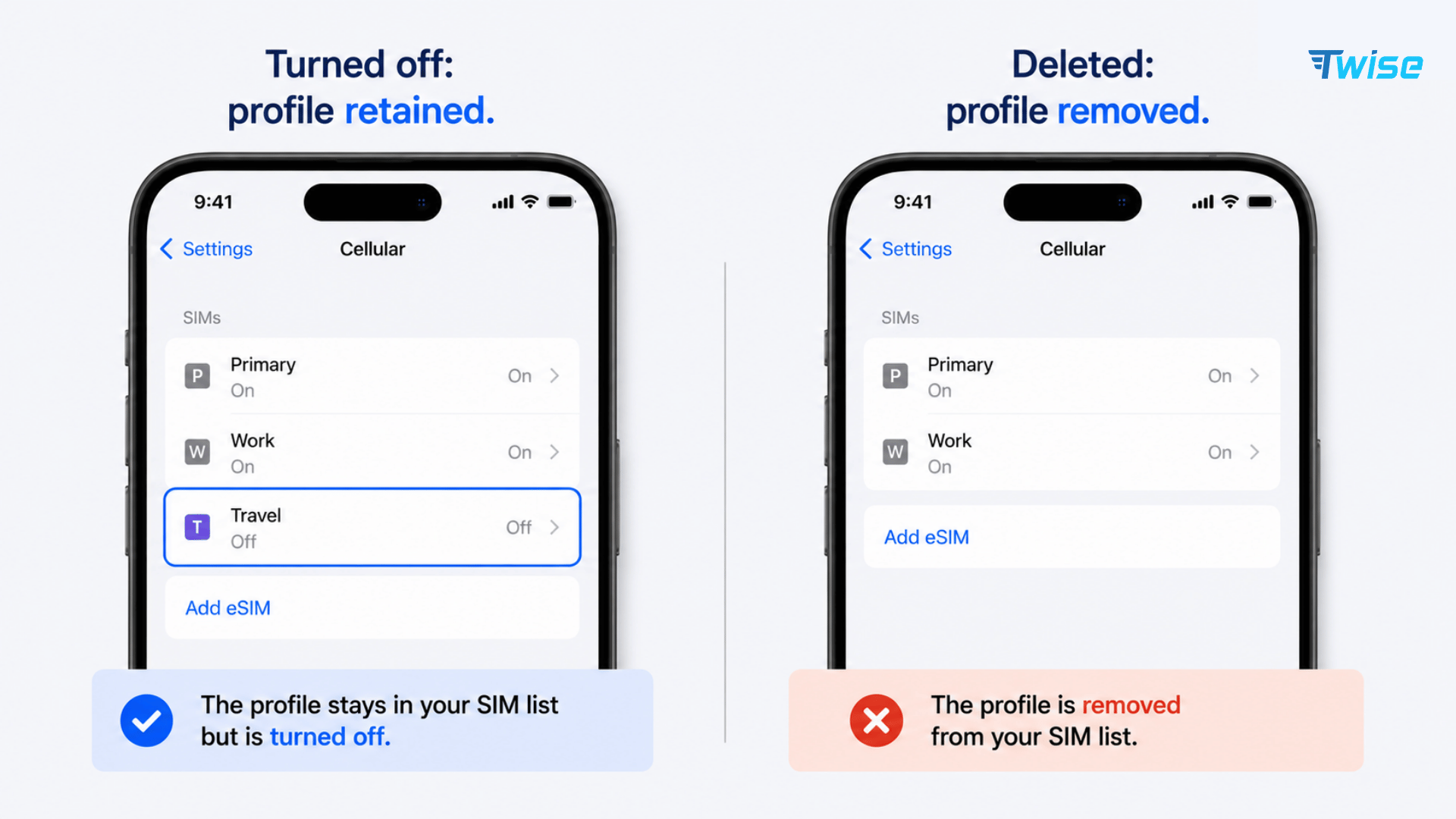
Delete a profile when you have confirmed that it is no longer needed or when removal is part of a verified device-transfer or handover process.
Returning from a trip is not, by itself, a reason to erase the travel line immediately.
When deletion makes sense
Removal may be appropriate when:
- The package is finished and cannot be renewed or reused.
- You have no further need for the subscription.
- A transfer to another phone has completed successfully.
- The provider instructs you to remove an obsolete profile.
- You are preparing the device for sale, trade-in, or permanent handover.
Before deleting an old profile, check whether renewal uses that same profile or requires a new installation. Products differ.
Keeping a travel eSIM installed does not guarantee future service, but switching it off preserves the profile while you confirm its status.
When you should not delete it
Do not erase the profile simply because:
- It displays No Service outside its coverage area.
- Mobile data is temporarily slow.
- You want to reduce battery use.
- You are leaving the country for a short side trip.
- You want to stop data usage overnight.
- You think deletion will pause the plan.
- A generic online troubleshooting checklist suggests it.
A line can be installed correctly but unable to register at your current location. Before considering removal, check coverage, activation, data balance, selected data line, and provider-specific roaming instructions.
For battery management or temporary disconnection, turning the line off is usually sufficient.
Check the next leg of your trip first
A regional plan may remain useful after you leave the first country. Conversely, a country-specific package may not cover your next stop.
If you are heading to America, compare USA plans against your next destination and remaining travel days. For a multi-country itinerary, review Europe options and confirm the exact country list.
Do not delete a functioning package until you know how the replacement will be installed and activated. Some replacement plans require internet access or a separate registration step.
For example, deleting a regional profile before boarding a train may leave you dependent on station Wi-Fi when you arrive. Disabling it temporarily preserves more options.
Before removing a profile permanently
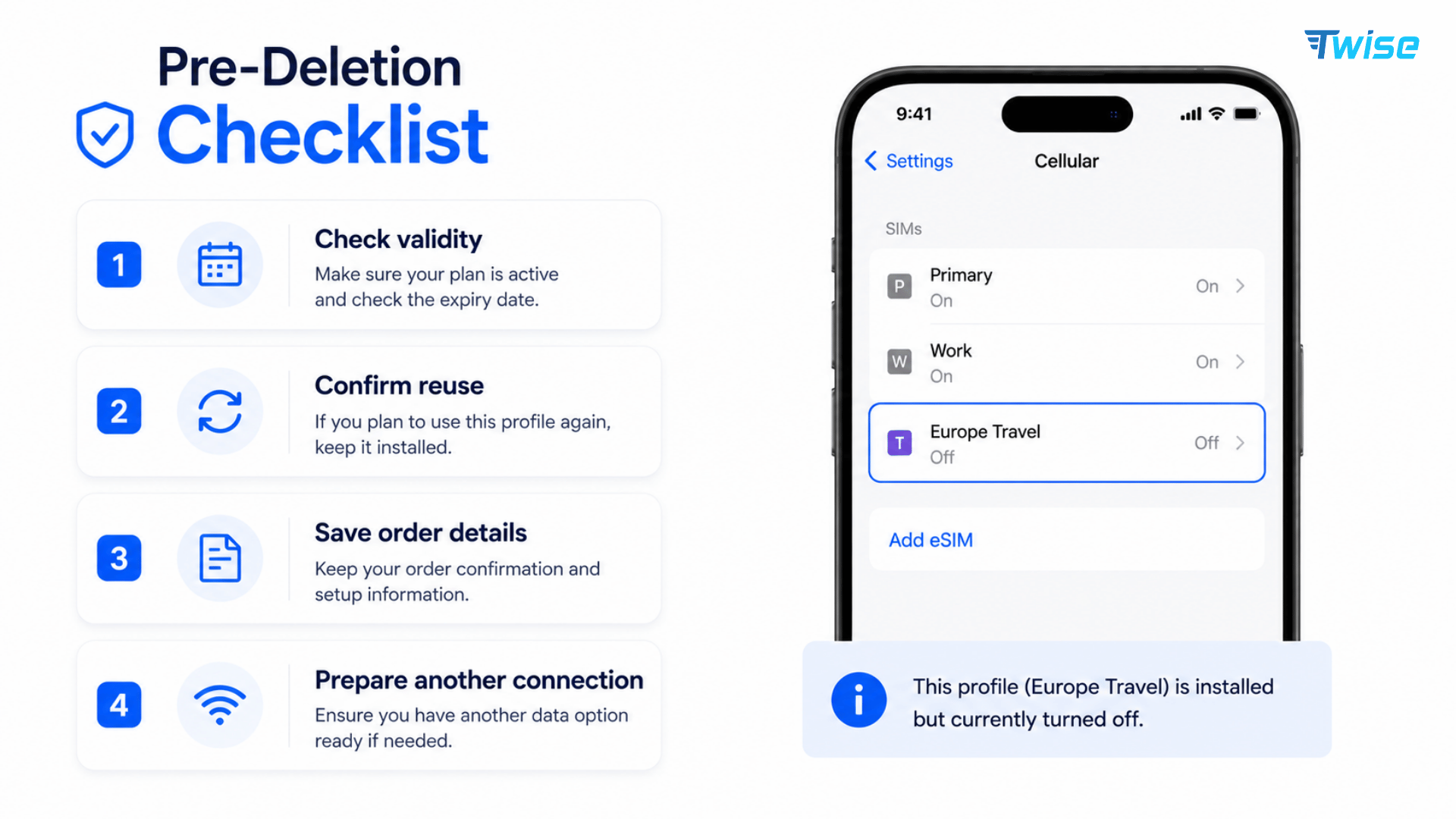
Use this short checklist:
- Confirm its label and subscription details.
- Check remaining data and validity.
- Ask whether renewal or reuse is possible.
- Verify that any number transfer has completed.
- Save the order reference and support correspondence.
- Arrange another connection.
- Handle cancellation or auto-renewal separately.
A provider app may continue showing the package after deletion because the account record still exists. That does not prove that the profile remains installed on the phone.
Likewise, restoring apps from a phone backup should not be treated as a guaranteed way to restore a deleted cellular subscription.
Selling or replacing your phone
Complete the carrier’s transfer process before removing a subscription you want to keep. Test the new device’s data and, where included, calls and SMS.
When handing over the old phone, follow the manufacturer’s full erase and account-removal procedure. Deleting only the eSIM does not remove your personal files or sign you out of your accounts.
If you erase a phone for your own troubleshooting, read the reset options carefully. Some devices offer separate choices for retaining or removing downloaded SIMs.
How to Deactivate an eSIM
For a temporary break, disable the line in your phone’s settings instead of deleting it.
Here, deactivate means switching the line off on the device. It does not mean canceling the subscription with the provider.
The profile stays installed, allowing you to enable it again if the service remains valid.
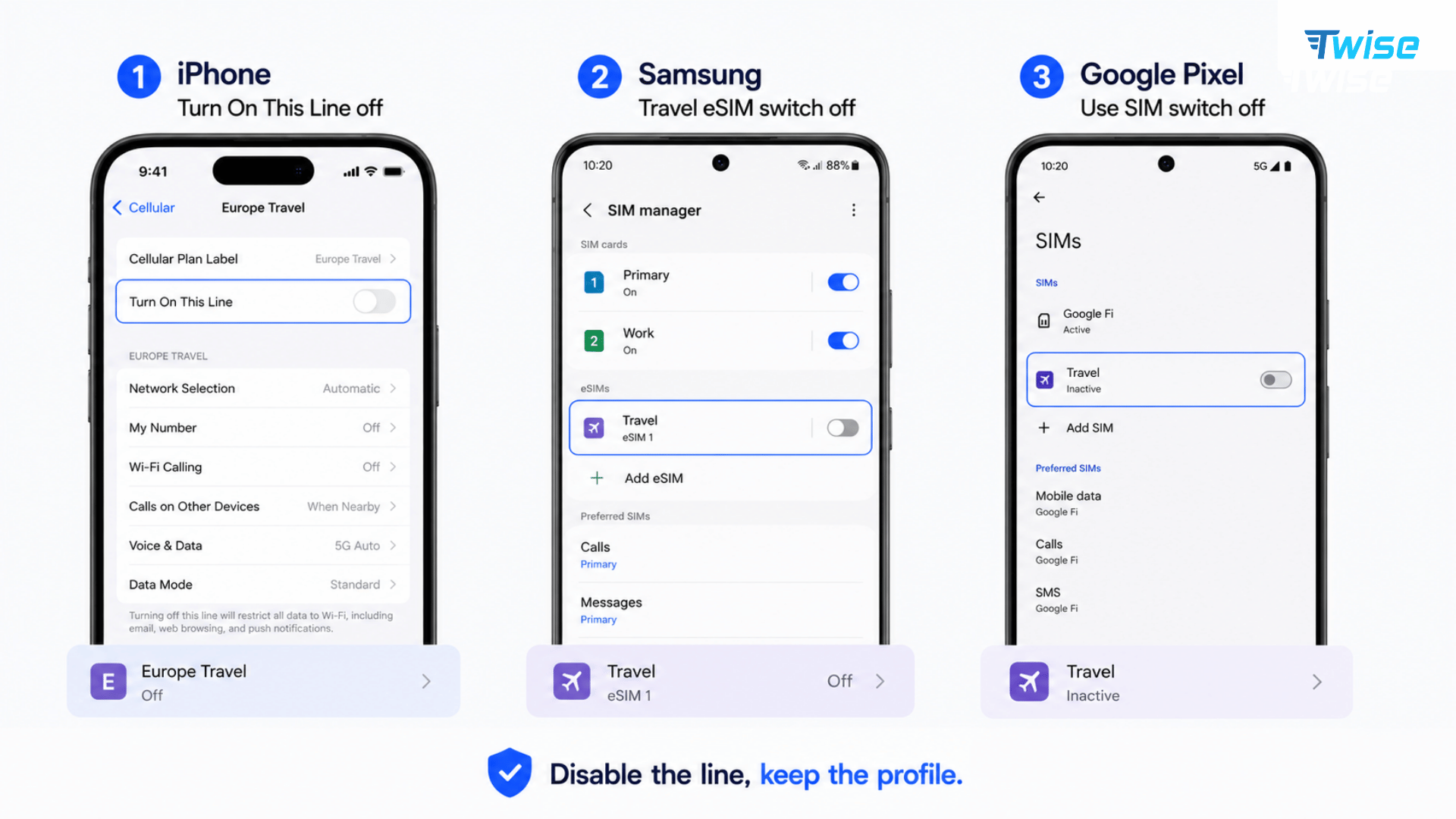
Turn off an eSIM on iPhone
- Open Settings.
- Tap Cellular, Mobile Data, or Mobile Service.
- Select the relevant line under SIMs.
- Switch Turn On This Line off.
- Return to the SIM list and confirm that the profile remains visible.
Avoid Delete eSIM, Delete Plan, or similar removal commands.
If the disabled line was supplying mobile data, select an appropriate replacement or remain on Wi-Fi. Check that the phone is not now using your home line at unwanted roaming rates.
Turn off an eSIM on Samsung Galaxy
On compatible Galaxy devices:
- Open Settings > Connections.
- Select SIM Manager or SIM Card Manager.
- Find the travel profile.
- Switch that line off, opening its details first if necessary.
- Confirm the change if prompted.
Leave the profile installed. Do not choose Remove when you only want to stop using it temporarily.
Menu wording varies by One UI version, device, and region.
Turn off an eSIM on Google Pixel
- Open Settings > Network & Internet.
- Open SIMs or Mobile Network.
- Select the subscription.
- Turn Use SIM or Use this SIM off.
Google distinguishes this temporary action from Erase eSIM in its Pixel Dual SIM guidance.
Afterward, review the default SIM for mobile data, calls, and texts. A disabled home line cannot receive ordinary SMS verification codes on the phone.
Understand what each setting actually does
| Action | Keeps the profile? | Pauses plan validity? | Cancels billing? |
|---|---|---|---|
| Turn the line off | Yes | Usually no | No |
| Turn Data Roaming off | Yes | No | No |
| Select another data line | Yes | No | No |
| Delete the profile | No | Usually no | No |
| Request cancellation | Profile may remain | Depends on provider terms | According to the cancellation terms |
Turning off Data Roaming is not equivalent to turning off the line. Calls and SMS may remain available, with charges governed by the carrier.
Similarly, a package that expires on Sunday generally still expires on Sunday even if you disable its line on Friday.
Turn the line back on when needed
Return to the same menu and enable the subscription.
Then check:
- You are within supported coverage.
- The package remains valid.
- Data allowance is available.
- The correct SIM is selected for mobile data.
- Data Roaming follows the provider’s instructions.
- Any required activation step is complete.
If it still does not connect, contact support before deleting anything. A disabled profile can be switched back on; an expired package may require renewal or replacement.
About Twise eSIM
A Twise eSIM helps you arrange mobile connectivity for arrival without inserting a physical SIM. On a compatible Dual SIM phone, you can use travel data while keeping your home line available for essential communication, subject to home-carrier charges.
Before deleting a finished travel profile, check its validity, reuse conditions, and whether another trip requires a separate package.
- USA local eSIM: T-Mobile or AT&T options with calls and SMS, useful when you need local communication as well as data during your stay.
- Europe eSIM: Options covering major European destinations with calls and SMS; verify your remaining itinerary before removing a regional profile.
- Japan local eSIM: Local carrier-network options for maps, booking messages, and train searches while traveling.
- South Korea local eSIM: Local-network options with strong urban and public-transport coverage for navigation and everyday communication.
Confirm eSIM compatibility and carrier unlock status before purchasing. On iPhone, check Settings → General → About → Carrier Lock → “No SIM Restrictions.”
Compare data allowance, validity, and hotspot policy with your usage. Replacement, top-up, and recovery conditions should be checked for the individual package rather than assumed.
Frequently Asked Questions
The phone loses access to that subscription through the deleted profile. Connect to Wi-Fi, confirm the profile is missing, and contact the provider about replacement or authorized reinstallation.
Possibly, but replacement availability and fees depend on the provider. Do not assume recovery is free or that a new purchase is always necessary.
Only if the provider permits reuse. Many codes have installation restrictions. Follow support instructions if the code is rejected or reported as already used.
No, not automatically. Contact the provider or use its account cancellation process to stop a recurring subscription or renewal.
Not necessarily. Removing the profile does not itself determine number ownership. Ask the carrier to restore an eligible subscription before canceling it or allowing it to expire.
Deleting the cellular profile alone does not erase phone files or chats. WhatsApp can generally continue over another internet connection, although future number verification may require restored access.
That depends on the package. Ask whether the original balance and expiration can be preserved. Neither a transfer nor an extension should be assumed.
Do not rely on a backup as the recovery method. Cellular-profile restoration or transfer requires provider and device support, separate from restoring ordinary apps and files.
Only after checking whether it is finished, reusable, or renewable. If you are unsure, switch the line off and retain the profile while confirming its status.
Use trusted Wi-Fi, a companion’s hotspot, or another available plan whose charges you understand. If recovery cannot meet your needs, consider temporary replacement service without assuming the original package is refundable.
