

IIJmio Network Bands Explained: Japan eSIM Compatibility
Sep
If you are considering a Japan eSIM that uses IIJmio, eSIM support is only the first compatibility check. Your phone should also be carrier-unlocked and compatible with the mobile network technologies used by the specific IIJmio service.
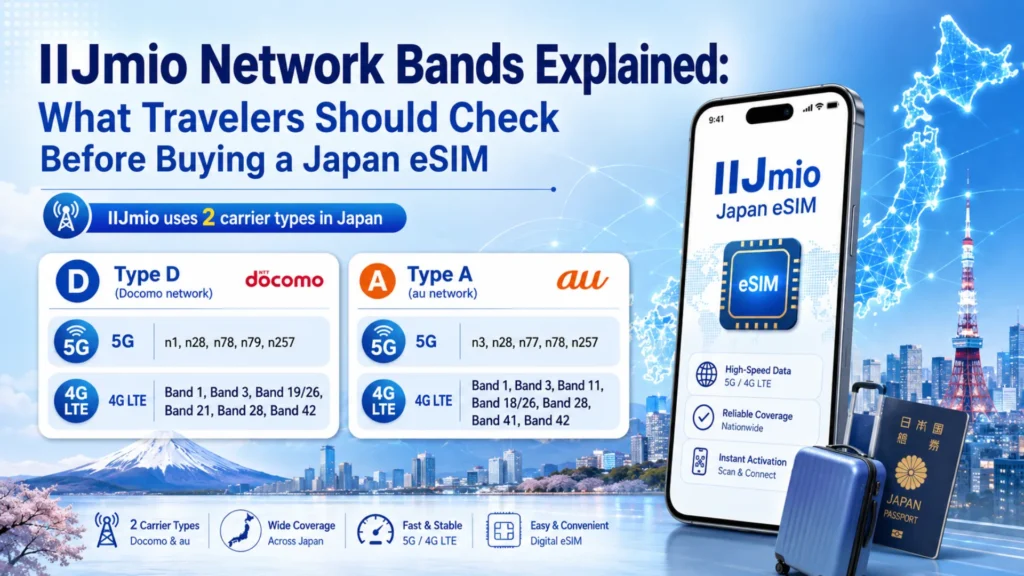
IIJmio is different from a facilities-based carrier with one nationwide radio network. Its official documentation says its mobile services use either Type D on the NTT Docomo network or Type A on the au/KDDI network. Its data eSIM is provided on the Docomo network.
Most recent mainstream iPhones, Galaxy flagships, and Pixel phones support broad ranges of Japanese LTE and 5G bands. Older phones, regional variants, imported devices, and carrier-locked models should be checked more carefully.
This guide explains what “IIJmio network bands” actually means, how host-network compatibility differs from eSIM support, and what to verify before choosing a Japan eSIM.
Already checked your phone? Compare Japan eSIM plans.
What Are Network Bands and Why Do They Matter?
Mobile networks use different portions of radio spectrum, usually described as LTE or 5G bands. Your phone’s modem and antennas need to support the relevant network technology for the service you want to use.
eSIM support means your phone can store and use a digital SIM profile. Network-band support means your phone’s hardware can connect to the mobile frequencies used by the carrier.
These requirements are related, but they are not the same.
A phone may be able to download an IIJmio eSIM profile while supporting fewer of the radio bands available on the underlying Docomo or au network. IIJmio therefore advises users to check the frequency support of their individual devices and maintains a tested-device database for its services.
This matters especially with regional or imported models. Apple likewise advises international eSIM users to check both whether the phone is unlocked and whether its cellular bands are compatible with the country and service being used.
Twise note: Travelers sometimes confirm that their phone has an “Add eSIM” option but forget to check its regional model or carrier-lock status. If an installed eSIM does not connect, the cause may instead be the APN, selected mobile-data line, network selection, activation state, or another setup issue. IIJmio itself requires users to check supported devices and notes that a SIM-locked device may need to be unlocked.
IIJmio Network Bands: What Travelers Should Know
The most important technical point is that there is no single universal IIJmio frequency list independent of its host networks.
IIJmio states that the frequencies used by its Giga Plan and mio Mobile services correspond to NTT Docomo’s 5G/4G network for Type D or au’s 5G/4G network for Type A. Its current official band table, updated in July 2026 with network information checked June 29, 2026, lists the following.
| Network layer | What travelers should understand |
| Type D — LTE/4G | Uses the Docomo network. IIJmio lists Bands 1, 3, 19/26, 21, 28 and 42. |
| Type D — 5G | IIJmio lists n1, n28, n78, n79 and n257. Whether a specific IIJmio product can use 5G is a separate plan-level question. |
| Type A — LTE/4G | Uses the au/KDDI network. IIJmio lists Bands 1, 3, 11, 18/26, 28, 41 and 42. |
| Type A — 5G | IIJmio lists n3, n28, n77, n78 and n257. |
| Lower-frequency bands | Docomo B19/26 and au B18/26 are examples of lower-frequency layers. Missing useful bands can leave a regional device with fewer network options. |
| Higher-frequency bands | B41/B42 and higher 5G spectrum add other coverage/capacity layers, but device and plan support varies. |
| Carrier aggregation | Modern host networks may combine radio carriers. Matching one band does not mean a phone supports every available aggregation combination. |
Date checked: August 18, 2026 | Sources checked: IIJmio official frequency, eSIM, 5G-option and device-compatibility documentation; Apple manufacturer support sources.
The band table is technical background, not a live engineering database. IIJmio itself says usable frequencies depend on the device and directs users to Docomo or KDDI for current network-area information.
There is also an important difference between network capability and plan capability. IIJmio currently says its Type D data eSIM on the Docomo network cannot use the 5G option, while eligible Type D voice eSIM and Type A voice eSIM services can use 5G on compatible devices.
IIJmio’s separate Japan Travel SIM range illustrates the same principle. Its current Unlimited product is listed as 5G/4G compatible, while its 3GB–55GB plans are listed as 4G LTE products.
A phone supporting one listed band therefore should never be described as guaranteed to work perfectly. Performance also depends on the exact device, host network, plan type, location, provisioning, congestion, and configuration.
eSIM Compatibility and IIJmio Network Compatibility Are Not the Same
There are really three questions to answer with IIJmio:
Can the phone install an eSIM?
Can the phone connect properly to the host network?
Does the selected IIJmio product support the network features you want?
IIJmio maintains a tested-device database specifically because compatibility varies by device and SIM/eSIM type. Its consumer information also tells users to verify that their phone is unlocked before bringing their own device.
Apple’s travel-eSIM guidance follows the same basic logic: the iPhone needs to be unlocked, the selected service must support eSIM, and cellular-band compatibility should be checked for the country where the phone will be used.
Think of eSIM as the digital-SIM part. Network compatibility is the can-this-phone-connect-well-to-the-host-network part. With IIJmio, the plan type adds another layer because Type D, Type A, voice eSIM, and data eSIM do not necessarily have identical capabilities.
Check whether your phone supports eSIM before choosing a plan.
How to Check If Your Phone Can Work with an IIJmio-Based Japan eSIM
1. Check Your Exact Phone Model
Do not stop at “iPhone 15,” “Galaxy S24,” or “Pixel 9.”
Find the exact model and regional variant. Then compare its LTE/5G specifications with the host network used by your IIJmio plan.
IIJmio recommends checking its tested-device list before signing up because device behavior can vary by service and SIM type.
2. Confirm Your Phone Supports eSIM
Look for Add eSIM, Add Cellular Plan, or a similar option under cellular/SIM settings.
Then confirm the exact model on the manufacturer’s specification page and IIJmio’s device database. IIJmio provides a dedicated filter for eSIM-tested devices.
You can also review Twise’s eSIM compatibility guide.
3. Make Sure Your Phone Is Carrier-Unlocked
eSIM capability does not override a carrier lock.
IIJmio says users bringing their own devices should confirm that the device is unlocked. On iPhone, Apple says Settings > General > About > Carrier Lock should display “No SIM restrictions” when the phone is unlocked.
If you are uncertain, contact the carrier that originally sold the phone before departure.
4. Check Your 4G/LTE and 5G Expectations
Travelers do not always need 5G.
LTE can comfortably support Google Maps, LINE, translation, train searches, hotel messages, ride-hailing, bookings, and ordinary browsing.
More importantly, 5G availability depends on the plan as well as the phone. IIJmio states that its Docomo-network data eSIM cannot use its 5G option, even though some other IIJmio Type D and Type A services can.
Never assume that owning a 5G phone turns an LTE-only plan into 5G service.
5. Check the Selected eSIM Plan’s Network and Terms
Determine whether the service uses Docomo/Type D or au/Type A and whether it is data-only or includes voice/SMS.
IIJmio’s English service information identifies its data eSIM as internet-only, without voice, SMS, or a phone number, while other IIJmio services can include different functions.
Check activation, validity, hotspot rules, APN requirements, data allowance, and speed/fair-use conditions before purchase.
Current product details override general information in this article.
Do Travelers Really Need 5G for a Japan eSIM?
Not always.
For normal travel use, LTE is enough for most day-to-day tasks.
| Traveler type | Is 5G essential? | What matters more |
| Maps + messaging | No | Compatibility and stable data |
| Social media | Usually no | Data allowance |
| Remote work | Helpful | Stability and hotspot support |
| Video streaming | Helpful | High-speed allowance |
| Short trip | Usually no | Setup and validity |
| Older phone user | No | LTE compatibility and unlock status |
IIJmio also notes that its current 5G service may share equipment with 4G LTE and that seeing a 5G indicator does not automatically guarantee a large speed improvement, particularly during congestion.
From a Twise support perspective, the more useful first question is:
“Will this work with my phone, cover my trip, and give me enough data?”
That normally matters more than choosing solely because a plan says 5G.
Common Compatibility Mistakes Travelers Make Before Buying a Japan eSIM
- Checking eSIM support but not carrier lock. A phone can support eSIM technology while remaining restricted to its original carrier.
- Assuming every IIJmio service uses the same network. Type D uses Docomo, while Type A uses au/KDDI.
- Assuming 5G is required. LTE is adequate for most travel activities, and some IIJmio data eSIM services do not support the 5G option anyway.
- Confusing data-only eSIM with local phone service. IIJmio’s data eSIM is internet-only and does not automatically provide voice, SMS, or a conventional Japanese phone number. If you need local calling features, read our Japan eSIM with phone number guide. Twise’s current Japan guidance also distinguishes data-only travel eSIMs from plans that provide local-number functionality.
- Forgetting setup after installation. IIJmio publishes APN setup instructions and, for some services, specifically instructs users to restart the device after configuring the APN.
When Twise support reviews a non-working eSIM, useful first checks include profile installation, selected data line, APN, roaming requirement, network selection, activation status, and carrier lock before assuming there is a network-band mismatch.
What to Check Before Buying an IIJmio-Connected Japan eSIM
- Exact phone model and regional variant.
- eSIM support.
- Carrier-unlocked status.
- Whether LTE is enough or you specifically need 5G.
- Hotspot requirements.
- Whether you need a Japanese phone number.
- Whether the selected service uses Docomo or au.
- Activation and APN instructions.
- Validity period.
- Data allowance and fair-use/speed terms.
When an IIJmio-Based Japan eSIM Is a Good Fit
An IIJmio-based Japan eSIM can be a practical fit when you have an unlocked, compatible phone and want mobile data for navigation, LINE, translation, hotel communication, transport searches, bookings, and everyday browsing.
The important part is choosing the right IIJmio service, not simply the IIJmio name. Type D and Type A use different host networks, while voice and data eSIM products may also have different 5G and phone-service capabilities.
If you require a Japanese phone number, calls, or SMS, confirm that the selected product explicitly includes those services.
Twise Japan eSIM Options for Travelers
After confirming compatibility, compare Japan eSIMs by the features that affect the trip: network, data allowance, validity, hotspot rules, speed policy, phone-number features, and activation instructions.
Twise’s current Japan eSIM page offers travel-oriented options, while its Japan phone-number guidance explains that many Twise plans are designed primarily around mobile data rather than local calling.
Suggested product module:
- Best for light users: Smaller fixed or daily-data plans.
- Best for heavy data: Higher-capacity or unlimited-style plans, subject to current speed/fair-use terms.
- Best for phone number: Use only when a current product explicitly includes the required calling/SMS features.
- Best for short trips: Short-validity plans matched to travel dates.
- Best for longer stays: Longer-validity options with enough data for the full itinerary.
Check Compatibility Before Choosing Your Japan eSIM
With IIJmio, the key question is not simply “Does my phone support IIJmio?”
Check your exact phone model, eSIM capability, carrier-unlocked status, IIJmio service type, and whether the product uses the Docomo or au network. Then verify the current data, validity, speed, and phone-number terms before purchasing.

FAQs About IIJmio Network Bands and Japan eSIM Compatibility
More Helpful Tips For Your Japan Journey
- KDDI Network Bands Explained: What Travelers Should Check Before Buying a Japan eSIM
- Rakuten Network Bands Explained: What Travelers Should Check Before Buying a Japan eSIM
- SoftBank Network Bands Explained: What Travelers Should Check Before Buying a Japan eSIM
- Docomo Network Bands Explained: What Travelers Should Check Before Buying a Japan eSIM
