



Korea Prepaid eSIM: Data, 010 Number & Setup Guide
A Korea prepaid eSIM lets tourists pay upfront for mobile service without taking a long-term Korean phone contract. Depending on the plan, it may provide only mobile data, or it may add a Korean phone number, voice, and SMS. Before buying, check the network, data allowance, number type, passport requirements, activation timing, and whether your phone is unlocked.
The decision underneath all of that is simple: if your trip mainly runs on Naver Map, Papago, transport information, hotel messages, and general internet access, data-only is probably enough. If you specifically need Korean calls or SMS, you’re looking at a different product category — a phone-number plan, not a data eSIM.
Korea’s Mobile Networks, Briefly
Every Korea prepaid eSIM runs on one of three networks: SK Telecom (SKT), KT, or LG U+. The carrier name tells you which network you’re on — it doesn’t tell you whether you’re getting data only, a Korean number, or voice and SMS. That’s set at the product level, and it varies even among products on the same network.
| Network | Common tourist product shape |
| SK Telecom (SKT) | Data-only reseller eSIMs, plus separate number-based products |
| KT | Tourist (e)SIMs generally aimed at short-term foreign visitors |
| LG U+ | Both data-only and Data+Voice tourist options |
What Is a Korea Prepaid eSIM?
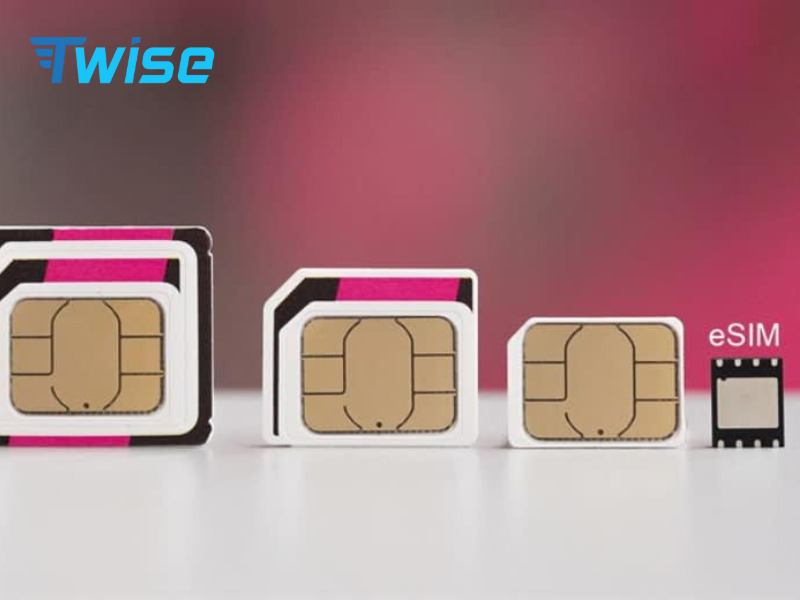
What “prepaid” actually means
You pay for a set period or data package in advance. Prepaid does not automatically mean data-only, unlimited, or that a phone number is included — those are separate product decisions layered on top of “prepaid.”
Prepaid eSIM vs postpaid Korean mobile contract
A tourist prepaid eSIM is built for limited-duration use — days or weeks — rather than becoming an ongoing Korean subscriber contract with monthly billing and long-term commitments.
Travel eSIM vs local prepaid eSIM
Two categories show up under the same search term:
- A travel/provider-issued data profile — a reseller product built around mobile data for visitors
- A Korean carrier or carrier-linked prepaid product — often closer to a standard local SIM experience, sometimes including a number
Neither is automatically the better choice — it depends on what your trip needs.
Korea Prepaid eSIM Types: Which One Do Tourists Need?
| Prepaid eSIM type | Best for | Korean number | Calls/SMS | Main caution |
| Data-only eSIM | Maps, translation, messaging, browsing | No | No | No conventional cellular service, no Korean SMS |
| Data + number | Travelers needing incoming/local contact | May include | Product-dependent | Check the exact number type |
| Data + Voice/SMS | Calls and Korean texts | Usually, on supported products | Yes/limited | May require verification |
| Unlimited data eSIM | Heavy mobile-data use | Product-dependent | Product-dependent | Check fair-use policy and speed |
| Fixed/daily data | Light-to-moderate traveler | Usually no | Usually no | Monitor your remaining allowance |
View all South Korea eSIM Plans
Data-only prepaid eSIM
This is the category Twise’s Korea product sits in — mobile data on the SKT network, without a Korean number attached. It’s built for travelers whose phone use is maps, apps, and messaging rather than conventional calling.
Prepaid eSIM with Korean phone number
Products in this category provision an actual 010 number. Not every number-enabled product works identically — some support full calling and SMS, others are more limited — so check the specific plan rather than assuming.
Voice and SMS prepaid eSIM
Worth separating incoming from outgoing capability: some products let you receive calls or texts more readily than place them, depending on verification status and account setup.
Fixed data, daily data and unlimited data
These describe how your data allowance is structured, not whether you get a phone number. For a full breakdown of unlimited-data structures, fair-use policies, and hotspot rules, see the dedicated Korea unlimited eSIM guide rather than duplicating that detail here.
Do Tourists Need a Korean 010 Phone Number?
What a 010 phone number is
A standard Korean mobile number prefix, functionally similar to a country’s normal mobile number format — it enables calls and SMS the way any local number would.
When data-only is usually enough
- Naver Map / KakaoMap
- Papago
- AREX / KTX schedule information
- Accommodation chat or email
- KakaoTalk / WhatsApp
- Airline and booking apps
- QR ticket retrieval
- General web searches
When a Korean number is useful
Placing or receiving calls, receiving Korean text messages, and certain restaurant or taxi reservation workflows that text a confirmation to a local number.
A 010 number does not guarantee every verification
SMS verification and Korean identity verification are different things. LG U+ currently states that its Voice/SMS service can support SMS verification for restaurant and taxi reservation apps, but not banking or government identity verification. A working Korean number doesn’t automatically satisfy every system that asks for one.
For a closer look at whether a number is worth adding to your setup, see Korea eSIM with a phone number.
Does a Korea Prepaid eSIM Require Passport Verification?
It depends on the product and which services you’re activating. Don’t assume every Korea eSIM follows the same passport rule.
Data-only travel eSIM
Twise’s current Korea data-only plans don’t require the same local phone-number verification process described by some local voice/SMS products — data-only activation is generally structured around a simpler process than provisioning a working Korean number.
Phone-number and voice/SMS products
Additional verification commonly applies once a product provisions an actual number. As one example, KRSIM currently requires foreign-passport registration after immigration before activating 010-number voice/message functionality on its applicable SKT-based eSIM.
Passport verification vs app identity verification
Providing a passport to activate telecom service does not mean the resulting number qualifies for every Korean real-name verification system. Banking and government platforms typically need deeper resident-level verification that a tourist number, verified or not, usually doesn’t satisfy.
For the fuller data-only-and-passport breakdown, see the SKT eSIM tourist guide.
Korea Prepaid eSIM Comparison: What to Check Before Buying
| Check | Why it matters |
| Network | Identifies underlying Korean mobile access |
| Data model | Fixed, daily, or unlimited |
| High-speed/fair-use rules | “Unlimited” may still have conditions |
| Korean phone number | Never assume it’s included |
| Number type | Verify the exact product |
| Incoming SMS | Useful for certain workflows |
| Outgoing calls/SMS | May require credit or top-up |
| Passport/ID | Product-dependent |
| Hotspot | Important for laptop or companion sharing |
| Validity start | Prevents losing paid time unknowingly |
| Installation timing | Some QR codes must wait until arrival |
| Reinstallation | QR or profile may be single-use |
| Device compatibility | Must support the required eSIM/network |
| Carrier lock | Phone must be unlocked |
| Extension/top-up | Useful if your itinerary changes |
Product terms checked August 18, 2026. Verify live terms before purchase — carrier and reseller rules change.
SKT, KT or LG U+: Does the Korean Network Matter?
SK Telecom
Twise offers an SKT-powered data-only option, but SKT-related tourist products from other sellers may have different phone-number and verification features. Using the same underlying network does not mean two eSIM products have identical data, phone-number, or activation rules.
KT
Another major Korean carrier with short-term tourist eSIM products; KT currently describes its tourist (e)SIM as intended for foreign visitors staying up to 90 days.
LG U+
Current tourist products span data-only and Data+Voice structures, each with its own SMS and identity-verification rules.
Want a deeper carrier breakdown? Read the best Korea eSIM providers comparison.
Twise Korea Prepaid eSIM: Who Is It Best For?
What Twise provides
Current Twise Korea offerings center on:
- An SKT-powered local data option
- Unlimited 5G/4G data
- Daily or fixed data alternatives
- Data-only use
- No conventional calls or SMS on the SKT data product
Twise’s current Korea pages position the SKT option around data and hotspot access rather than a 010 number or conventional calls and SMS. For SKT-specific coverage, setup, and plan detail, see SKT eSIM for Korea tourists.
Best for the data-first tourist
A traveler lands at Incheon, uses mobile data for route planning, Naver Map, Papago, accommodation messages, QR bookings, social apps, and intercity navigation — the product fits that pattern closely.
When another prepaid option makes more sense
A local phone-number product fits better if:
- Korean cellular calls are required
- Incoming or outgoing SMS matters
- A 010 number is specifically needed
- You need a supported SMS-based local workflow (certain restaurant or delivery services)
When Should You Buy, Install and Activate a Korea Prepaid eSIM?
Buying, installing and activating are different steps
Buying an eSIM pays for the plan. Installing adds its profile to your phone. Activating starts or enables service according to that product’s rules. These three steps don’t always happen at the same time.
What to do before flying
- Check eSIM compatibility on your device
- Confirm your phone is carrier-unlocked
- Complete the purchase
- Save the email or QR instructions somewhere accessible offline
- Save your hotel address offline
- Download Naver Map, Papago, and any transport or booking apps
Should you scan the QR code before departure?
Only if your provider says you can. KRSIM currently allows its relevant QR to be scanned before the flight. By contrast, current Twise guidance for its applicable SKT Korea product tells travelers to wait until they arrive in Korea before scanning. Same country, same general product category, different rule — check the specific product’s instructions.
For a deeper look at pre-arrival purchasing and timing, see buy a Korea eSIM before arrival.
What to do after landing at Incheon
Connect to airport Wi-Fi → install the profile if you haven’t already → select the Korea line for mobile data → follow the roaming instructions → confirm the connection → open your route and accommodation details.
How to Set Up a Korea Prepaid eSIM
Step 1 — Check that the phone supports eSIM
Settings or EID checks are useful indicators, but confirm compatibility against your manufacturer’s or provider’s official list rather than relying on one test alone.
Step 2 — Confirm the phone is carrier-unlocked
This is mandatory preparation regardless of which product you choose.
Step 3 — Connect to stable Wi-Fi
Installation generally goes more smoothly on Wi-Fi than on limited mobile data.
Step 4 — Add the eSIM using the provider’s instructions
Typical path — iPhone: Settings → Cellular/Mobile Service → Add eSIM. Android: wording varies by manufacturer, commonly under SIM Manager or Network & Internet → Add eSIM.
Step 5 — Label the travel line
Something identifiable, like “Korea Data” or “Twise SKT,” so you can tell it apart from your home line at a glance.
Step 6 — Select it for mobile data
Make sure the new line, not your home SIM, is set as the active data connection.
Step 7 — Follow the plan-specific roaming/APN instructions
Don’t apply a generic roaming setting found online — follow what your specific provider gives you.
Step 8 — Test before leaving the airport
Open a web page or Naver Map while you still have airport Wi-Fi as a fallback, so you catch any setup issue early.
Your First Day in Korea: Where Mobile Data Actually Matters
Incheon Airport to Seoul
AREX and airport bus routes, plus directions to your accommodation, are usually the first things you’ll check.
Navigating Seoul
Naver Map or KakaoMap, especially for finding the correct subway exit — a small detail that saves a surprising amount of walking.
Translation
Papago for menus, signs, and short conversations, used repeatedly rather than once.
Accommodation and tour communication
Email, KakaoTalk, WhatsApp, or booking-platform messages to confirm arrival times and details.
KTX and intercity travel
Ticket information, route changes, and destination navigation for day trips or city-to-city travel.
Jeju or less familiar routes
Keep offline maps and important addresses saved in case mobile signal or battery becomes unavailable on less-covered routes.
Korea Prepaid eSIM vs SIM Card vs Pocket Wi-Fi vs Roaming
| Option | Best for | Main advantage | Main limitation |
| Data-only prepaid eSIM | Solo/app-focused travelers | No physical SIM swap | No normal calls/SMS |
| Phone-number prepaid eSIM | Calls/SMS needs | Korean telecom features | Extra rules may apply |
| Physical prepaid SIM | Travelers wanting a physical carrier product | Broad device choice | SIM swap/counter pickup needed |
| Pocket Wi-Fi | Families/groups | Shares across multiple devices | Extra device to carry and charge |
| Home roaming | Very short/simple trips | Keeps your existing number | Check home-carrier cost first |
| Offline + Wi-Fi backup | Emergency resilience | No cellular dependency | Not real-time connectivity |
View all South Korea eSIM Plans
LG U+ currently describes pocket Wi-Fi as supporting simultaneous multiple users, making it a legitimate alternative for groups rather than an inferior fallback. For a fuller side-by-side, see eSIM or pocket Wi-Fi in Korea.
What to Do When Your Korea Prepaid eSIM Does Not Work
QR code will not install
Check device compatibility and carrier-lock status first — these cause most installation failures.
eSIM installed but no data
Confirm the correct line is selected for mobile data, and follow the provider-specific network or roaming/APN instructions exactly.
Data works but calls or SMS do not
Ask whether this is actually a data-only plan by design. If not, confirm whether the required phone-number or voice registration step has been completed. KRSIM’s current SKT-based number product, for example, separates data use from the post-immigration passport step needed for its voice/message function.
Korean app will not verify the number
This usually comes back to the same distinction covered earlier: SMS verification and full Korean identity verification aren’t the same thing, and a tourist number may satisfy one without the other.
Do not delete the eSIM immediately
Restart your device and check your configuration before deleting the profile. Some tourist eSIM profiles cannot be reissued or restored after deletion — LG U+ explicitly warns against assuming an activated eSIM can be reinstalled once removed.
Which Korea Prepaid eSIM Should You Choose?
| If you mainly need… | Start by comparing… |
| Maps + translation | Data-only prepaid eSIM |
| Daily browsing/social | Fixed or daily data |
| Heavy mobile data | Unlimited plan |
| SKT-powered data | Twise SKT/local SKT options |
| Korean calls | Voice-enabled prepaid product |
| Korean SMS | SMS-supported product |
| A 010 number | An explicit 010-number plan |
| Certain restaurant/taxi SMS | A compatible local Voice/SMS product |
| Banking/government authentication | Don’t assume a tourist eSIM can support it |
| Laptop + companion sharing | Hotspot policy |
| Family/group sharing | Hotspot allowance or pocket Wi-Fi |
The right prepaid eSIM isn’t the one with the most features attached — it’s the one that matches what you’ll actually be doing with your phone after you land. Compare Korea eSIM plans by what your trip actually needs, or start from Twise eSIM if you’re planning connectivity for more than one destination.

FAQs
Yes, purchase is typically available in advance, though installation timing depends on the specific product — some are designed to be scanned only after landing.
Not automatically. Many tourist prepaid eSIMs, including Twise’s SKT data option, are data-only with no Korean number attached.
It depends on the product. Data-only eSIMs are generally not built around identity-verification steps, while phone-number and voice/SMS products commonly require passport information as part of activating that number.
Some apps accept SMS verification through a supported Voice/SMS product, but this isn’t guaranteed across all Korean apps or services, and doesn’t extend to banking or government-level identity verification.
Yes, on dual-SIM-capable devices — keep your home SIM active for SMS/OTP while your Korea eSIM handles data.
More useful tips for your South Korea journey
KT eSIM Purchase vs Twise SKT eSIM: Which Is Easier for Tourists?
Cheapest Korea eSIM: Compare Price, Data & Network
eSIM or Pocket Wi-Fi Korea: Which Is Better?
